
Quit ChatGPT.
I haven’t opened ChatGPT in the last 30 days because of Claude Cowork:

I haven’t opened ChatGPT for almost a month.
First, I’ll cover 4 things that made me switch to the new Claude Cowork.
Then I’ll show you 5 things I’ve built with it in the last 3 weeks.
Anyone can replicate what I did. I don’t know how to code. I am non-technical.
Give me 7 minutes. Follow my lead:
#1. It actually follows instructions
Here’s the problem with ChatGPT.
You give it a detailed prompt. 500 words of context. Specific requirements. Formatting rules. Things you want. Things you don’t want.
It ignores half of it.
You remind it. It apologizes. Then ignores the other half.
I got tired of fighting.
With Claude Cowork, I upload my voice profile. Over 2,000 words describing how I write, what I hate, phrases I never use, structures I prefer. I upload my copywriting rules. I upload reference documents.
It reads all of it. It follows all of it.
When I write with Claude Cowork, the output sounds like me.
Not “AI trying to sound like me.” Me.
This matters more than you think. The quality of your output depends on how much context you can give. If the AI ignores your context, you’re stuck with generic results. Forever.
Play this video to understand how it works:
Quick step-by-step to install Claude Cowork:
Install Claude (the app) here.
You need a Pro account (seventeen dollars a month).
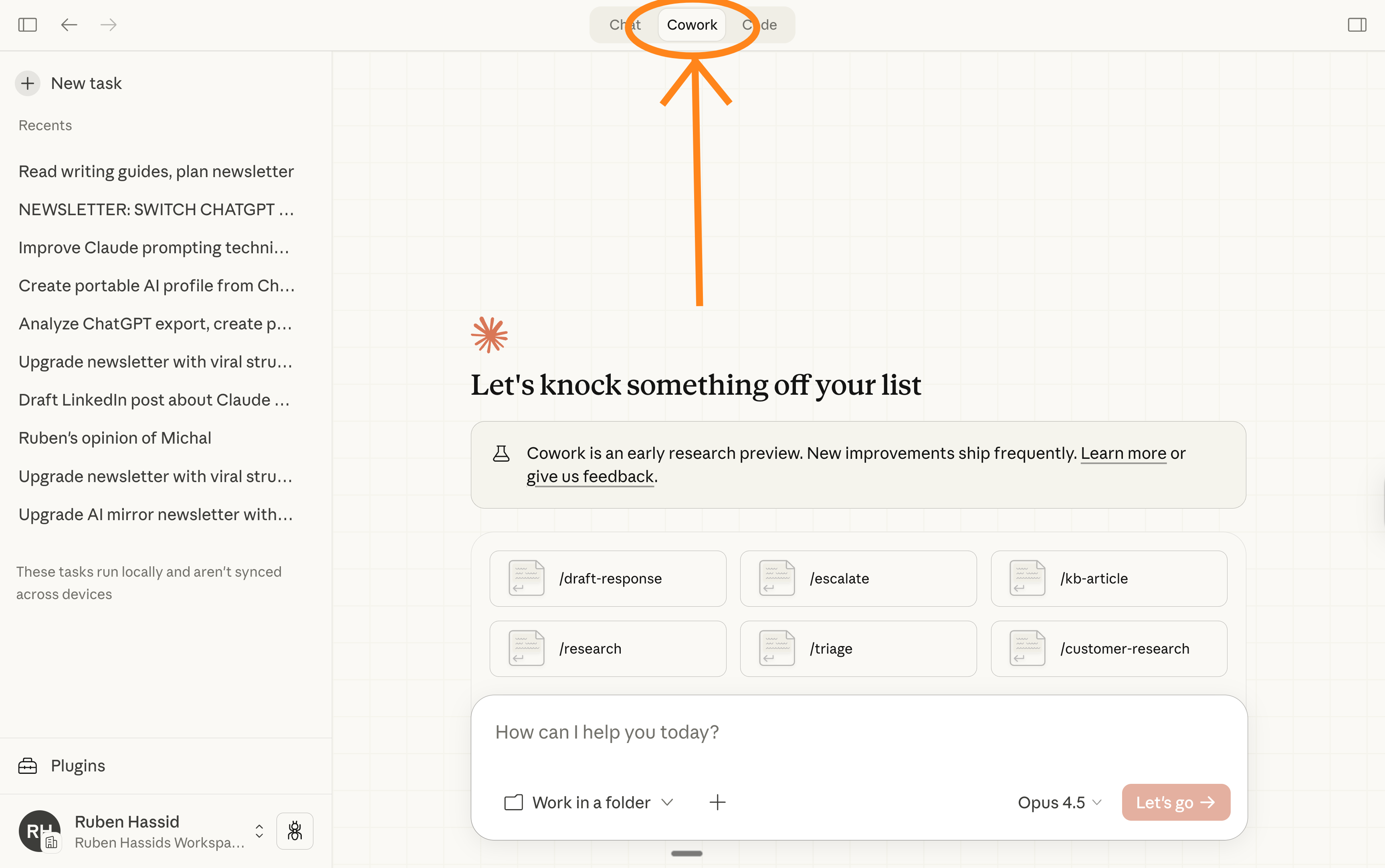
When you open Claude, simply go to the tab “Cowork”.
#2. I’m finally out of the infinite loop.
You know the feeling.
You’re 45 minutes into a complex task. ChatGPT starts repeating itself. Or contradicting what it said earlier. Or getting stuck in a loop where it keeps apologizing and producing the same wrong output.
You start over a new chat. Or work around it. Or give up.
Now I’ve had 2-hour sessions in Claude Cowork. Complex back-and-forth. Revisions. Pivots. New directions mid-conversation.
1- It doesn’t lose the thread. 2- It doesn’t get trapped. 3- It remembers what we decided 90 minutes ago and builds on it. 4- It creates a form to ask me about a potential new direction (since I’m not satisfied with the output).
Real work takes time & multiple pivots. If your AI breaks after 20-minute sessions, you can only do small tasks. That’s a ceiling on what’s possible.
My favorite trick (when eveything is going wrong) is this prompt:
We are getting sidetricked. We need to start over without losing the context of this chat. First, generate a first AskUserQuestion form for me to answer so we get to decide what went wrong and where we must go instead. From my answer, generate a second AskUserQuestion form to now be able to complete the task.You understood that right. Claude Cowork is the one prompting me.
Play this video to see it in action:
#3. No memory is the best somehow.
Yes, this is a feature. Not a bug.
ChatGPT remembers your past conversations. Sounds useful.
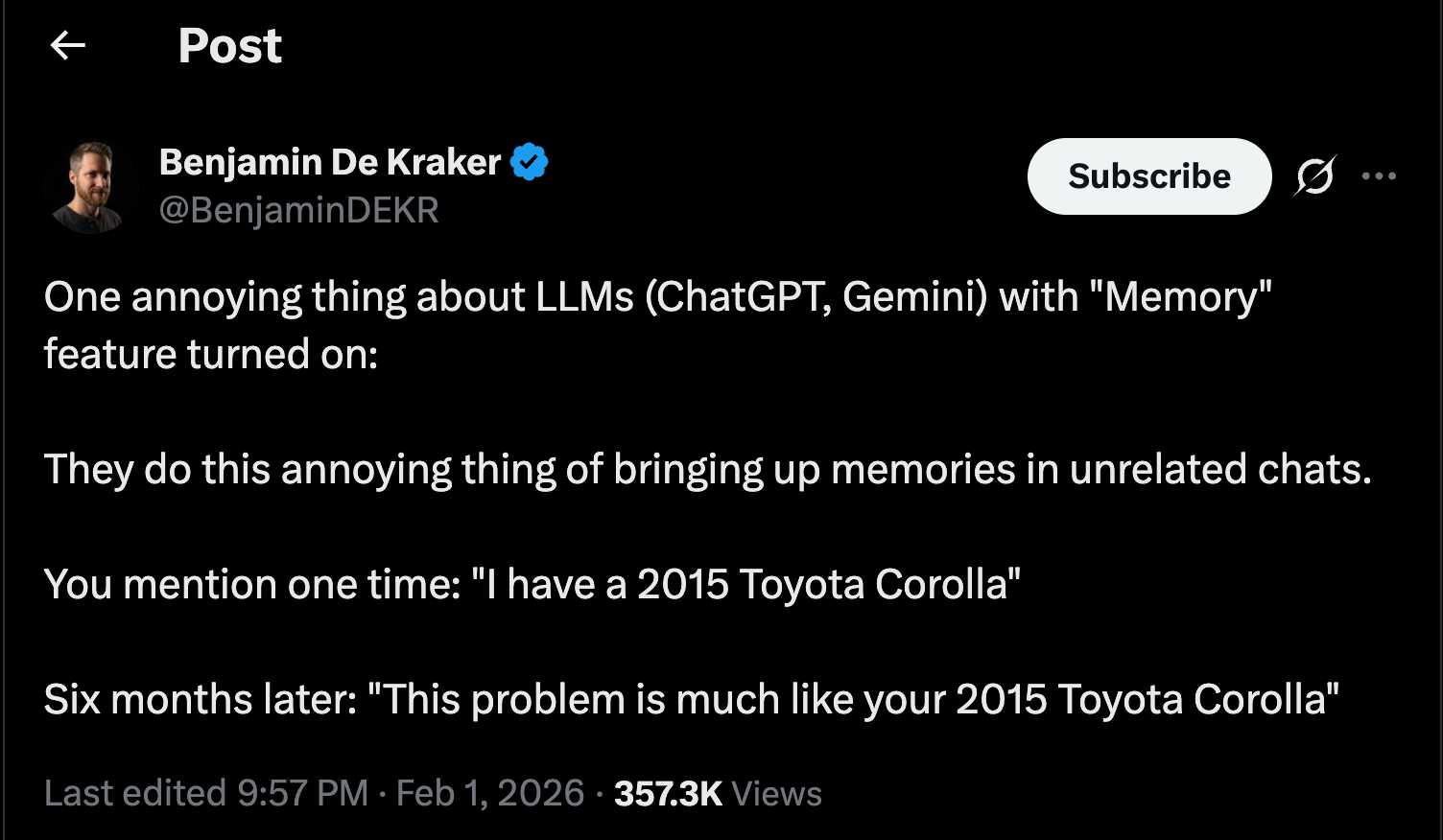
But it creates what I call overfitting.
It tries too hard to match what you said last week. It makes assumptions based on old context that no longer applies. It gets weird in ways that are hard to diagnose.
And I’m not the only one hating it:
But Claude Cowork starts fresh every time.
No baggage. No assumptions from three weeks ago.
If I want Claude to know something, I give it that context explicitly. In this conversation. For this task. With my favorite markdown files to support it.
I decide what matters. Not some algorithm guessing based on a conversation I don’t even remember having.
Sure, it would have been awesome to have an AI knowing exactly when to pull the right information from past conversations. But it simply does not work like this.
So instead of fighting it, or not using it because it can’t, simply use AI the way its best. And this is when you control the full context before you start the task.
You’re sick to introduce yourself? Create a markdown file with everything about you, and upload it to any AI at the start of every conversation (when necessary).
So far Claude Cowork can:
Follow (long) instructions properly.
Prompt itself (so I don’t have to).
Avoid overfitting (with memories).
Time for #4: Claude create files directly.
#4. It creates actual files, not just text.
This is the big one.
ChatGPT gives you text. You copy that text. You paste it into another tool. You format it yourself.
Every. Single. Time.
Claude Cowork creates the actual files.
I ask for a presentation. I get slides. Real slides.
I ask for a spreadsheet. I get an Excel file with working formulas.
I ask for a document. I get a Word file formatted and ready.
The files appear in my folder. I open them. They’re done.
Play this video to see it in action real quick:
Okay. Enough about why I love it.
Let me show you what I actually do with it.
Case Study 1: Slides from a prompt.
Gamma is my favorite AI for slides. Claude Cowork has Gamma built in.
Here’s my step-by-step process:
Give Claude Cowork about my needs.
Use the AskUserQuestion tool to prompt myself on the outline.
Once the outline is good, create the content inside each slide.
Last prompt is “Use Gamma MCP connector to create the slide in [style].”
Case Study 2: It’s too long. Read for me.
I am writing a book with a publishing house.
They sent me 4,992 files to read. It’s too long.
So I ask Claude Cowork what I should (really) read & why.
Case Study 3: Excel with working formulas
Claude lives in Excel now. I wrote an entire newsletter on it.
But Claude Cowork is also pretty good at absorbing Excel files.
And then creating an upgraded version, as an xcl. file.
Here’s a good example:
Case Study 4: Expense report from invoices.
47 receipts from a work trip. Needed an expense report.
The old way: Open each photo. Squint at amounts. Type into spreadsheet. Categorize. Calculate totals. 2 hours minimum.
What I did: Dropped receipts in a folder. “Create expense report. Categorize by type. Include date, vendor, amount. Calculate totals.”
What I got: Excel file. Every receipt logged. Dates extracted. Vendors identified. Categories assigned. Totals calculated.
3 receipts were blurry. Claude flagged them: “Could not read clearly. Please verify.”
I filled in 3 cells manually. Time: 10 minutes total.
I can’t show the video for security purposes :)
Case Study 5: Research brief with sources
I’m writing a newsletter about AI agents.
Needed to research the current landscape.
The old way: 23 browser tabs. Copy quotes into a doc. Lose track of which quote came from where. More time organizing than researching.
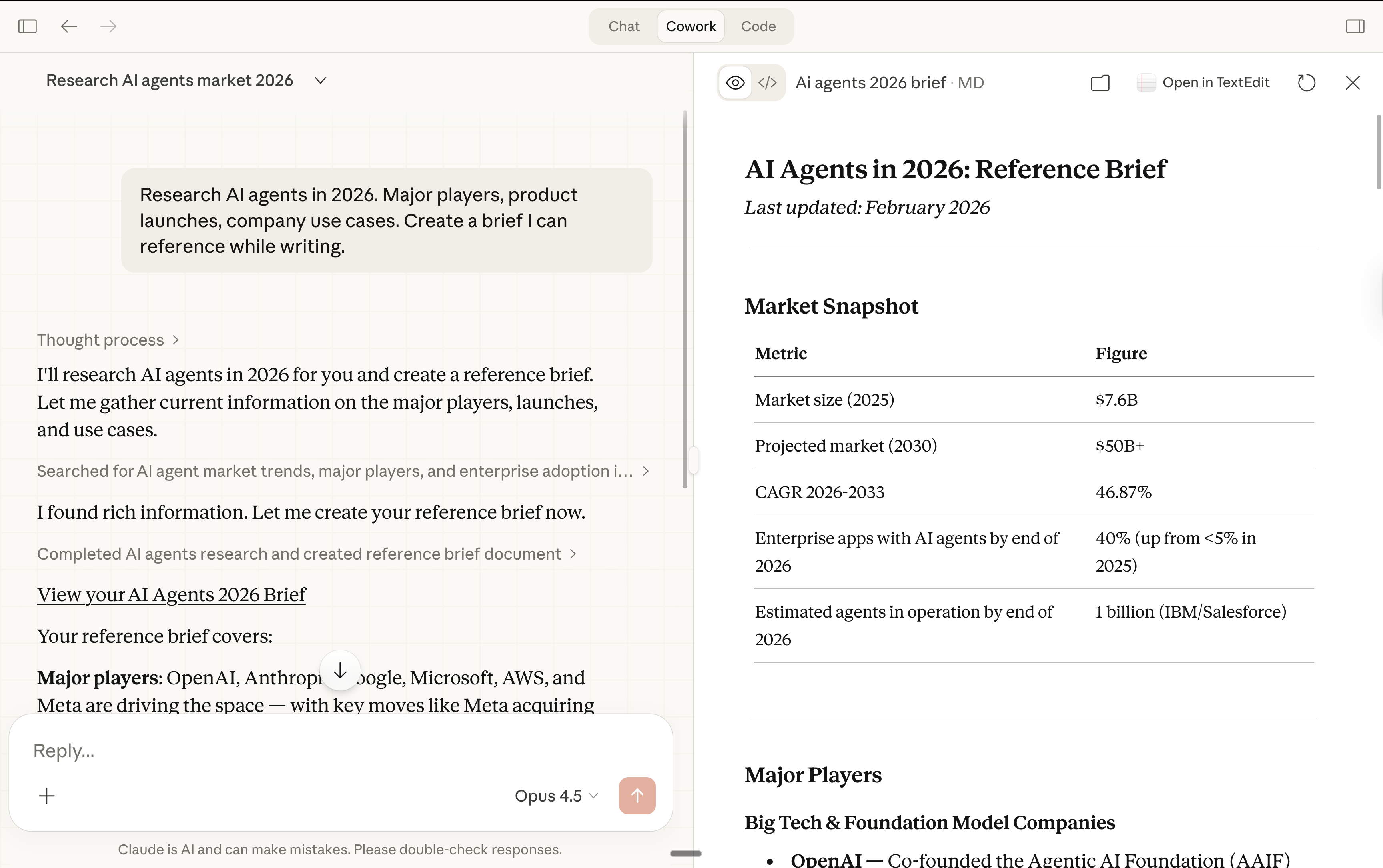
What I did: “Research AI agents in 2026. Major players, product launches, company use cases. Create a brief I can reference while writing.”
What I got: Markdown file. Organized by theme. Key points summarized. Source links included.
I didn’t open a single browser tab. Claude searched, read, synthesized, and organized. Time: 2 minutes.
Claude Cowork isn’t perfect.
I’m not saying Claude Cowork is perfect. Nothing is.
But it changed how I work more than any tool since the original ChatGPT launch.
It’s time we evolve from 2022-2025 AI, and move to 2026-2030.
“What if ChatGPT also has a Cowork mode?”
“What if Grok becomes the best LLM after the merger with SpaceX?”
What if Gemini, from Google, is now correctly integrated with Google Drive?”
Claude Cowork is a philosophy more than a tool. Just like learning how to prompt ChatGPT teaches you how to prompt any other AI.
Here, the same applies. We must think in terms of “This is how things can be done.” not in terms of “This is the right tool.”
A quick summary:
Claude Cowork replaced ChatGPT and any other AI.
I only sometimes use Gemini (images, videos) or Grok (to search).
Cowork follows long instructions, prompt itself, without overfitting memory.
Cowork creates files directly, to generates slides, excel, PDFs, inside your PC.
BONUS: Claude Cowork now has plugins and connectors.
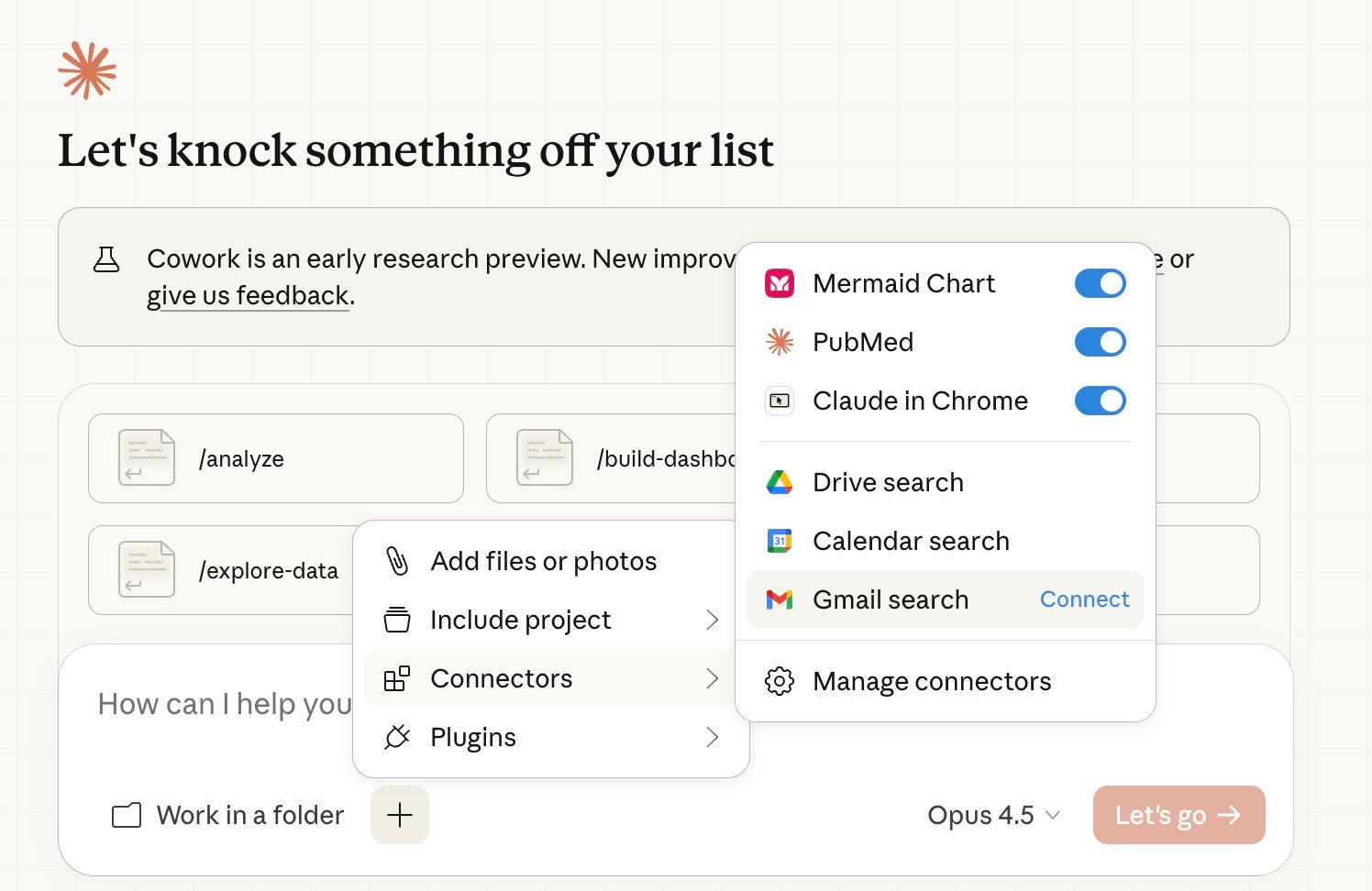
Plugins & connectors deserve their own newsletter. And I don’t want this one to be aggressively long. If you could choose my next newsletter, what would it be?
Leave a comment (my team uses Claude to select the best ones):
How can you quickly go from top 1% in AI to top 0.1%?
I only see three ways.
✦ Play with AI. You learned through games as a kid. You are still a kid.
✦ Use AI without its current limitations. Claude Cowork has the least today.
✦ Join a community of obsessed AI users (like my Slack with 1,000+ professionals).
I consult Fortune 500 companies in the US to deploy this exact system: setting up Claude Cowork per department, duplicating senior’s knowledge. Spot left for Q2.
DM me on LinkedIn. I read every one of my messages there.
Cowork is currently macOS only and requires the Claude Desktop app. Since you're on Windows/Android, you don't have access to it yet. --> said Claude to me
OMG this article just converted me. In the 1st few lines you were able to capture my frustration with ChatGPT. Everything you said is what I have. I have MAC laptop to try it on but my main working Comp is Windows can't wait for it to expand on there