
How to stop hitting Claude usage limits.
23 tricks to use Claude better and not spend too much money:

You’re paying for Claude. But you’re burning through your credits like someone who leaves the lights on in every room.
I know because I did the same. For weeks. I’d hit my usage limit by 2 pm, stare at the “you’ve reached your limit” screen, and wonder if the $20 plan was enough.
I did switch to the $100 plan… but I kept receiving the same private DM:
“Ruben, I have a problem with Claude limits… how can I save it?”
So I made a list for my team on how to save Claude credits.
This free guide is my list of 23 habits, ranked from the most unknown to obvious.
I now hit my limit maybe once a month, never more.
Two things before we start:
Save this guide. Pick 3 habits this week. You’ll feel the difference by Friday.
Send it to anyone on your team who keeps complaining about Claude limits.
PS: This newsletter mostly grows from your shares. And I keep hitting 1,000+ shares! It’s my north star. I now know what you love (or don’t). It’s free & helps me stay laser focused.
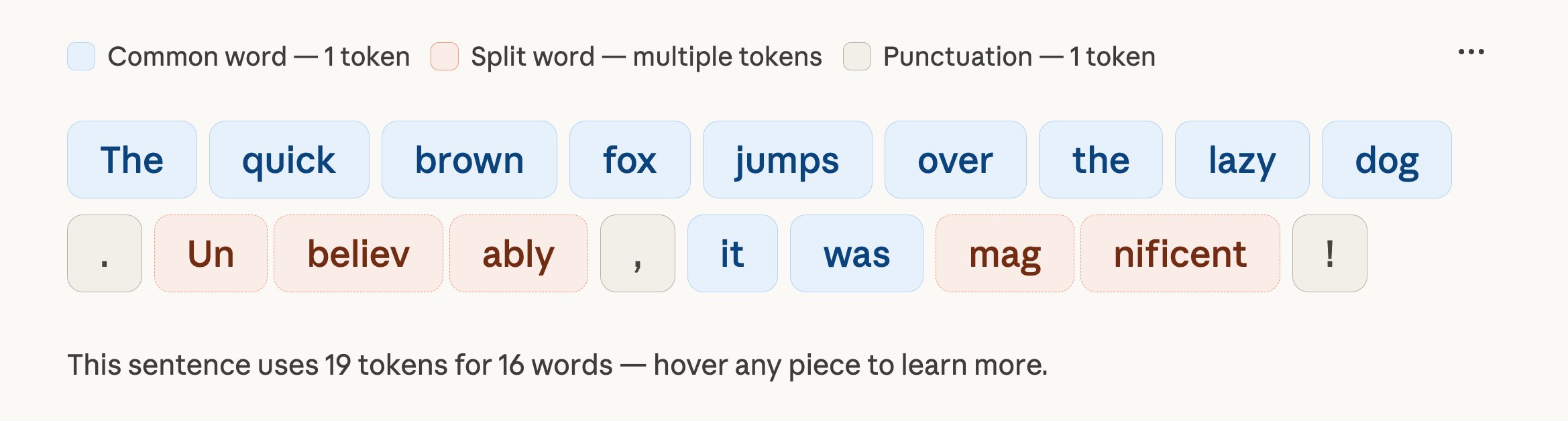
Claude counts tokens.
Claude counts tokens. A token is roughly a word.
You send one message, and Claude re-reads your entire conversation from the top. Every previous message. Every previous answer. All of it.
So message 1 costs very little. But message 30? Claude is re-reading 29 previous exchanges before it even starts thinking about your new question.
That’s why your credits disappear. The conversation gets longer, and every message gets more expensive.
Every habit you will apply from this newsletter comes back to this one idea: how to avoid wasting tokens, so you can spend them on what matters.
The habits you (probably) don’t know about.
These are the ones that changed how I spend tokens.
Most of them I discovered by accident. A few came from Anthropic’s own documentation that almost nobody reads (and I know you don’t, stop lying).
1. Convert files before uploading them.
A single PDF page costs 1,500 to 3,000 tokens. Screenshots are even worse (a full 1000x1000 image is roughly 1,300 tokens). DOCX and PPTX files carry metadata bloat you can’t even see.
Before uploading, extract the text. Copy-paste the relevant sections into a plain text or markdown file.
Crop screenshots tight to only the part that matters (a tight crop can drop from 1,300 tokens to under 100).
If you upload the same 15-page PDF to 4 different chats, you just burned 180,000+ tokens on a document you could have converted to 2,000 tokens of clean text.
My favorite workflow is the following:
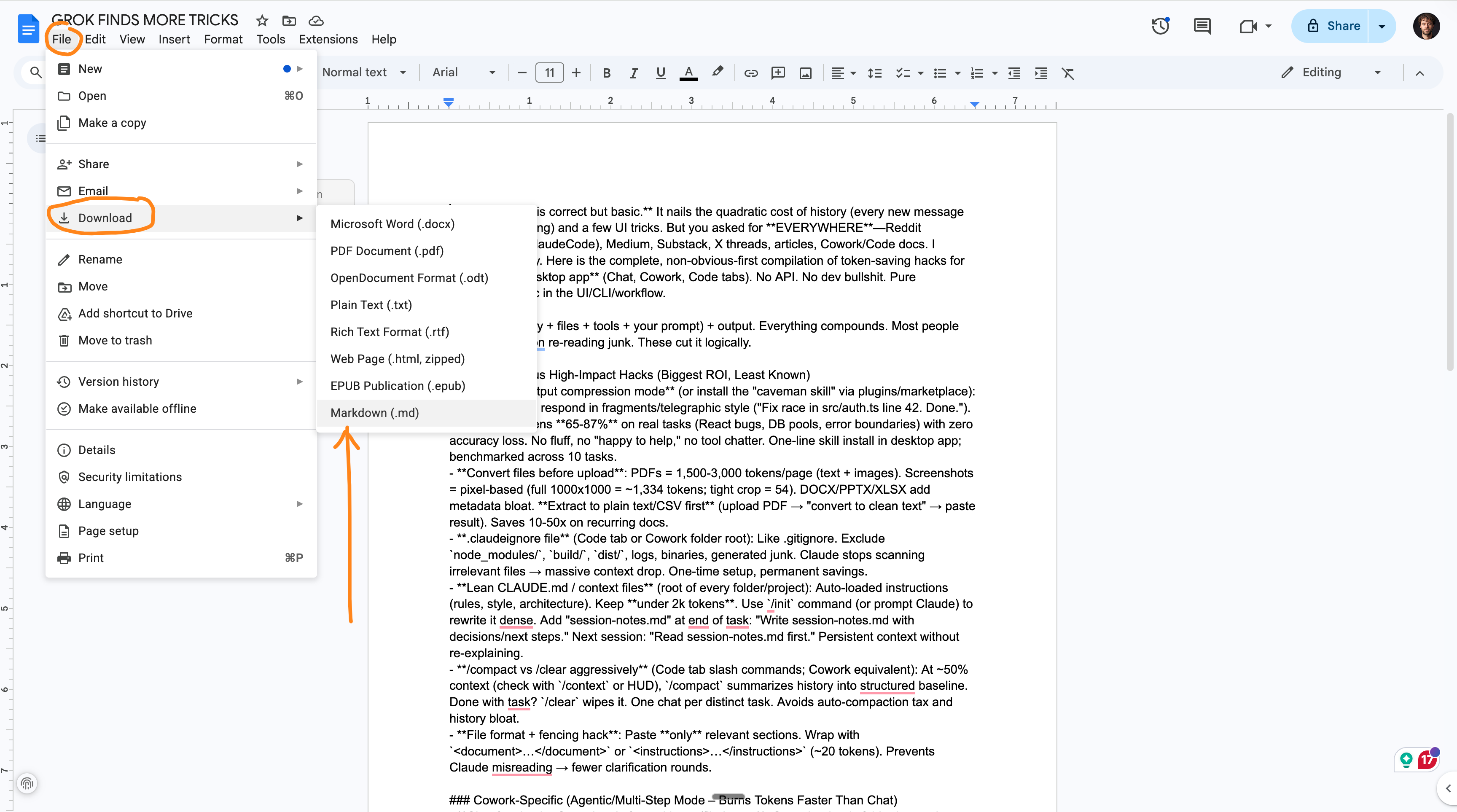
I open a google doc (little trick, type doc.new on the URL bar).
I paste the text that I need to upload to Claude.
I download the file as an md. file.
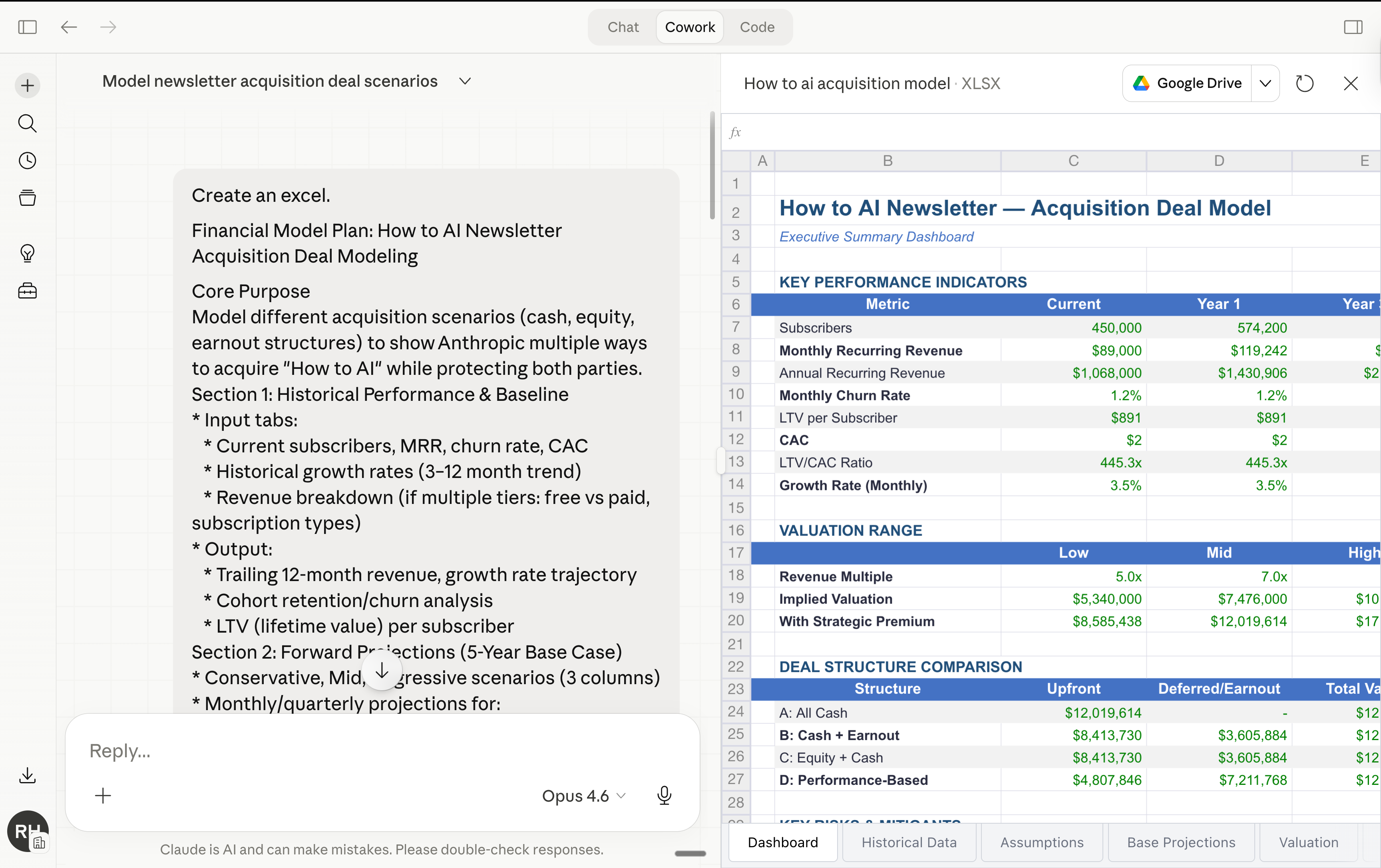
2. Plan in Chat. Create the file at the end.
Anthropic confirmed that file creation (spreadsheets, docs, presentations) uses more of your limit than regular chat messages.
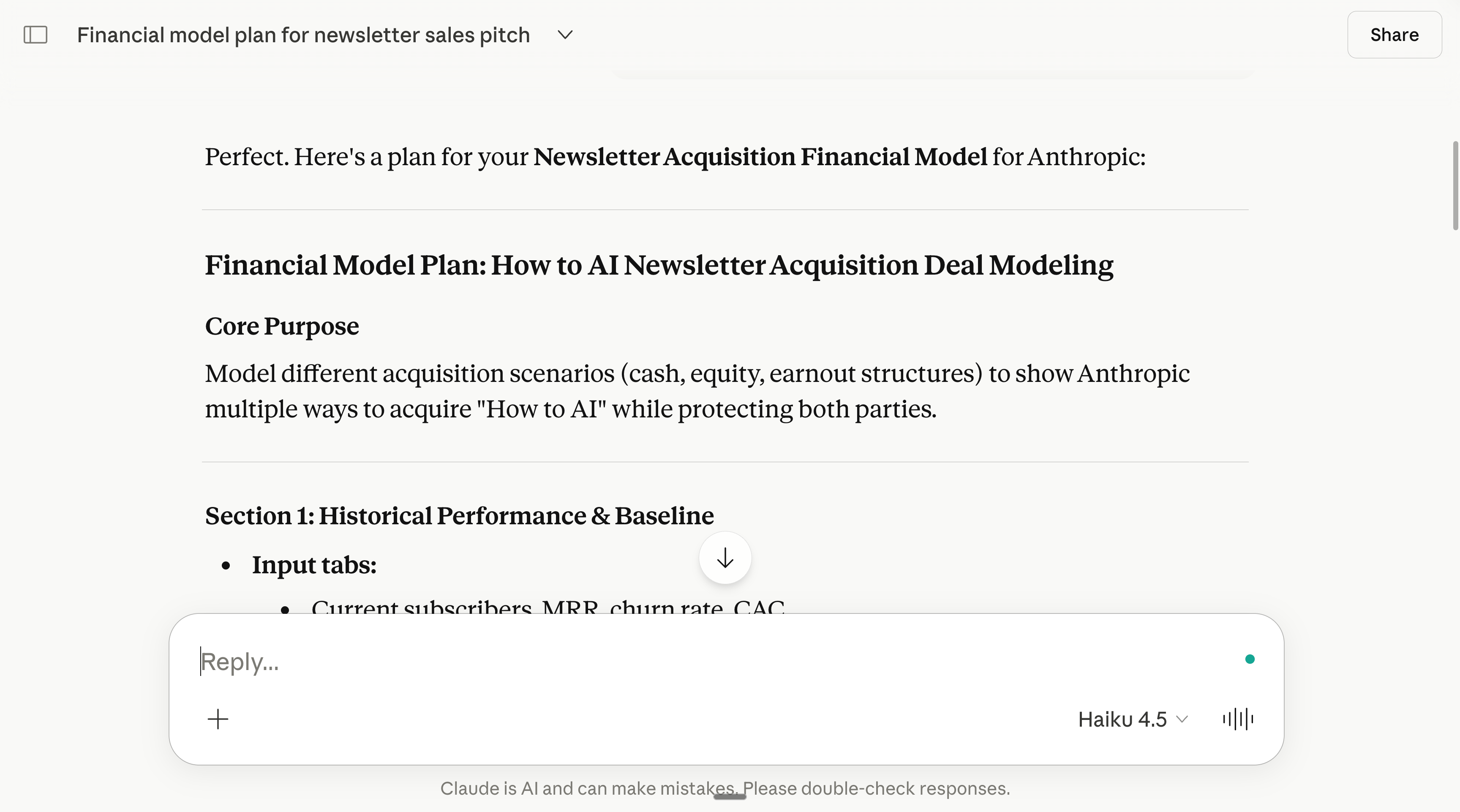
So don’t open Cowork and say “Create me a financial model.”
Instead: open Chat, plan the structure, agree on the sections, nail the assumptions. Then, once you know exactly what you want, move to Cowork and say “Build this exact file.”
→ You do the thinking in the cheap product.
→ You do the building in the expensive one.
3. Say “ask me questions” instead of writing a long prompt.
A 500-word prompt costs 500 tokens every time Claude re-reads the conversation. But if you write a 15-word prompt and let AskUserQuestion do the work, the clarifying questions are generated once and your answers are short clicks.
My go-to prompt is under 30 words: “I want to [task] to [success criteria]. Read my folder. Ask me questions using AskUserQuestion before you start.”
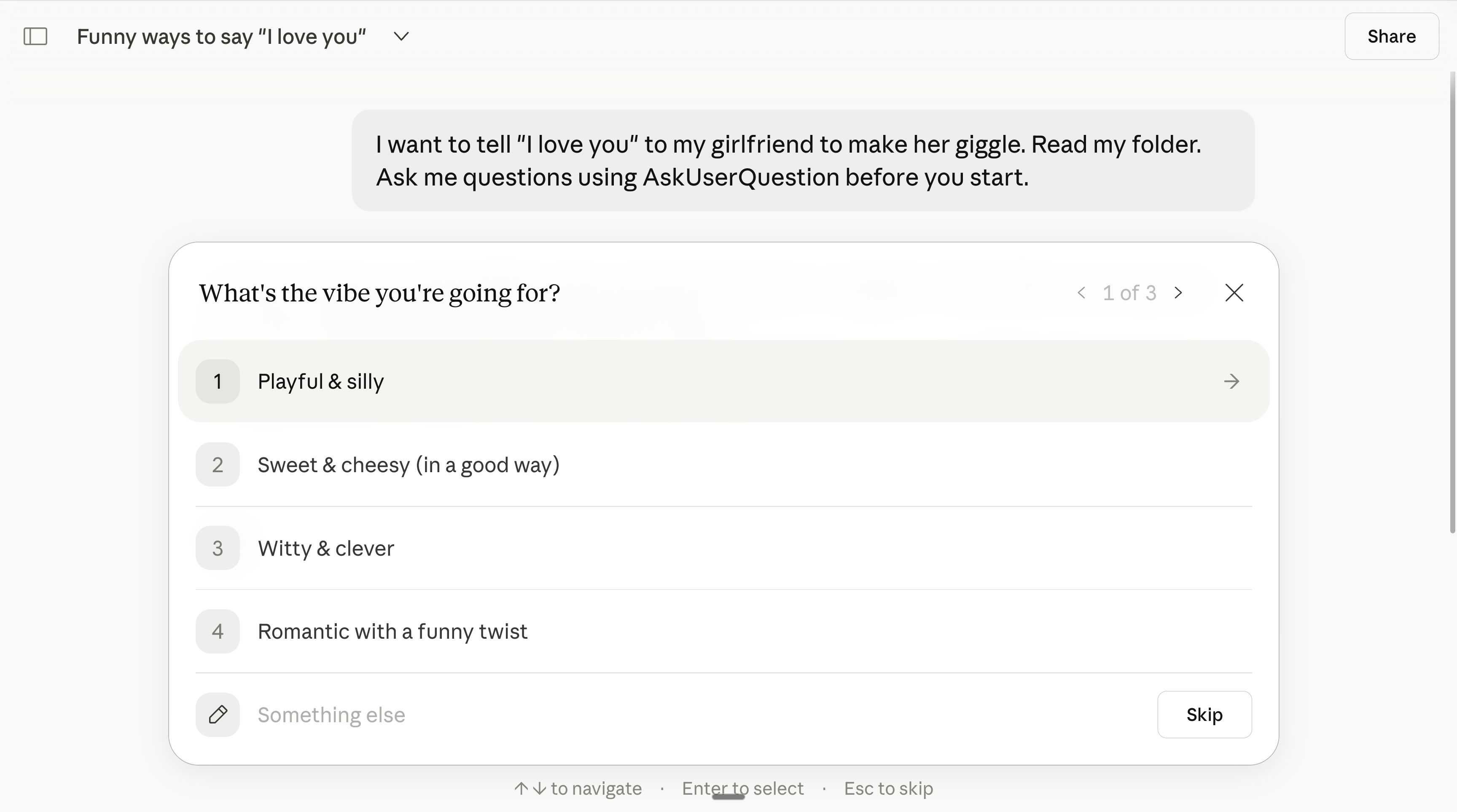
Clicking options costs almost nothing. Typing paragraphs of instructions costs a lot. Let Claude pull the context from you instead of you pushing walls of text at it.
4. Use Wispr Flow to give richer answers (without token bloat).
Wispr Flow is a voice-to-text tool. I explain how I use it everyday here.
So wait, this sounds counterintuitive: speak your answers instead of typing them, and you’ll use fewer tokens?
Here’s why it works. When you type, you write lazy prompts. “Make it better.” “Change the tone.” Vague. Claude guesses wrong. And you keep sending more and more and more messages (so Claude has to re-re-read everything).
When you speak, you naturally give more context in one-shot. “The tone is too stiff. I want it to sound like I’m texting a friend who runs a 200-person company. Keep the data but make it casual. Only redo section 2.”
Fewer messages = fewer context reloads = saving tokens.
5. Stop asking Claude to redo the whole thing.
When section 3 of a report is wrong, don’t say “redo the report.”
Say “only redo section 3. Keep everything else to save tokens.”
Every full redo means Claude re-generates the entire output. If your report is 2,000 tokens, that’s 2,000 output tokens burned again. Point to the specific section. Tell Claude what’s wrong with it.
While you’re at it, add “No commentary. No explanations. Just the output.” to your prompts when you know exactly what you want. Claude defaults to being helpful and verbose.
Every sentence of “Happy to help! Here’s what I did...” is tokens you’re paying for.
6. Batch your tasks into one message.
Three separate prompts = three full context reloads.
One prompt with three tasks = one reload.
Instead of sending “Summarize this article” then “List the main points” then “Suggest a headline,” write: “Summarize this article, list the main points, and suggest a headline.”
Side bonus: the answer usually turn out better too.
Claude needs to see the full picture at once… just like a normal human.
7. Use the same prompt structure every time.
Anthropic confirmed that similar prompts you use frequently get partially cached. They don’t publish the exact mechanism, but the practical takeaway is clear: keep a stable prompt library and swap only the variable part.
Access my prompt library by subscribing for free at my newsletter.
And if you already did subscribe, just comment under this article.
I use the same 30-word structure for 80% of my Cowork sessions:
“I want to [task] to [success criteria]. Read my folder. Ask me questions using AskUserQuestion before you start.”
8. Edit your message instead of sending a follow-up.
This is by far my favorite hack. I use it all of the time.
In Chat (unlike Cowork), you can click Edit on your original message, fix it, and regenerate. The old exchange gets replaced. Not stacked.
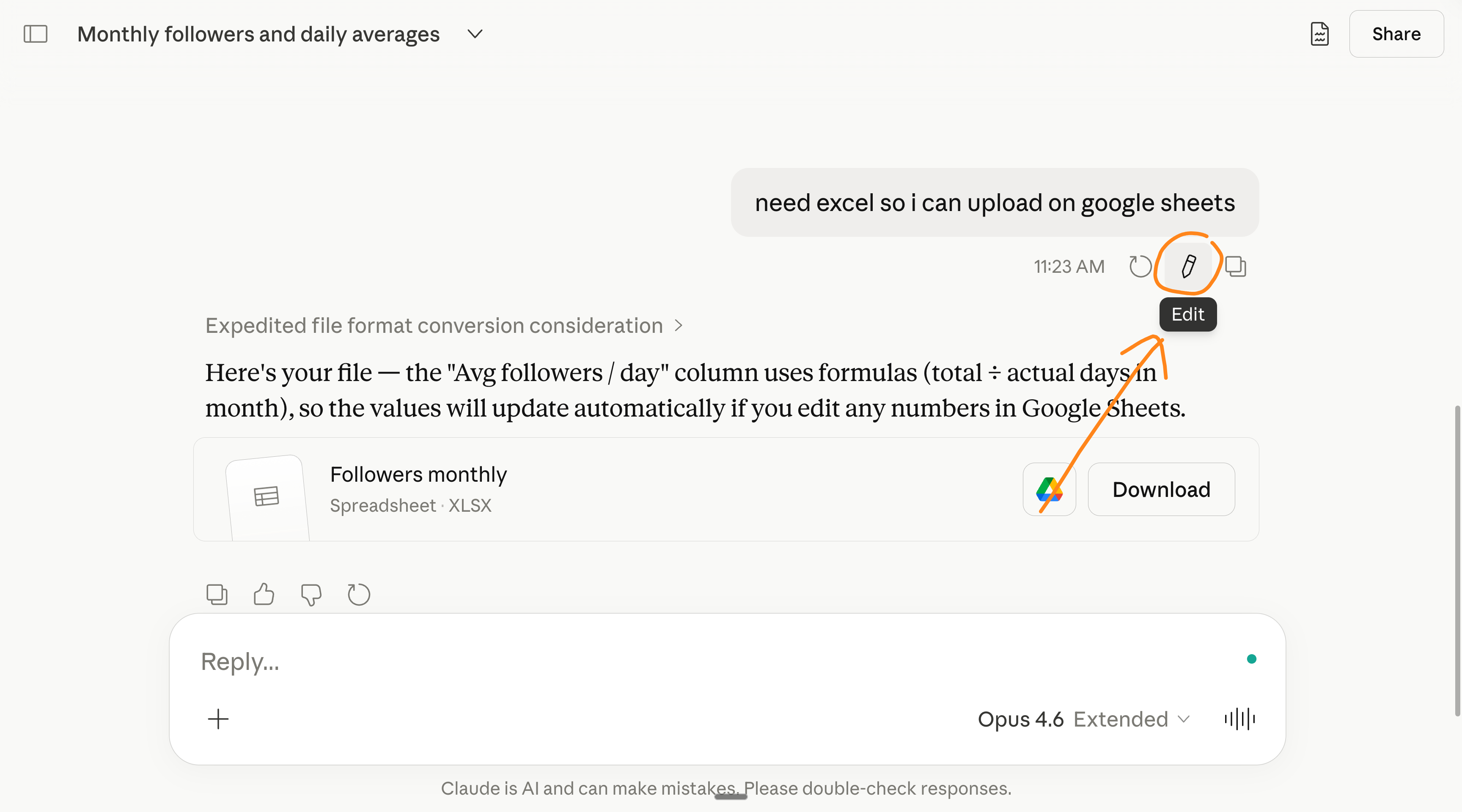
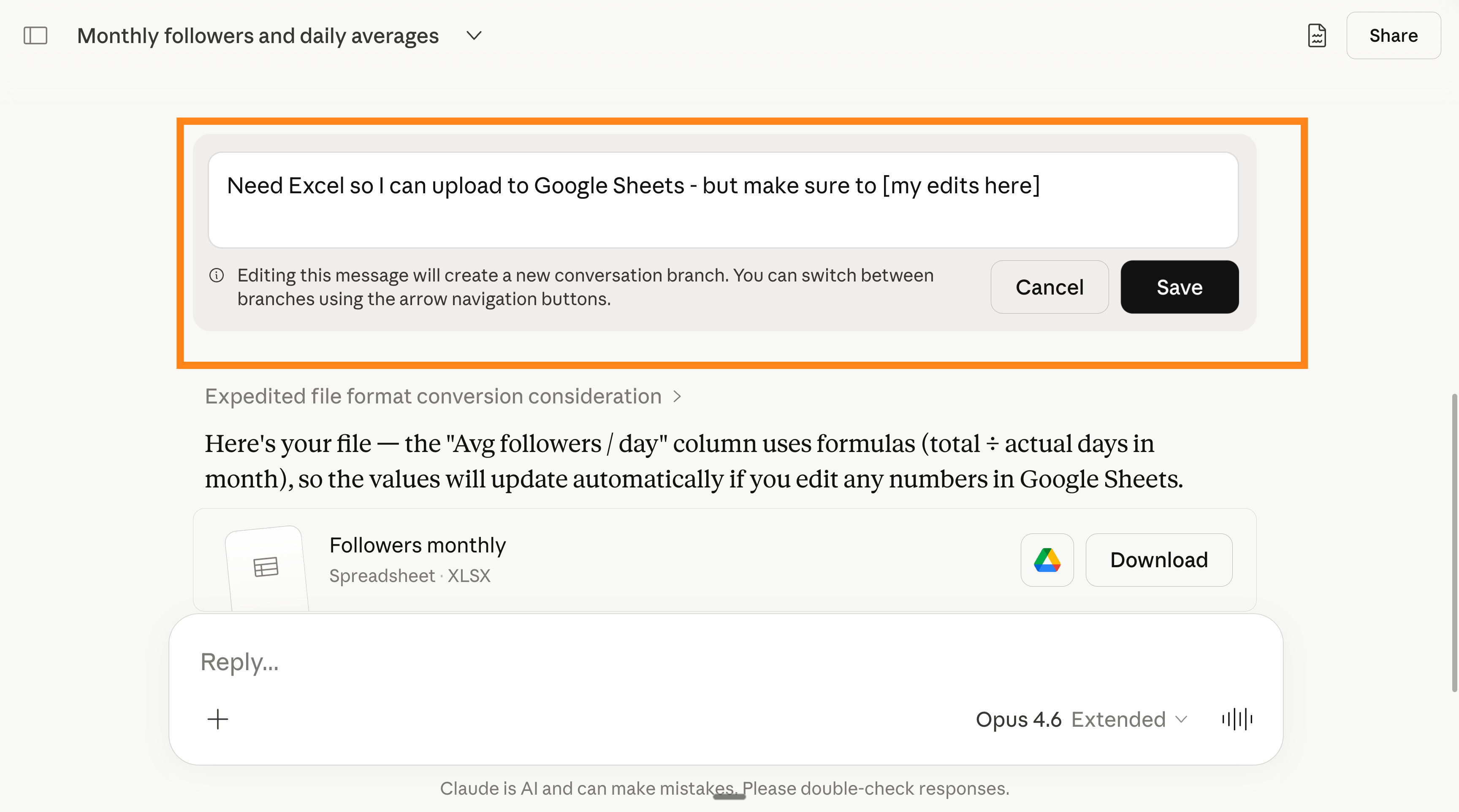
Every time you send “No, I meant...” or “Actually, change X to Y,” you’re adding to the conversation history. The edit button avoids this entirely.
Bonus: it’s also awesome when Claude missed the spot, you can just “go back”.
9. Pick the right product for the task.
Quick question? Chat with Haiku.
Writing a report based on your files? Cowork with Opus.
Building a chart from data? Code with Sonnet.
Every product has different token costs per interaction. Chat is the lightest. Cowork is the heaviest. Matching the tool to the task means you stop paying Cowork prices for Chat-level work.
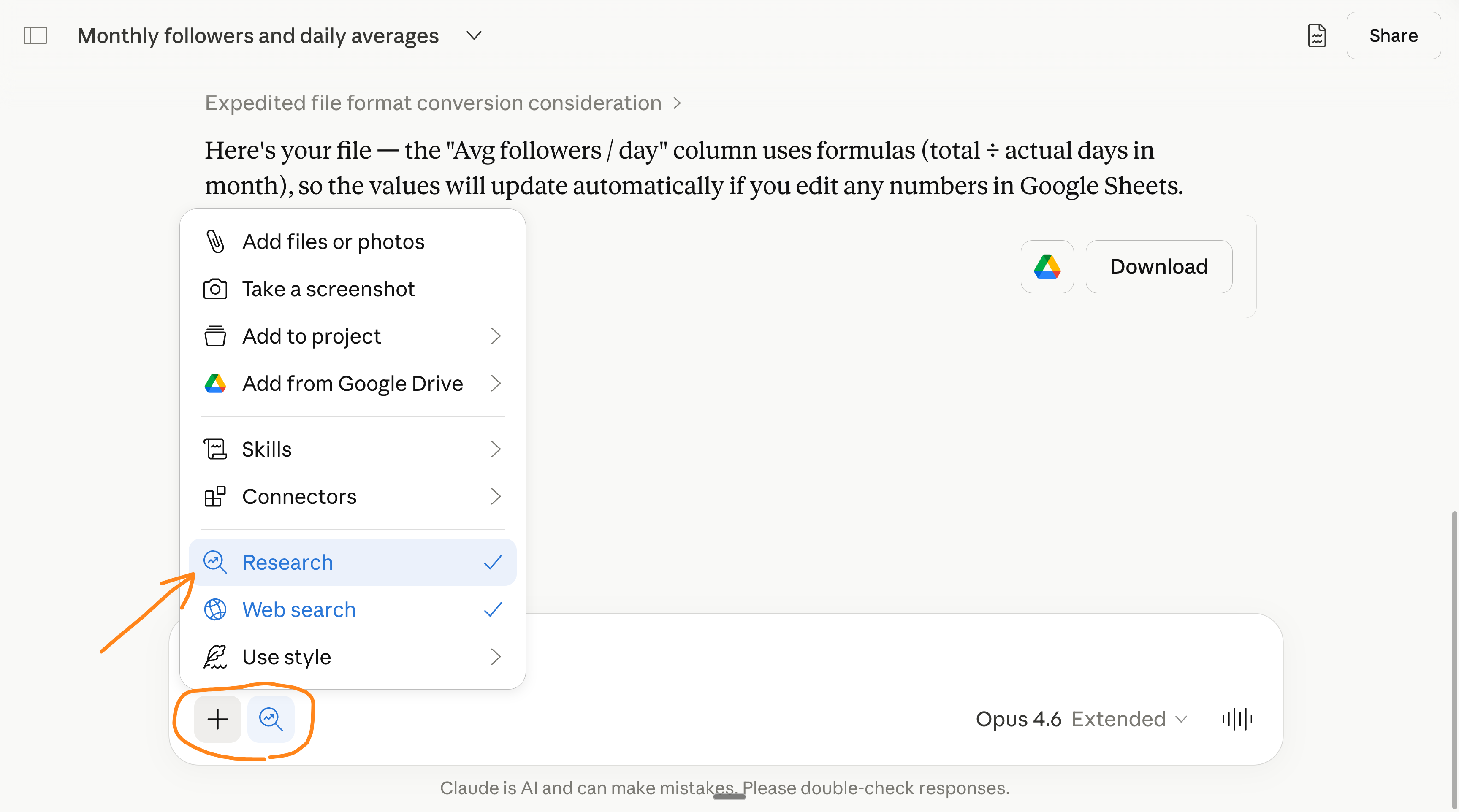
Same goes to a feature no one uses (somehow), the Research feature of Chat:
The basics that still matter.
You probably know some of these.
10. Keep your ABOUT ME files under 2,000 words each.
I explained everything on my last Claude Cowork guide.
But you’ve read it, right? Right?
Cowork reads your folder before every single task. If your about-me file is 22,000 words (mine used to be), that’s thousands of tokens burned before any real work starts. Every session. Every task.
I trimmed it to under 2,000 words.
Pro tip: at the end of a Cowork session, prompt “Write a session-notes.md with the key decisions and next steps.” Next session, start with “Read session-notes.md first.”
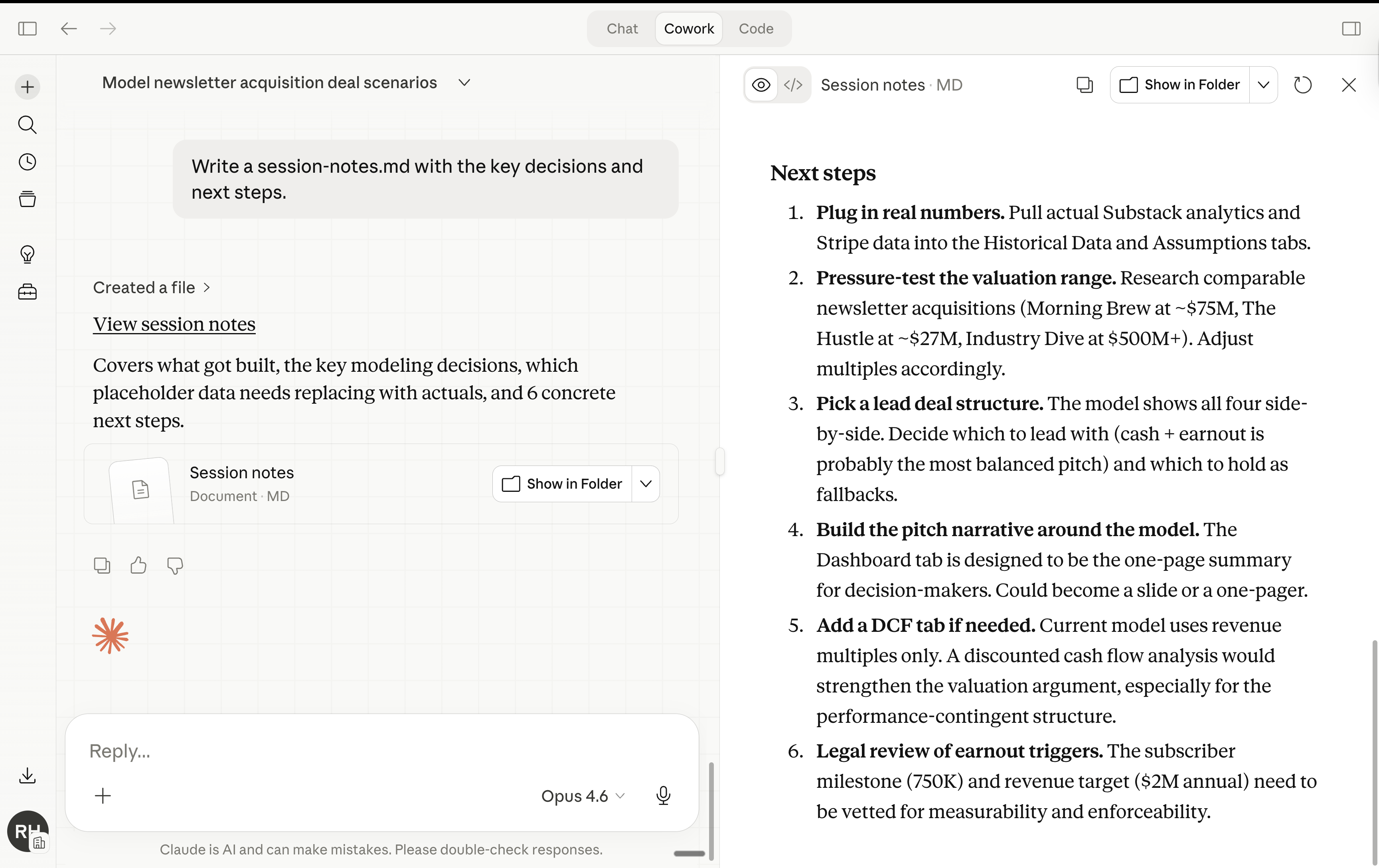
You carry the context forward without re-explaining everything from scratch.
11. Restart the conversation instead of sending follow-ups.
When Cowork gets something wrong, your instinct is to type “No, I meant...” and send another message. Every follow-up stacks on top of the full conversation history. Claude re-reads all of it. Again.
A 20-message session burns roughly 105,000 tokens.
A 30-message session burns 232,000. That’s insane, right?
Since you can’t edit prompts inside Cowork (to go back), you can still “Restart the conversation from here” on an earlier message. The higher up you restart, the more tokens you save.
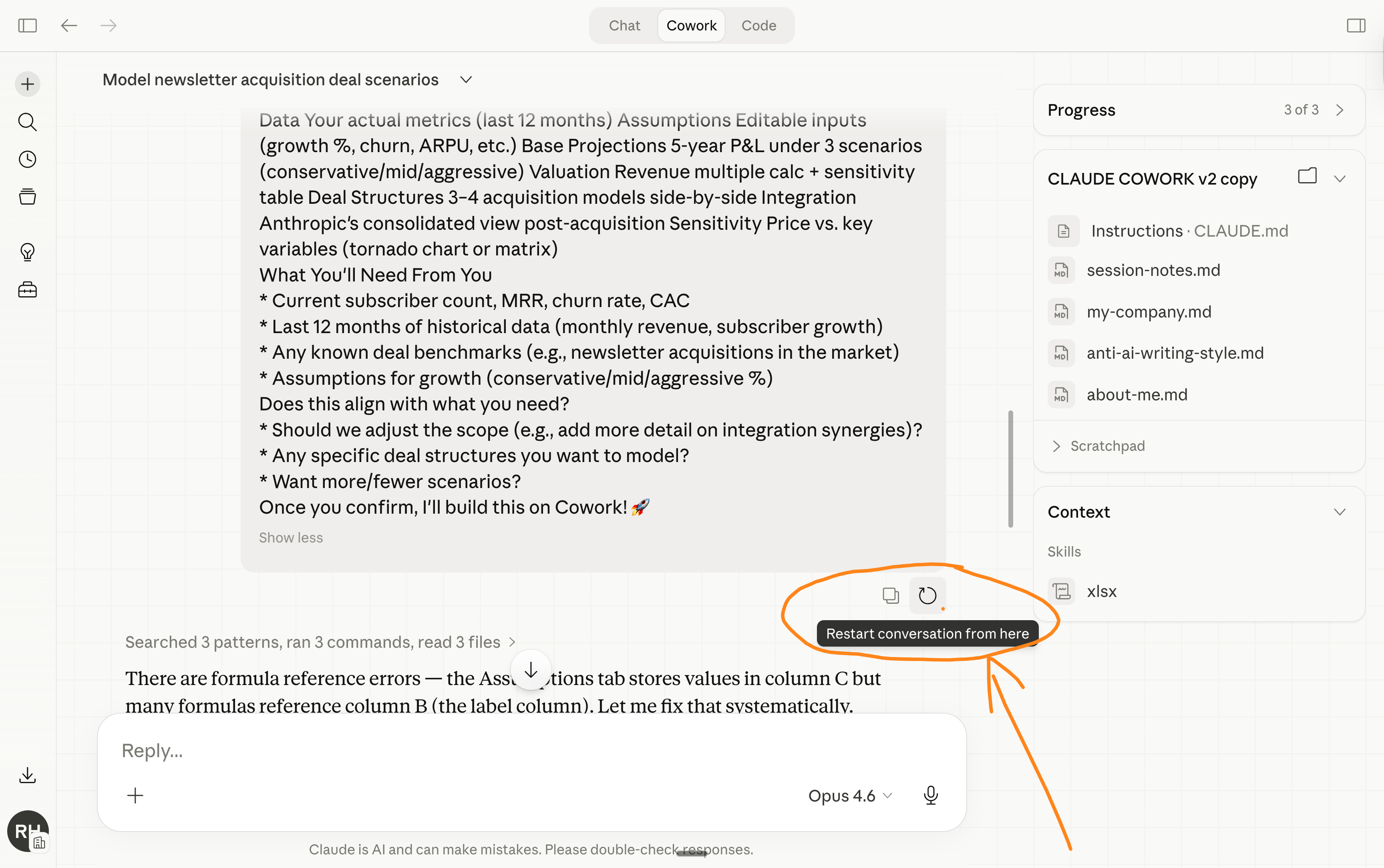
If the whole session went sideways, start a fresh one. Paste a one-line summary of what you need. Clean slate.
12. Summarize and start fresh every 15-20 messages.
Long conversations are token furnaces.
One developer tracked his usage and found 98.5% of tokens were spent re-reading history. Only 1.5% went toward the actual output.
When a Cowork session gets long: ask Claude to summarize everything important, copy that summary, open a new session, paste it as your first message.
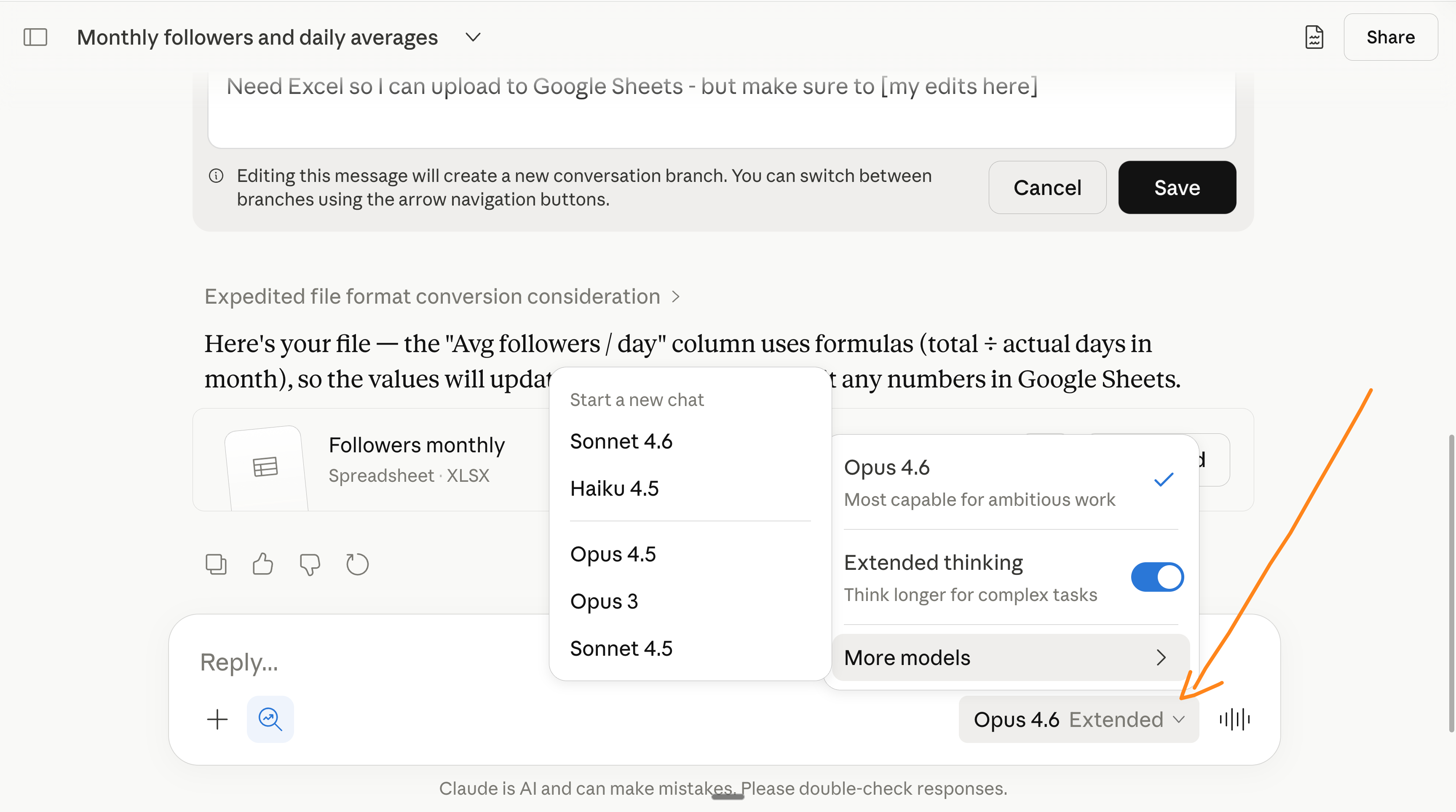
13. Use Sonnet or Haiku for simple tasks. Save Opus for deep work.
Grammar checks, brainstorming, reformatting, short answers. Sonnet handles all of this at a fraction of the cost.
Opus + Extended thinking is your heavy machinery. Don’t use heavy machinery to move a chair.
My rule: if the task takes Claude less than 30 seconds to answer, it probably doesn’t need Opus. Switch models before you start the session. It takes 2 clicks.
14. Don’t dump your entire folder into Cowork.
I’ve seen people drop 50 files into their Cowork folder “just in case.”
Every file Cowork reads is tokens spent. And if your files are too big, Cowork starts summarizing them loosely instead of reading them carefully.
If Claude doesn’t need it for this task, it shouldn’t be reading it.
And for Cowork tasks that don’t need your files at all (like a quick email draft using a connector), select zero folders when you start the session.
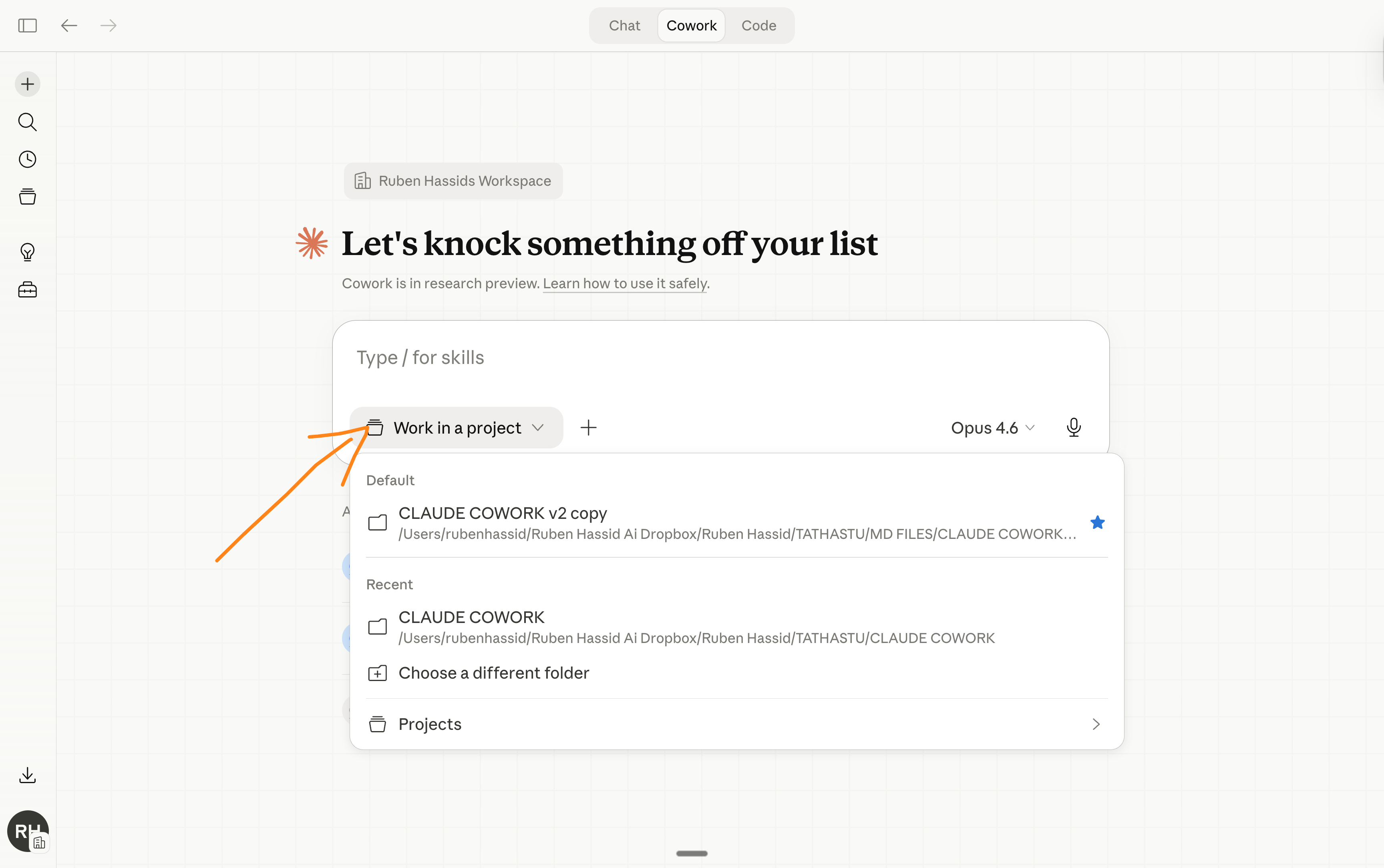
Zero folders = zero local file context = tokens saved before you even type.
15. Start a new chat when the topic changes.
You asked Claude to help with a LinkedIn post. Then you asked about a client proposal. Then a recipe. Inside the same chat. Well… don’t.
Claude is still re-reading the LinkedIn post conversation and the client proposal every time it thinks about your dinner. Those old messages are dead weight. Tokens burned on context that does nothing for the current question.
New topic = new chat. Always.
16. Turn off features you’re not using.
Web search, connectors, and “Explore” mode all add tokens to every response. Even when you don’t need them.
Writing your own content? Turn off Search and Tools. Doing a simple grammar check? Turn off Extended Thinking. These features are powerful, but they cost tokens. Only turn them on when you actually need them.
My default: everything off. I turn features on per task, not per account.
I do use Extended thinking almost all of the time, but I pay for the $100 plan.
And when you do use connectors (Slack, Google Drive, Notion), be specific about what you need. “Search Slack from the last 7 days for messages about the Q2 launch” is way cheaper than “Search Slack for anything about launches.”
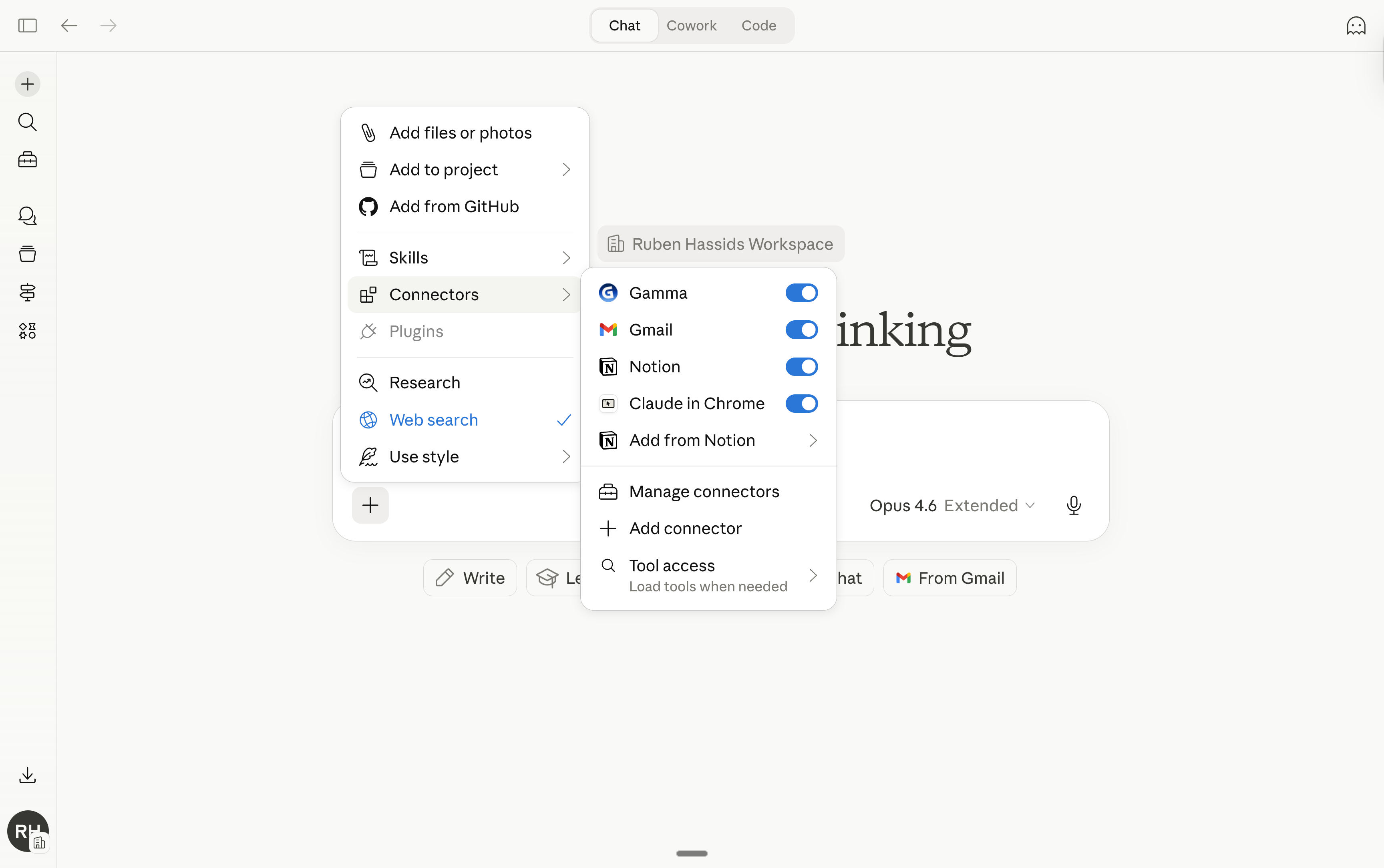
Filtered retrieval = fewer results loaded = fewer tokens burned.
17. Use Projects for recurring work.
If you upload the same PDF to five different chats, Claude re-tokenizes that document every single time. Five chats, five full reads.
Use Projects instead. Upload the file once. It gets cached (= saved).
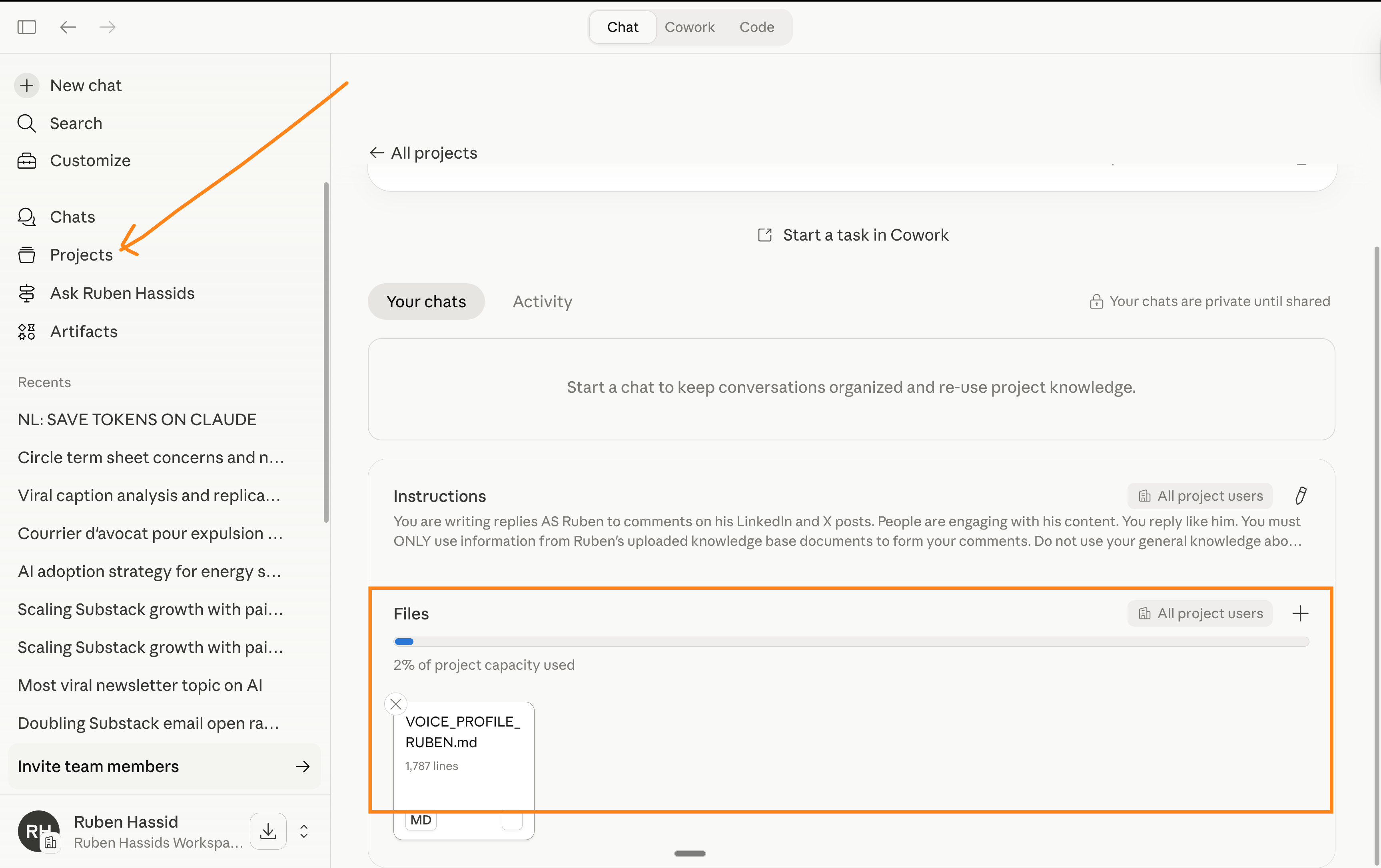
Every new conversation inside that project references it without burning tokens again. Anthropic confirmed that reused project content does not count the same way as fresh uploads.
On paid plans, Projects also use RAG, which means Claude retrieves only the relevant chunks instead of loading your entire document into the context window.
If you work with contracts, brand guides, research papers, or any document you reference often, this alone could cut your token spend significantly.
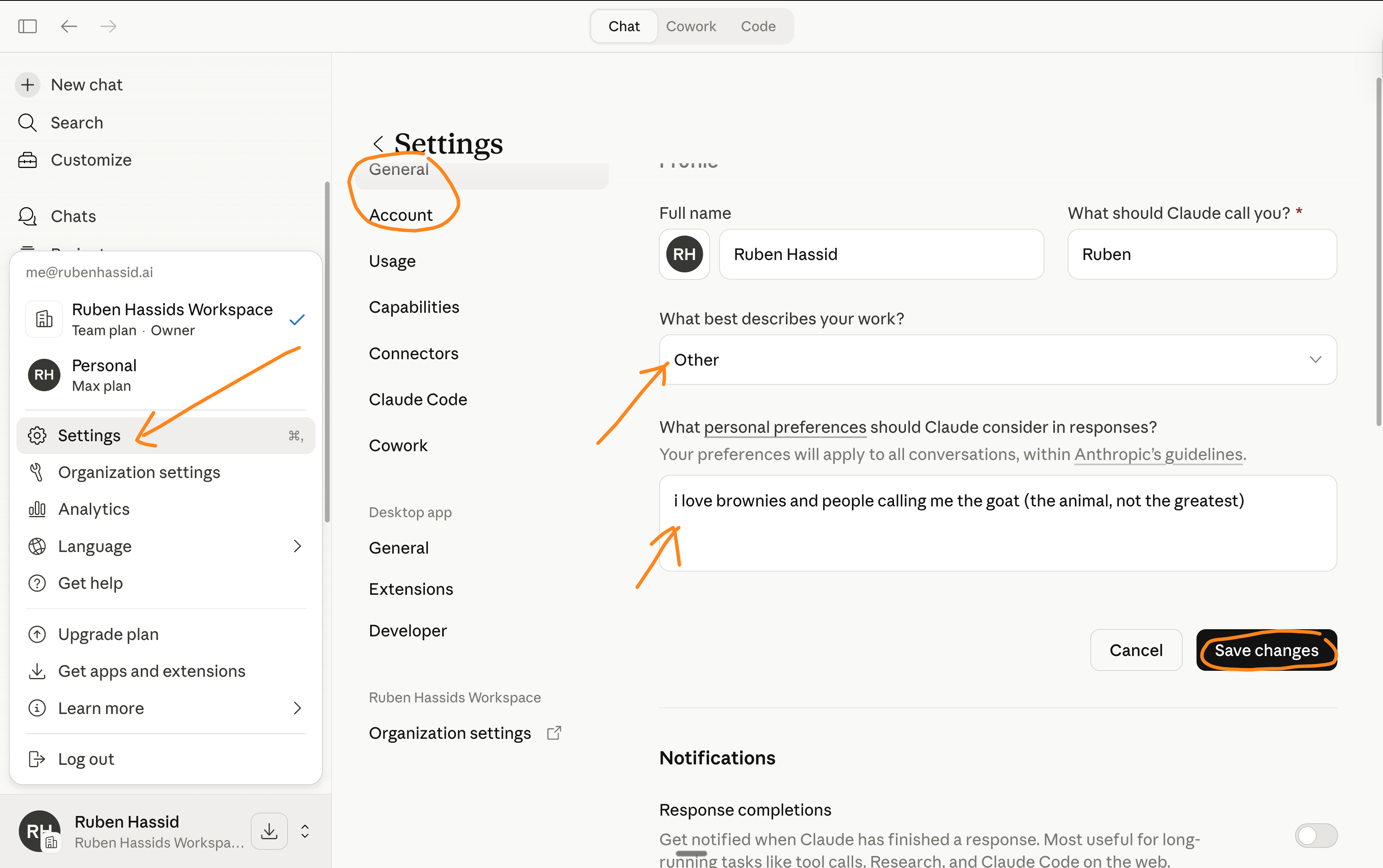
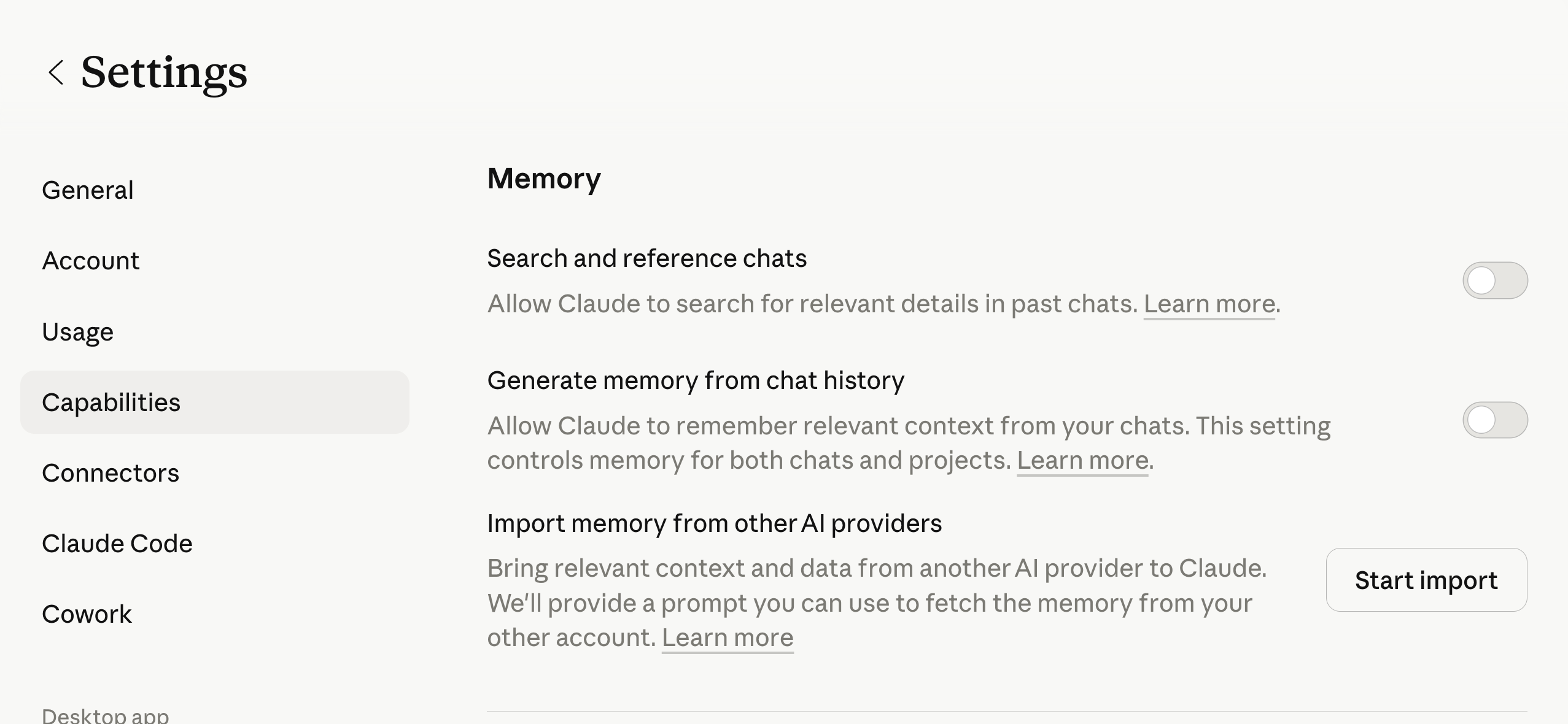
18. Turn off Memory and add User Preferences.
Every new chat without saved context wastes 3-5 messages on setup.
“I’m a marketer, I write casually, I prefer short paragraphs...”
So do this:
Also set up Styles (you’ll find it in the model selector).
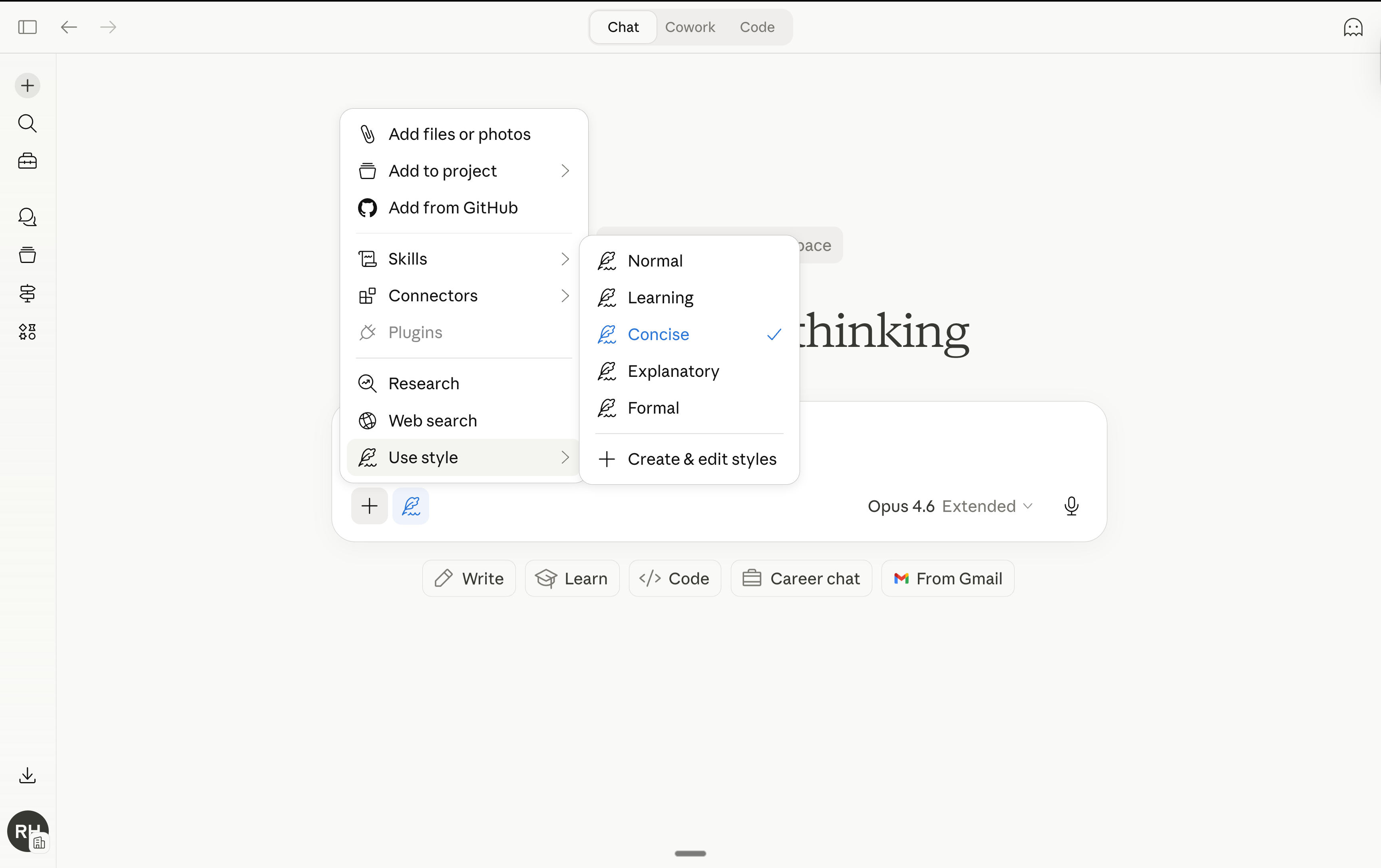
Pick “Concise” or create a custom style. It persists across chats without eating your context. One setup, permanent savings.
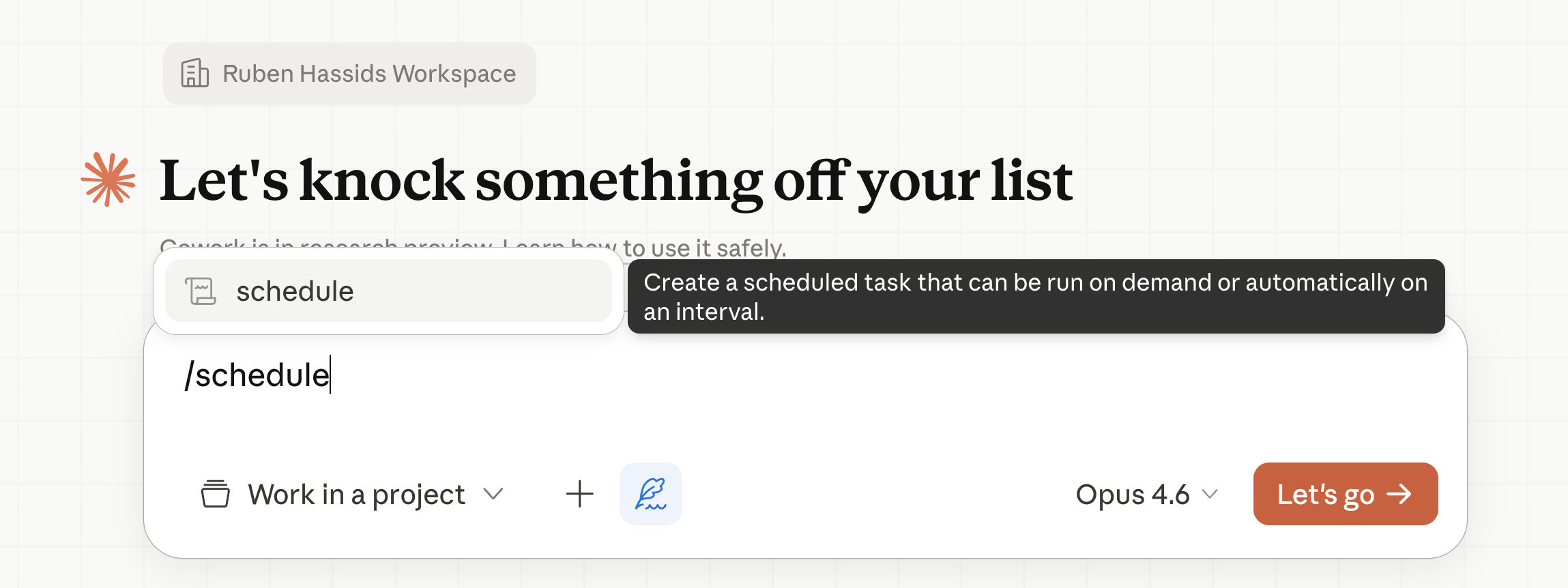
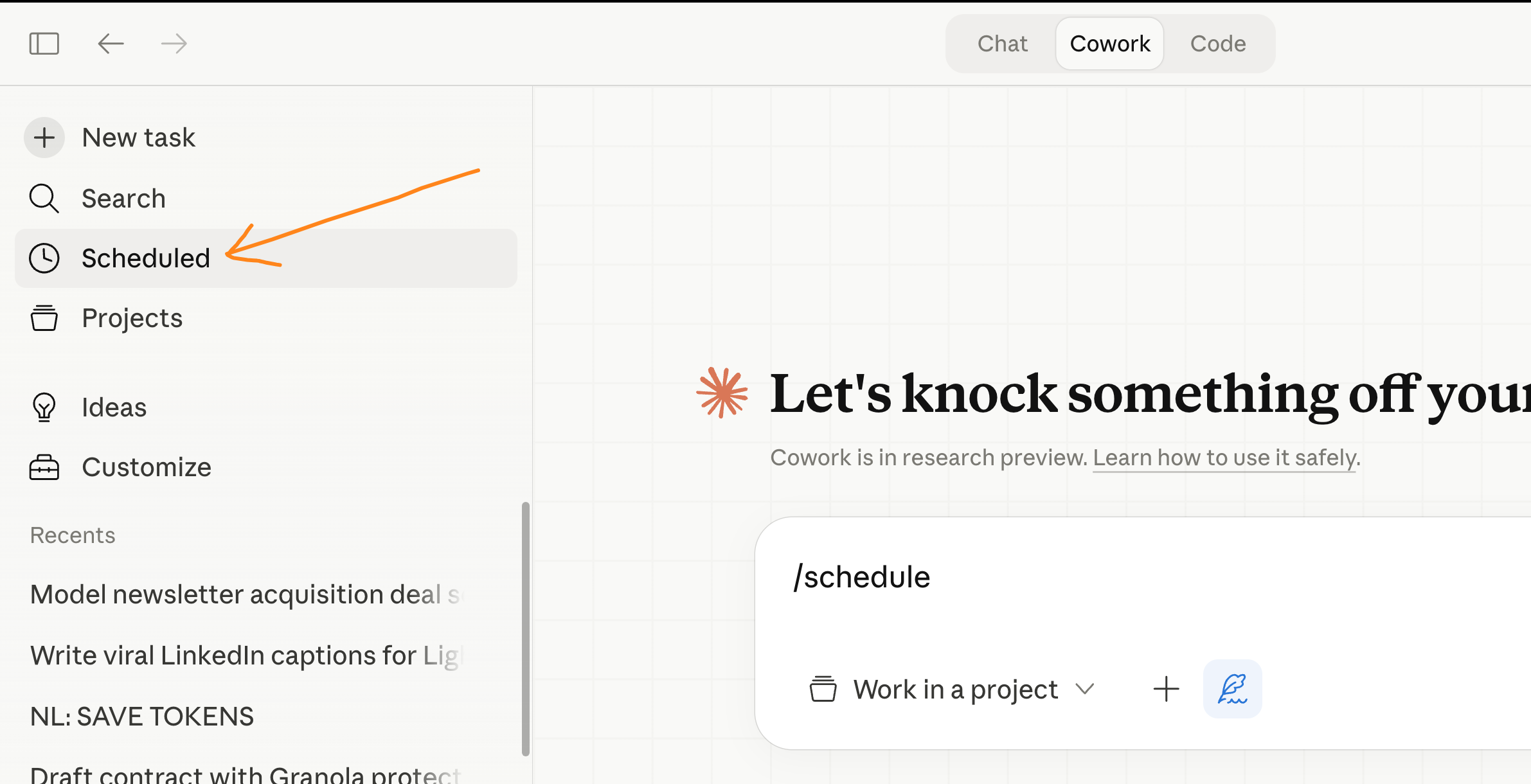
19. Use scheduled tasks for recurring work.
If you run the same report, digest, or research task every week, don’t do it manually in a growing Cowork session.
Use the /schedule plugin.
20. Give Claude Code a clear scope before it starts.
You might think Claude Code is only for developers. I use it to create briefs for my tech team and build quick data visualizations. I explained how:
But Code sessions can burn tokens faster than anything else if you’re not careful.
Code tends to go wide. It explores files, reads directories, runs checks. If you don’t tell it exactly what you need, it will investigate everything in sight.
Tokens everywhere, wasted.
Be specific. “Create a bar chart from this CSV showing monthly revenue for 2025. Save it as chart.png.” Don’t leave room for Claude to explore.
21. Use the CLAUDE.md file to set permanent context.
Code reads a CLAUDE.md file (if it exists) before every task.
Put your recurring instructions there: what folder to work in, what language to use, what your naming conventions are.
Same logic as Cowork’s Global Instructions. Write it once, never repeat it, save tokens every session.
Anthropic also warns that bloated CLAUDE.md files make Claude ignore your actual instructions. Keep it short. If you have workflows you only use sometimes (like a specific reporting format), move those into Skills instead.
Skills load on demand. CLAUDE.md loads every single time.
More about skills here.
22. Spread your work across the day.
Claude uses a rolling 5-hour window for usage limits. If you burn your entire limit in one morning session, most of your daily capacity goes unused.
Split into 2-3 sessions: morning, afternoon, evening. By the time you come back, your previous usage has rolled off.
I know. Easier said than done. I pay for the $100/month plan specifically so I don’t have to worry about this. But if you’re on the $20 plan, it matters.
23. Stop using Claude for things Claude is bad at.
Claude can’t generate images. If you’re spending 5 messages trying to describe a visual and getting text-based workarounds, switch to Gemini.
That’s 5 messages of tokens wasted on a task Claude was never going to solve.
Claude isn’t the best at real-time search either. Grok is faster and more accurate for that. Use Grok.
Recently, ChatGPT has been pretty good at both images and search. A comeback?
Where to start.
You won’t do all 23 at once. Don’t try.
Pick three:
If you use Cowork daily, start with habits 1, 2, and 5. Convert your files before uploading, plan in Chat before building, and stop asking for full redos.
If you mostly use Chat, start with 8, 15, and 17. Edit instead of correcting, new chat per topic, and use Projects for recurring files.
If you’re on the $20 plan and keep hitting limits, start with 6, 13, and 22. Batch your prompts, use cheaper models, and spread your sessions across the day.
PS: This newsletter is growing because you guys are sharing it.
On every one of my free articles, I get over 1,000+ shares!! It keeps it free.
The best kind of share is to your colleagues, on your group chat (on Teams or Slack). You’re helping them save tokens, and you help me spread the word!
And if it’s the first time you’re here, don’t miss the next newsletter:
The token math at message 30 stopped me. I never thought of it as Claude re-reading 29 full exchanges before even getting to my new question. The edit button trick too. I was typing "actually, change X" constantly without realizing I was just feeding the furnace.
I really enjoy reading your AI articles and then implementing what I understood. You explain complex tasks in a very interesting and simple way. Thanks for sharing your precious wisdom with us for free! 😊