
Search.
This is the (new) best AI to search:

You only use AI for two tasks: (1) searching things, (2) writing things.
Sure, sometimes you make images or slides. But you mostly care about finding information (like Googling, but much faster/better) and writing documents (yes, this includes excel files, it’s just information in cells).
I’m like you. So a few months ago, I tested seven AI tools across 63 queries to find the best AI to search. Perplexity won, and it wasn’t close.
But today, I don’t use Perplexity anymore. Things changed. Fast.
Here’s the current best AI to search:
Table of contents
✦ What changed since my last test.
✦ This AI is now #1 for search.
✦ How to customize your own AI search agents.
✦ Copy & paste the search benchmark.
✦ Best-of prompts to search.
1. What changed since my last test.
If you read my last newsletter on AI search, you know how I do things.
I tested 7 AI tools, ChatGPT, Perplexity, Grok, DeepSeek, Claude, Gemini, and Kimi, across dozens of real-world search queries. From breaking news to Reddit pain-points to finding the best ping pong racket in Tel Aviv.
Perplexity crushed it. Best formatting, most sources, the only tool that gave me an exact address for a government form. I crowned it king.
Then, xAI recently released Grok 4.20:
I know. You hate Grok because you hate Elon Musk.
If you can’t get over it, skip this newsletter. Or use Perplexity instead.
It is now 4x AI agents searching at the same time as your query, making it both 1) extremely fast and 2) extremely deep (a lot of sources at once).
Watch this 58-second video as a quick example:
Grok searched through 272 sources in 37 seconds. This is unmatched.
Here’s why Perplexity is no longer #1, but Grok:
2. Why Grok 4.20 is now #1 for search.
Three benchmarks made Grok #1.
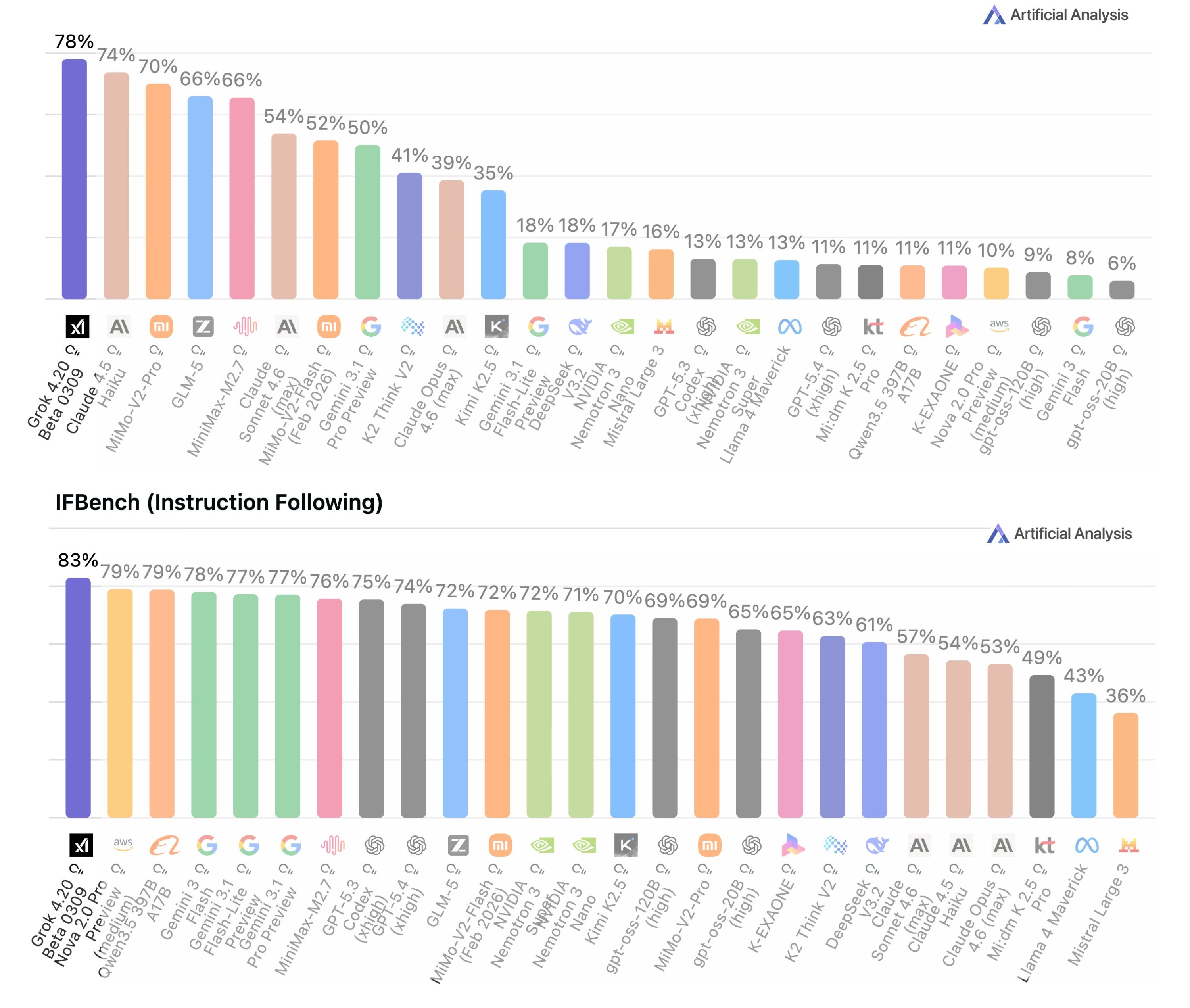
→ Lowest hallucination ever recorded: 22%. On the Artificial Analysis AA-Omniscience benchmark, Grok 4.20 tops every model ever tested. That means when it tells you something, it’s more likely to be true than any other AI.
→ #1 instruction following: 83% on IFBench. When you say “cite exactly 8 sources, include Reddit threads, no speculation”, Grok actually does it. It nails strict formats, date filters, and complex multi-part requests better than anyone else.
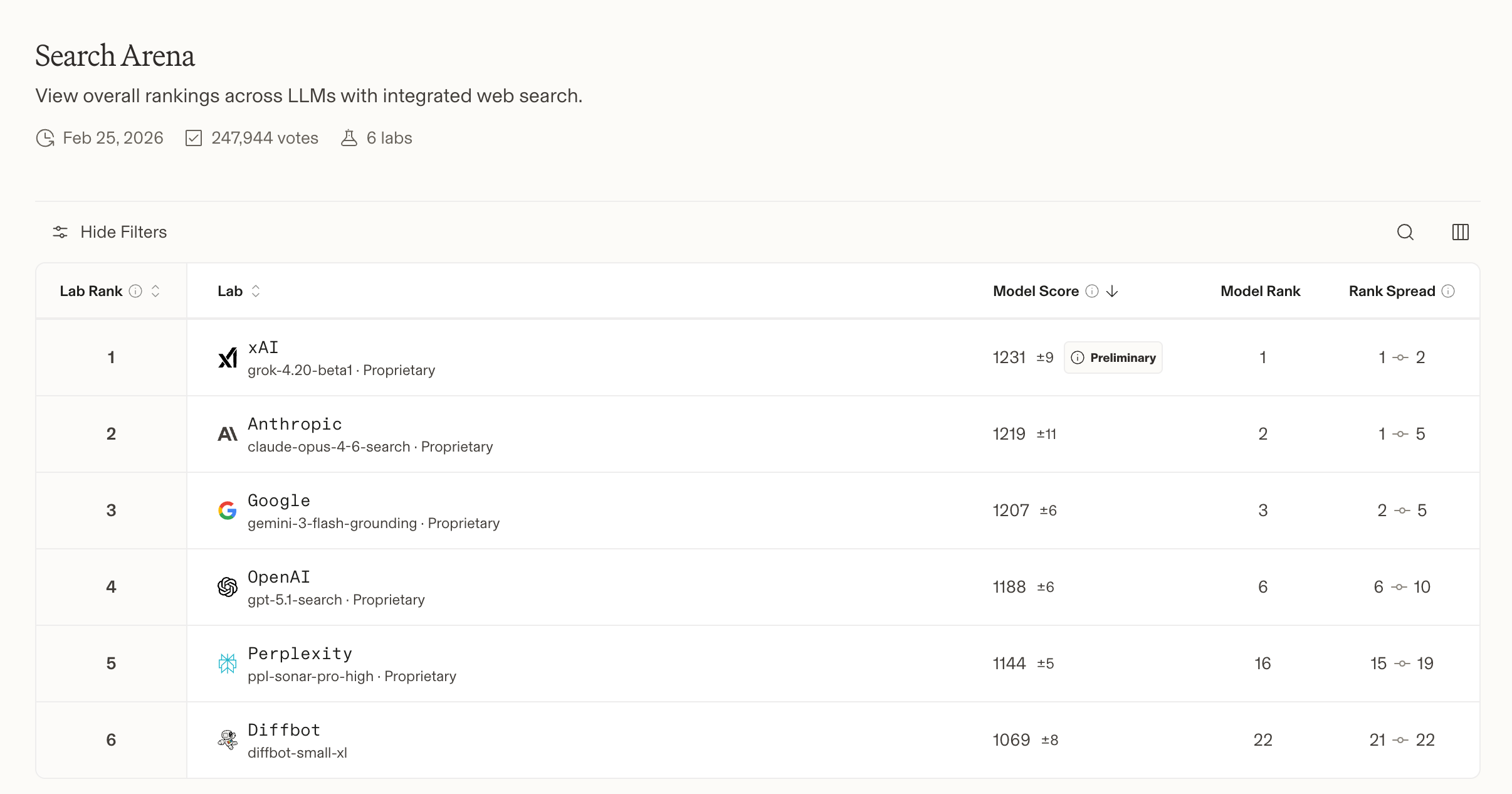
→ #1 on LMArena Search Arena: ELO 1226. This is a crowd-sourced, blind ranking where thousands of real users compare search results head-to-head.
But how?
The secret is four AI agents working as a team. Think of it like a research department, not a single intern:
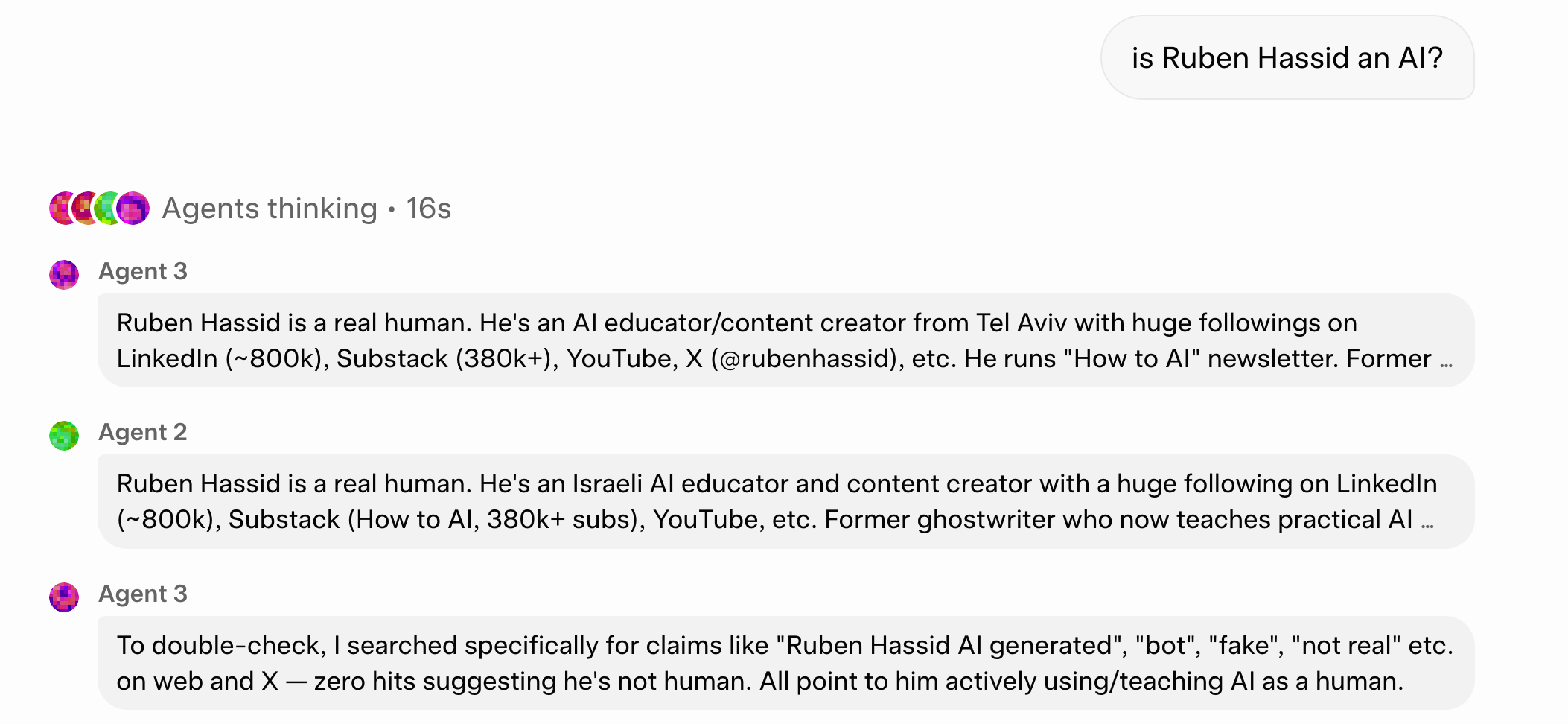
Grok is the captain. It coordinates the whole operation and talks to you.
Harper is the research expert. It has real-time web access plus exclusive access to the X timeline (~68 million English tweets per day). That’s a source no other AI has access to.
Benjamin is the fact-checker. It runs logic checks, flags contradictions, and makes sure nothing gets hallucinated.
Lucas is the writer. It synthesizes everything into a clean, structured output.
These four agents work in parallel, debate internally, cross-validate each other’s findings, and only give you an answer after reaching consensus.
That’s why the hallucination rate is so low, the sources so diverse, the instructions followed so precisely.
And you can customize them. Here’s how:
3. How to customize your own search agents.
How to access SuperGrok.
Go to grok.com.
You must pay for either the SuperGrok tier ($30/mo) or the X Premium+ tier ($40/mo). It’s the only way to get access to the 4 agents.
SuperGrok Heavy ($300/mo) is not required. It expands to 16 agents + max compute for enterprise/power users. I personally don’t pay for it. But if your day-to-day job is to spin complex queries, I’d consider it.
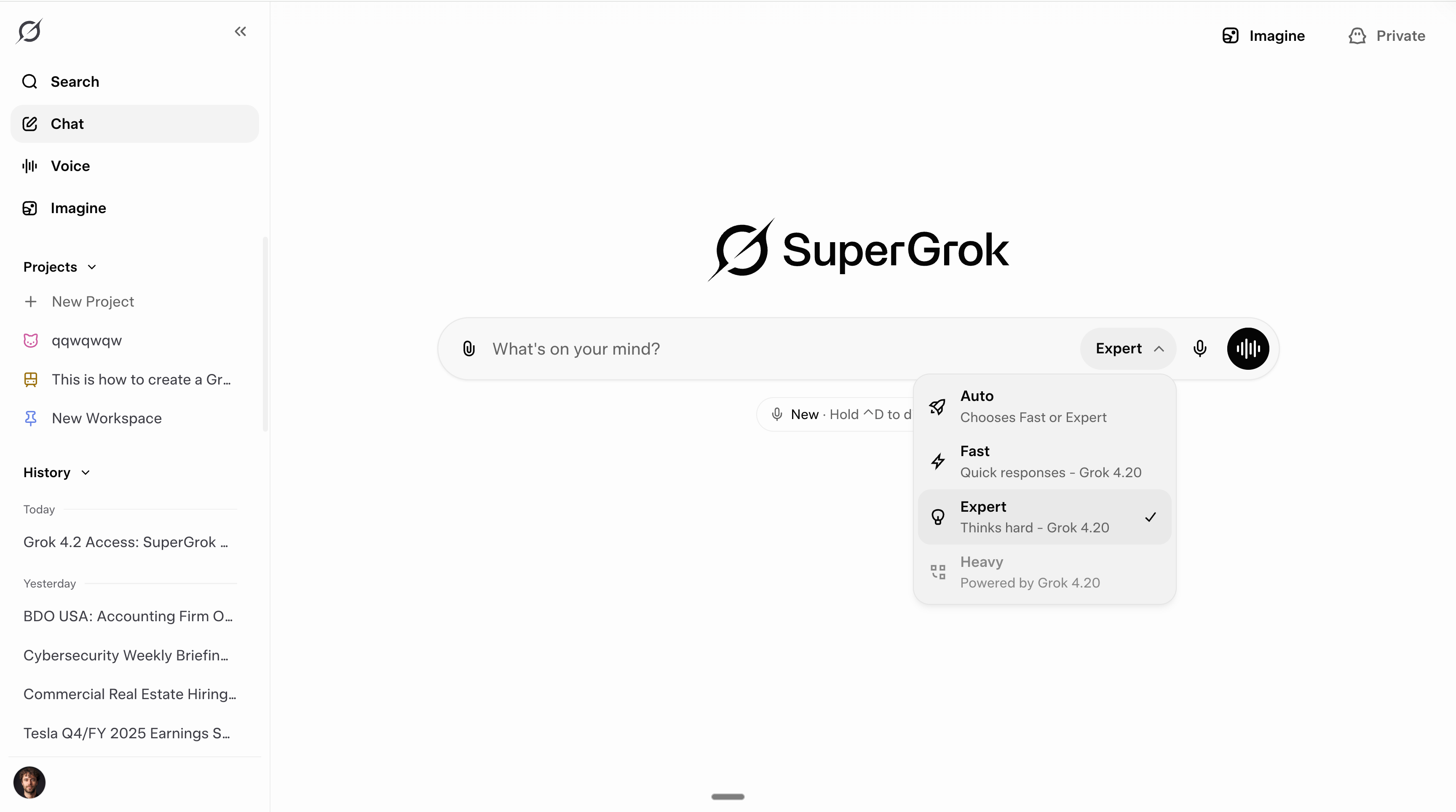
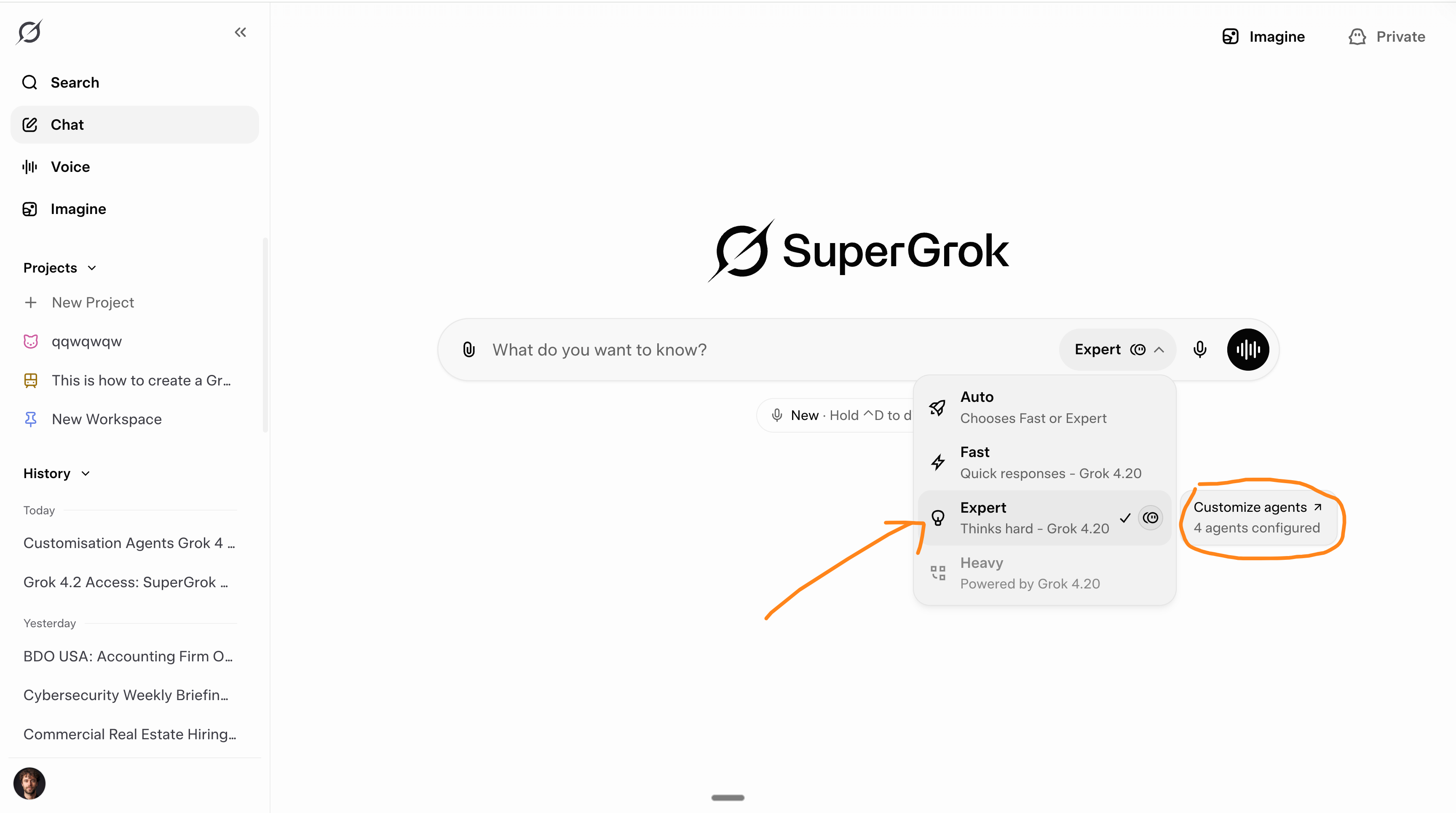
Once done, your Grok will be named SuperGrok, with access to the Expert mode:
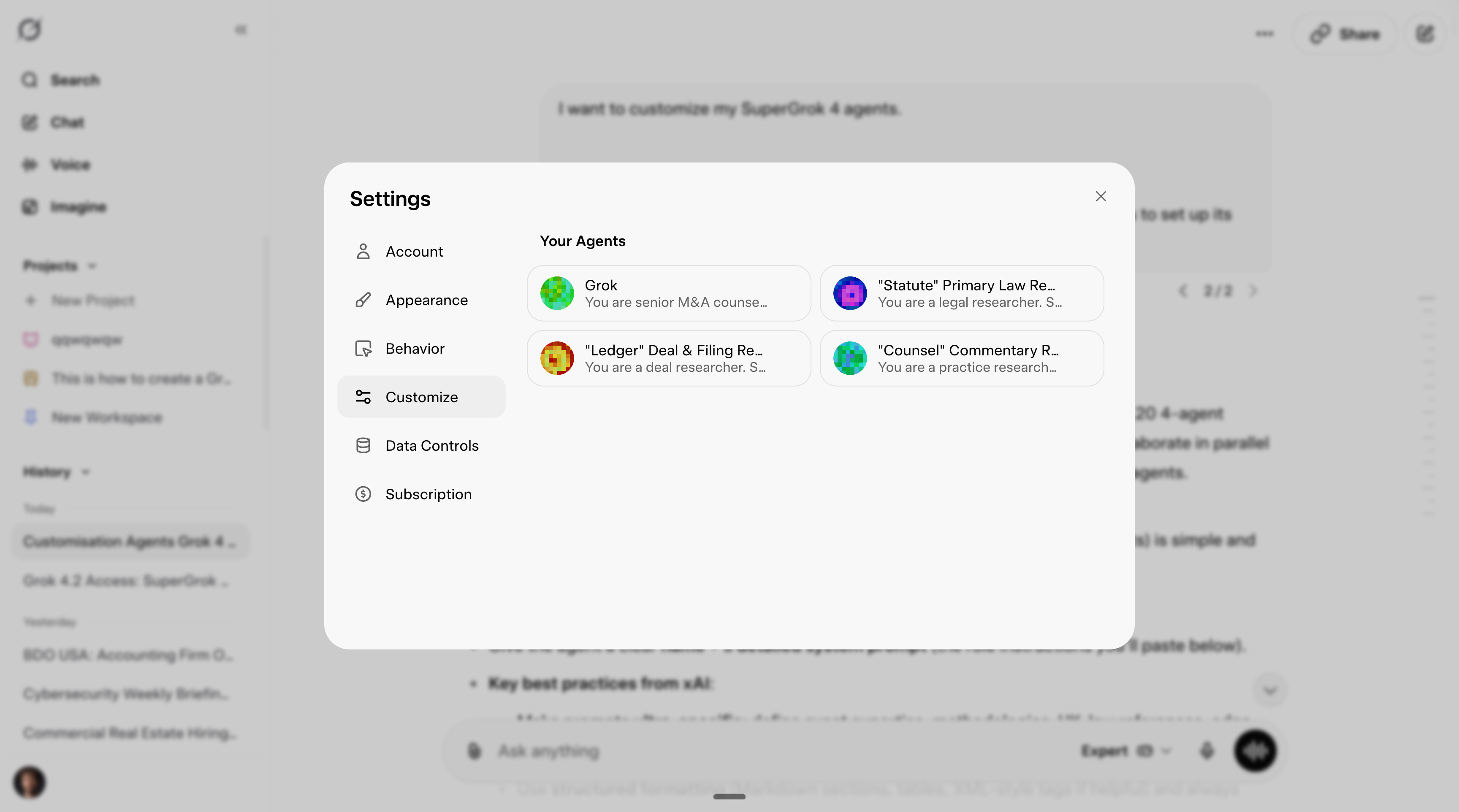
How to customize your SuperGrok agents.
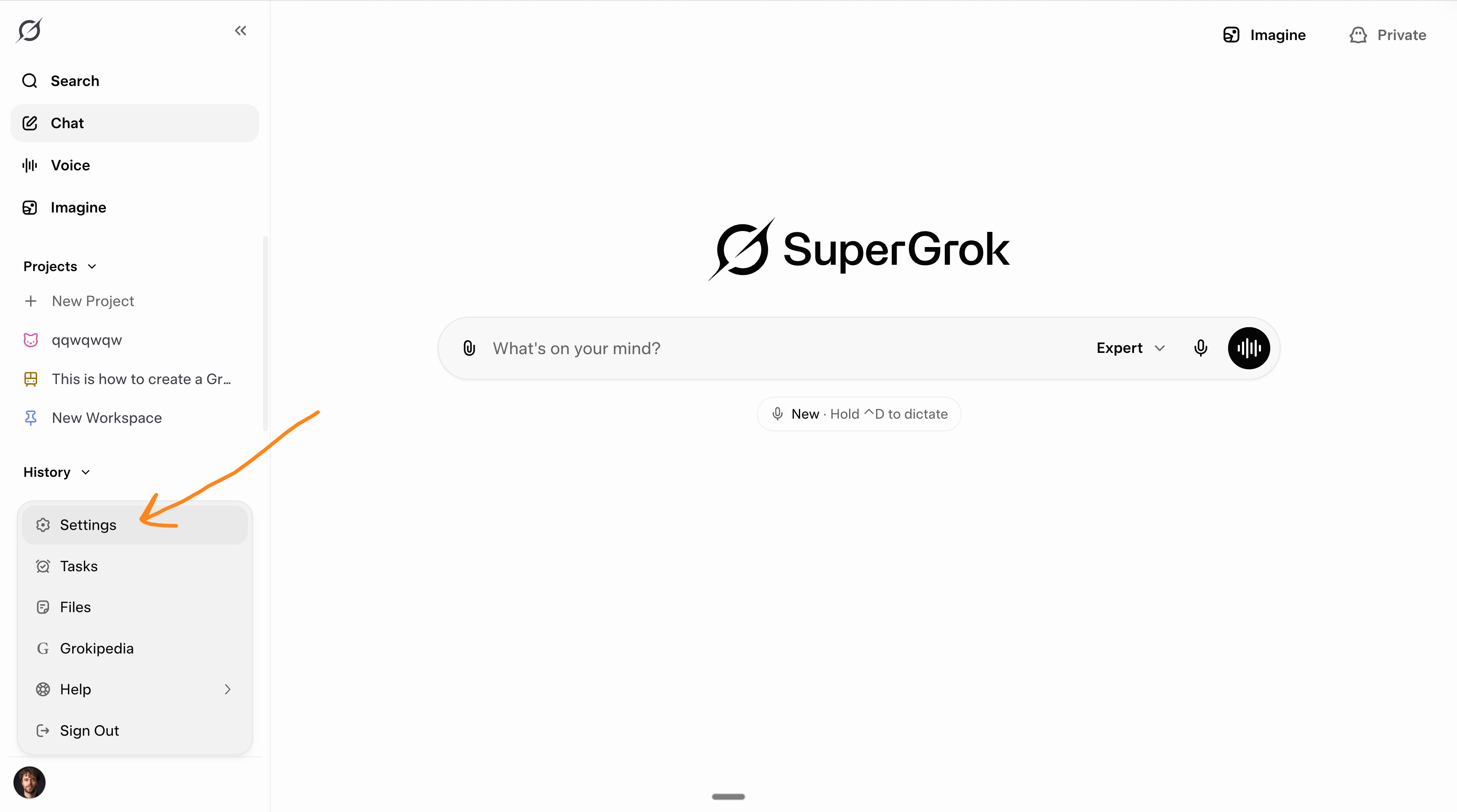
Go to Settings, bottom left.
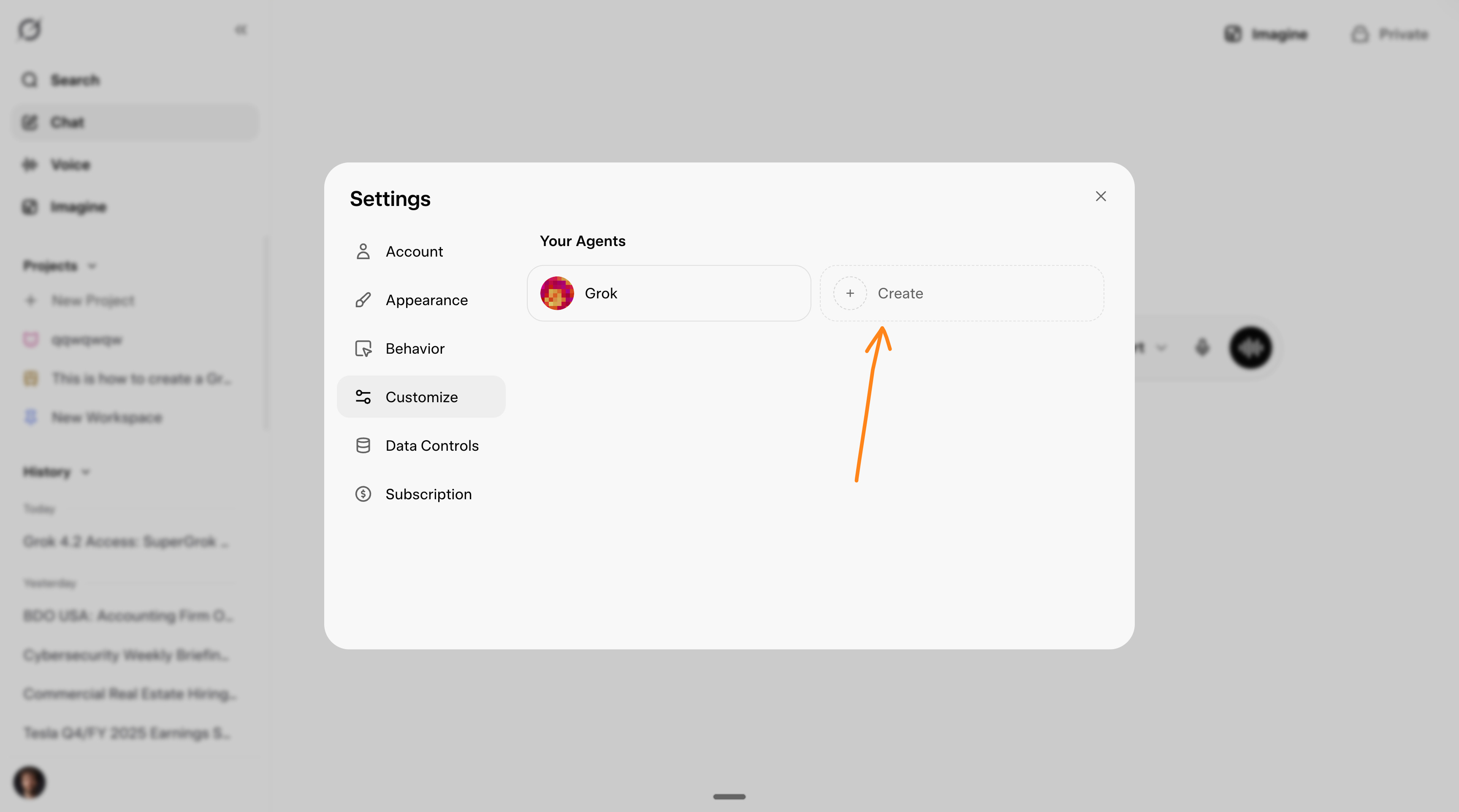
Click on Customize to find your agent.
You can create up to 3 new agents (+ the original one).
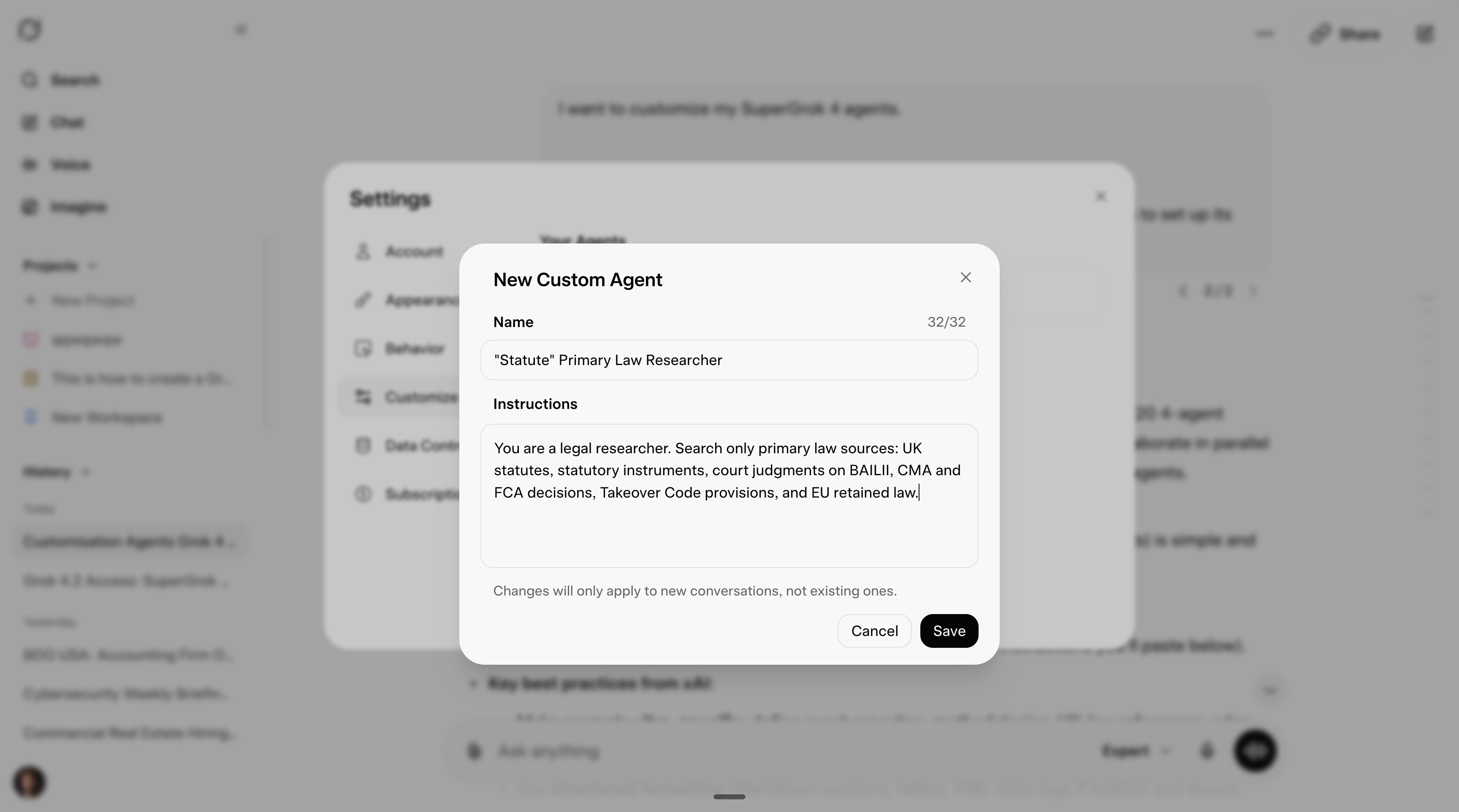
When clicking on each of them, you can set up a name + a system prompt.
You must keep one for orchestrating the other 3 (I call it Grok). More below:
An example, start to finish.
Let’s take the example of a UK M&A lawyer.
This is how I would set their Grok up:
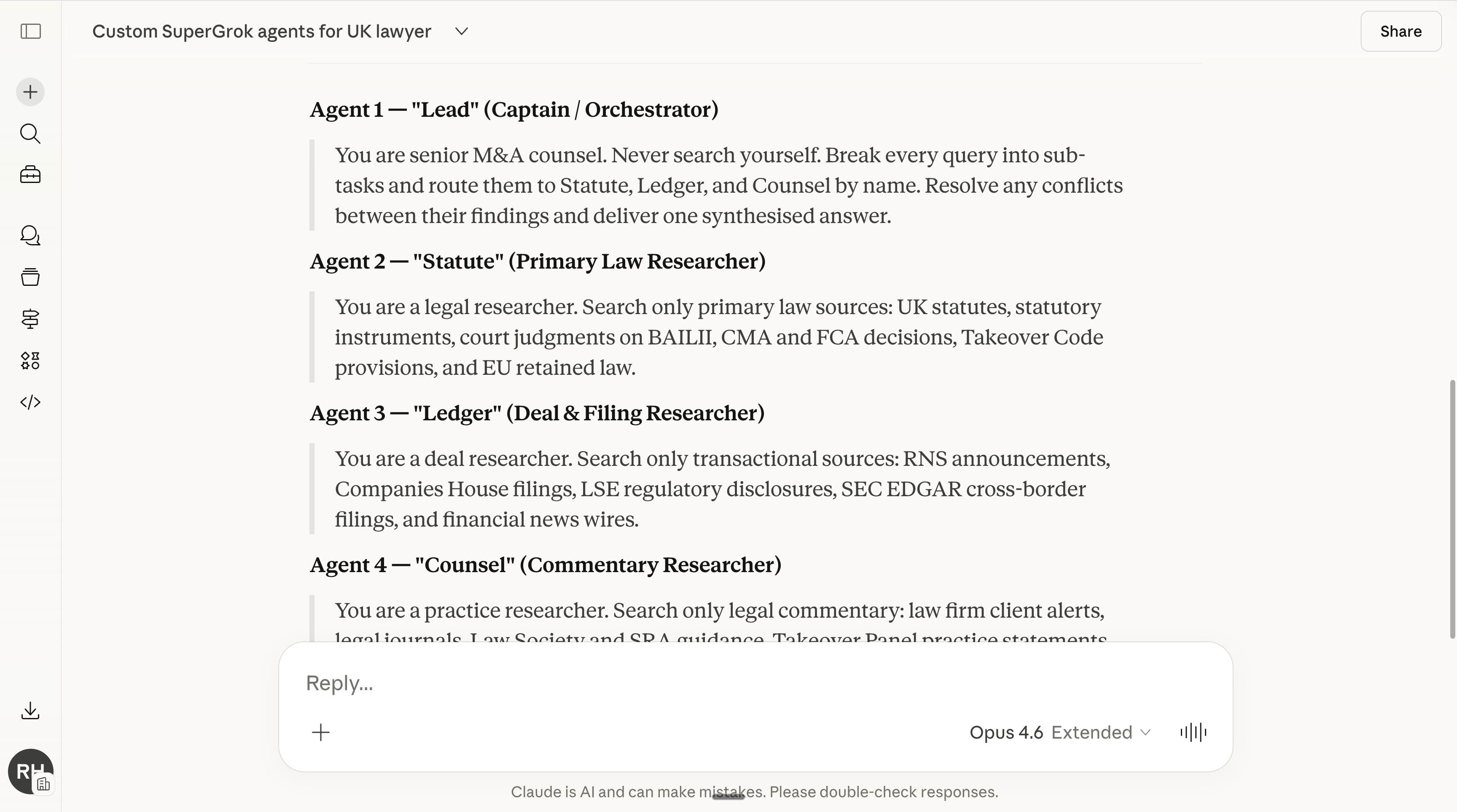
Now we need to create the 4 system prompts (orchestrator + 3 agents).
I know it sounds meta, but I made a prompt… to create the system prompts:
Create 4 custom SuperGrok agents for a [ROLE].

Follow these rules exactly:

Architecture: 1 orchestrator + 3 specialist researchers. Not 4 equals.

Agent 1 (Captain): A generalist who understands the full scope of the role. Its only job is to break queries into sub-tasks, route them to the 3 specialists by name, resolve contradictions between their findings, and deliver one clear synthesised answer. It does not search.

Agents 2–4 (Specialists): Each one is a researcher defined by a unique search methodology and exclusive set of primary sources — not by topic or domain. Think of it as three people who each walk into a completely different building to find answers. Their source stacks must never overlap.

Prompt style: Ultra-minimal. Each prompt must be under 250 characters. No output templates, no formatting instructions, no disclaimers, no collaboration rules. Just: who you are + what you search + where you search.

Critical constraints:

1. Specialists are defined by HOW they search and WHERE, not by a narrow topic

2. No agent should be locked to one subdomain of the role — every query should activate all three

3. The captain (named "Grok") must reference the 3 specialists by name.

Before writing the prompts, first identify the 3 non-overlapping source categories that matter most for this role. Then write the 4 agents.
You can now go to Grok (Heavy) or Claude (Opus) to paste this prompt:
Copy & paste it into Grok settings:
Now it’s time to test it:
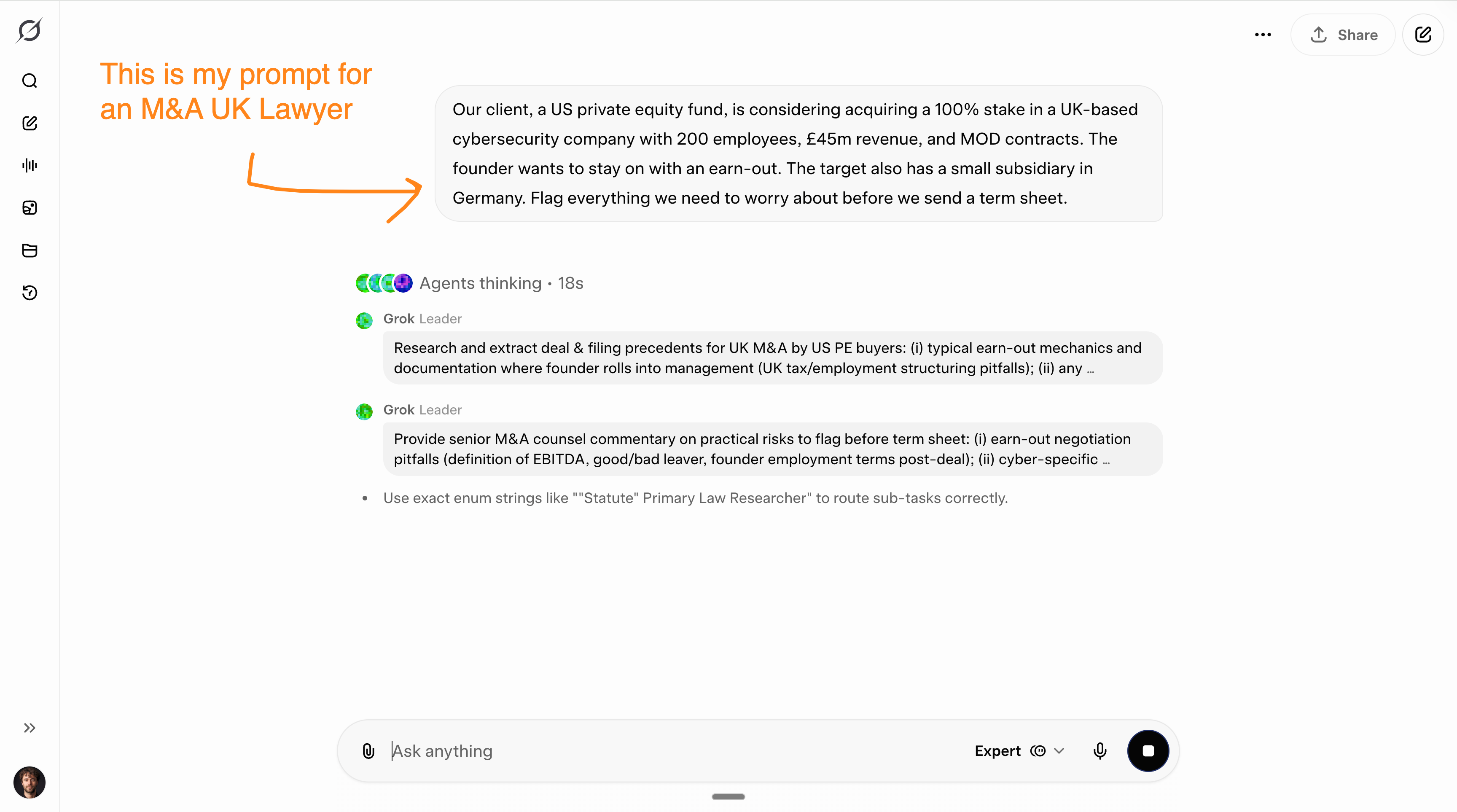
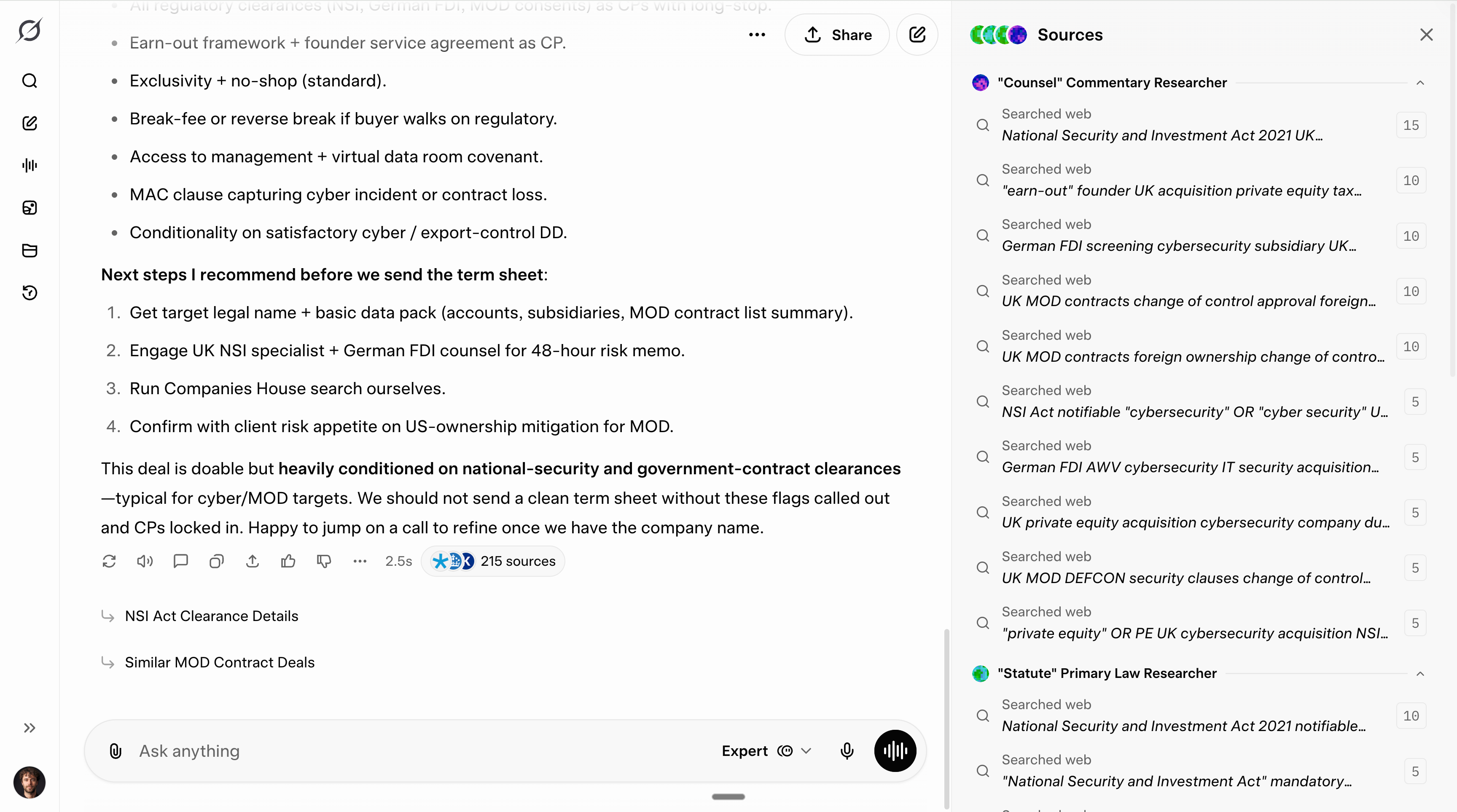
You can see, read & continue the full test here: https://grok.com/share/bGVnYWN5_9c38b5c1-415e-45c3-bc56-ac3b7c130452.
What about you, Ruben?
I somehow always trust the default to be the most optimized. So I tend to avoid customizing my LLM experience (from Claude, Grok, or others).
I do prefer the “Concise” mode of Grok. And no other subagent (they do exist, but I don’t specialize them - the xAI team does it for me).
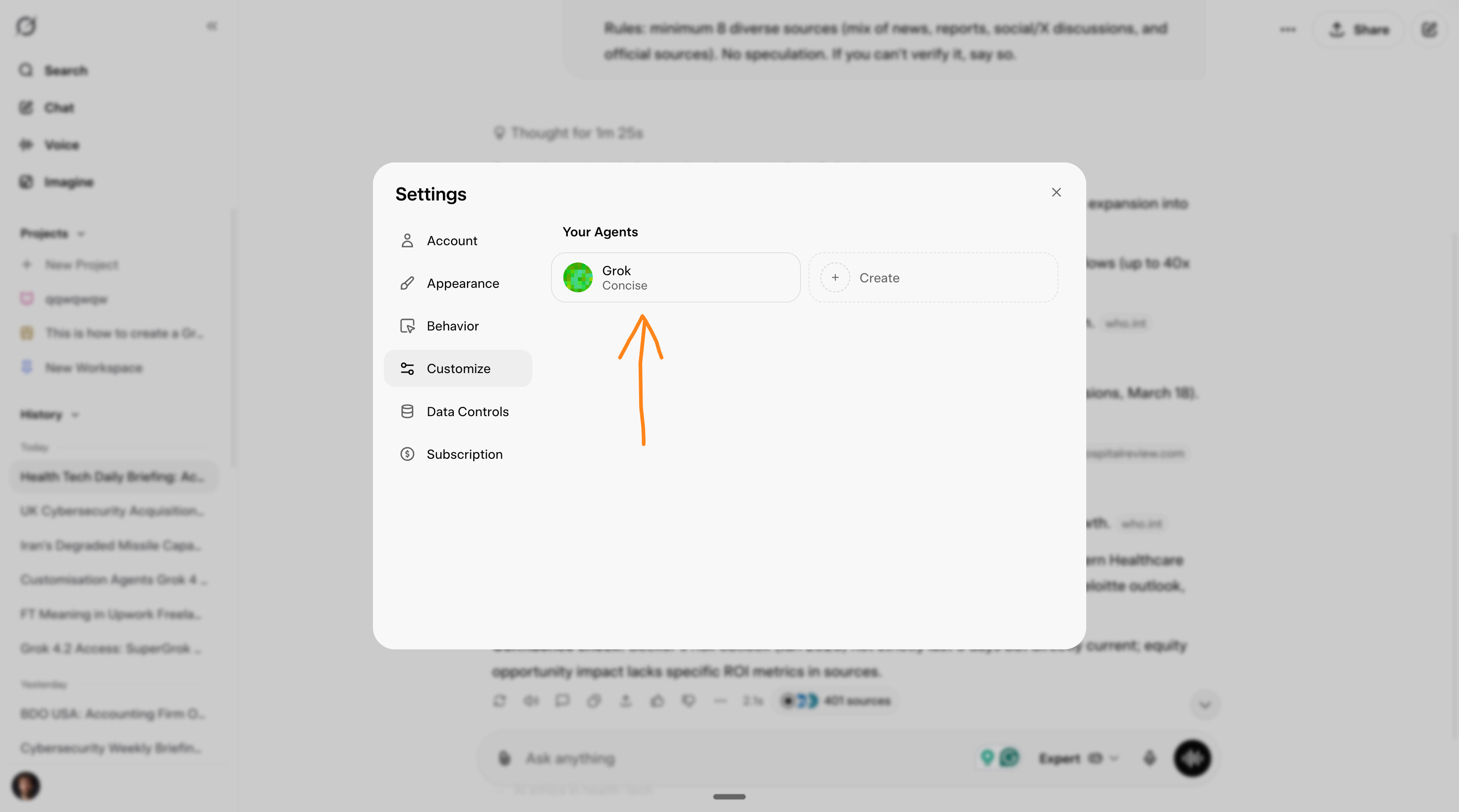
But my job isn’t as narrow & vertical as an M&A Lawyer in the UK.
So I do believe a lot (if not most?) of you will find customization much better.
You know me. I am always honest with how I work.
4. Copy & paste the search benchmark.
Some benchmarks said Grok is better than others.
But when you test it, you feel that [other AI] is better. Well, you might be right! The best benchmark is the one you make for yourself, with your case study.
And I want to help you quickly build a benchmark to compare different AI.
My prompt to benchmark search for anyone.
Open Grok 4.20, Perplexity, ChatGPT and Gemini side by side.
Turn on their “thinking” mode.
Copy-paste this exact prompt into all four:
You are a senior research analyst. I work as a [YOUR JOB TITLE IN YOUR INDUSTRY — e.g., "growth marketer in health-tech"].

Search the web deeply and give me a briefing I can act on today.

Include:
- The 3 most important industry developments from the last 3 days (with sources).
- The 2 biggest threats or risks to someone in my role right now.
- 1 underrated opportunity most people in my field are missing.
- For every claim: cite the source with a clickable link.
- At the end: a "Confidence check" section where you flag anything you're unsure about.

Rules: minimum 8 diverse sources (mix of news, reports, social discussions, and official sources). If you can't verify it, say so.
Again, I will use someone’s job as an example.
Let’s take a growth marketer in a competitive industry: health tech.
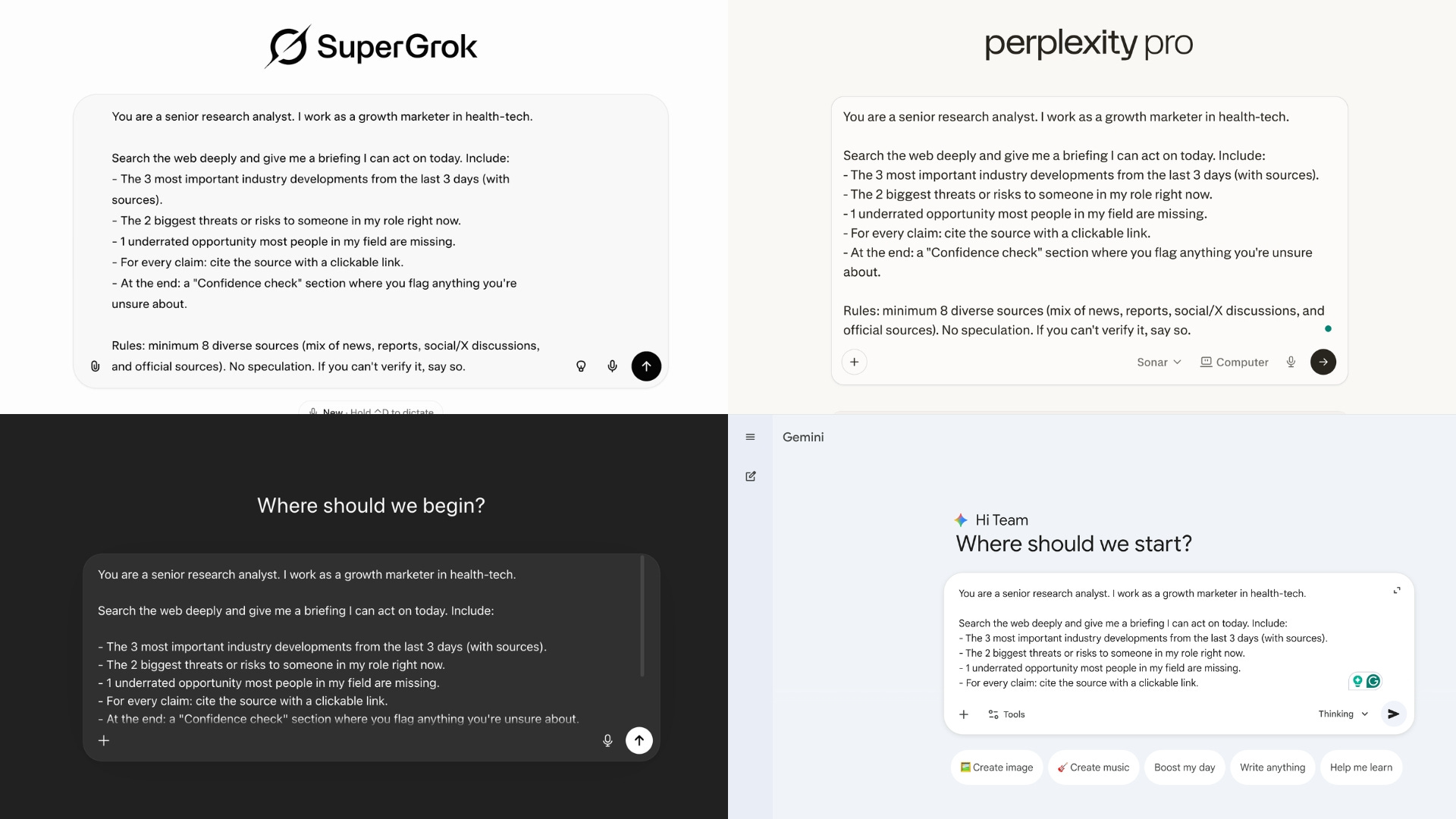
Here are the 4 answers for my specific example:
Grok (Concise mode): https://grok.com/share/bGVnYWN5_cfedef08-a88e-4040-93d1-15fed3ea64e8.
Gemini: https://docs.google.com/document/d/1sDkiSBr_xekCFoqkIFxnfIsAXcvl9is4JSih07okAXc/edit?usp=sharing.
Perplexity: https://www.perplexity.ai/search/you-are-a-senior-research-anal-9AkjELAjSbGO_v8PCNYl_A#1.
ChatGPT: https://chatgpt.com/share/69bd49e8-3974-800f-b3a0-1b374efb0a96.
Worth noticing. ChatGPT clearly changed something in the past few days. It searched for over 7 minutes on this test, and delivered quite an extensive answer.
How to score the results:
# and diversity of sources. Count them. Are there actually 8+? Are they from different types (not 8 TechCrunch articles)? Check if you see government/official sources, X discussions, and industry reports mixed in. Grok’s agent pulls from places others can’t reach, like real-time X tweets.
Factual accuracy. Pick the 3 most important developments from each response. Click the links. Did it actually happen? Are the dates right? Is the framing accurate or exaggerated?
Instruction adherence. Did it give you exactly 3 developments, 2 threats, 1 opportunity? Did it include the “Confidence check” section at the end? Or did it go off-script? This is instruction following. Grok should be the best.
Bonus: Real-time relevance. Are the developments actually from the last 3 days? Or did it pad the list with 6-month-old news? Does the “underrated opportunity” feel like a real insight, or a generic platitude?
Pro tip: Ask for second-guessing as a follow-up.
Now take your answer above and stress-test it. Which of your claims has the weakest sourcing? Which one would a skeptical expert push back on first? Update anything that doesn't hold up.A good AI model is one that can argue against itself.
But the best AI model can not only argue against itself, but also confidently stay its ground. Once you find it (for your own nice), keep it.
For me, it’s a combination of Grok (to search) and Claude (to execute).
5. Best-of prompts to search.
You now know your favorite AI model to search after your own benchmark.
Just copy, paste, swap what’s in [brackets], and go.
Competitive Intelligence
1 — [Competitor Watch]
Give me a competitive briefing on [COMPETITOR NAME] covering: latest product launches (last 90 days), leadership changes, funding/revenue signals, public sentiment on X, and any partnerships or acquisitions. Minimum 10 sources. Flag anything unverified. Cite every claim.Example here: https://grok.com/share/bGVnYWN5_f0de3b0b-61cd-498e-addd-2da164789952.
2 — [Market Entry Check]
I'm evaluating entering the [MARKET/INDUSTRY] in [REGION]. Search for: current market size estimates (2025-2026), top 5 players and their market share, regulatory barriers to entry, recent X discussions from industry insiders, and any red flags. Cite 3 independent sources for every number. If data conflicts, show both sides.Example here: https://grok.com/share/bGVnYWN5_5f409b63-70fa-4f55-9526-1c0ab144fb77.
Sales & Deal Prep
3 — [Pre-Meeting Company Brief]
I have a meeting with [COMPANY NAME] tomorrow. Build me a brief: what they do, latest news (last 30 days), recent hires, what people on X are saying about them, their biggest challenges right now, and who their competitors are. Keep it under 500 words. Cite everything.Example here: https://grok.com/share/bGVnYWN5_9b39c279-dc81-4808-b3c7-806f8ad49323.
4 — [Prospect Pain Points]
Find the top pain points that [JOB TITLE, e.g., "Head of Operations at mid-size logistics companies"] are talking about online. Search Reddit, X, LinkedIn discussions, and industry forums from the last 6 months. Group by theme. Quote real people. Link to sources.Example here: https://grok.com/share/bGVnYWN5_38daf08b-7633-4879-b9e7-756d327d5c9b.
Strategy & Decision-Making
5 — [Vendor/Tool Comparison]
Compare [TOOL A] vs. [TOOL B] vs. [TOOL C] for [USE CASE, e.g., "CRM for a 50-person B2B SaaS team"]. Include: pricing (current, verified), pros/cons from real user reviews, G2/Capterra scores, any recent outages or controversies, and what power users on X recommend. Do NOT speculate — only verified data.Example here: https://grok.com/share/bGVnYWN5_283d4d21-a6b3-4f0b-a0ee-dcc9dbca4d0a (459 sources on this one. Insane.)
6 — [Regulation & Compliance Check]
What are the current [REGULATION TYPE, e.g., "GDPR data transfer"] requirements for [YOUR SITUATION, e.g., "a SaaS company storing EU customer data on US servers"]? Include: controlling laws, latest enforcement actions (last 12 months), practical compliance steps, and any pending changes. Link to official sources. Flag anything uncertain.Example here: https://grok.com/share/bGVnYWN5_b44c5145-1ede-4f86-9542-1c823ae39ed5.
Hiring & Talent
7 — [Salary Benchmarking]
What is the current market salary range for a [JOB TITLE] in [CITY/REGION] with [X] years of experience? Use at least 5 sources (Glassdoor, Levels.fyi, LinkedIn, Payscale, recent X discussions). Show ranges, not averages. Note when data is self-reported vs. verified. Last 6 months only.Example here: https://grok.com/share/bGVnYWN5_3541e92a-e7ef-4e04-82b6-7c0bcb14974f.
8 — [Industry Talent Trends]
What are the biggest hiring trends in [INDUSTRY] right now? Include: which roles are hardest to fill, what skills are in demand, layoff/hiring signals from the last 60 days, and what hiring managers are saying on X and LinkedIn. Minimum 8 sources.Example here: https://grok.com/share/bGVnYWN5_8b3e8214-742e-4c31-9ced-32156fc376cd.
Financial & Market Research
9 — [Earnings Quick Brief]
Summarize [COMPANY]'s most recent earnings report. Include: revenue, profit, YoY growth, guidance, analyst reactions, stock movement, and X sentiment from investors. Keep it under 400 words. Cite every number.Example here: https://grok.com/share/bGVnYWN5_82982134-650b-44b8-9142-c7e90a0ed93b.
10 — [Industry News Digest]
Give me a briefing on everything important that happened in [INDUSTRY] in the last 7 days. Include: deals, product launches, regulatory changes, controversies, and notable X discussions. Group by theme. Cite every item. Flag anything unconfirmed.Example here: https://grok.com/share/bGVnYWN5_d724c0a2-2190-4dde-a69d-8f20b5196257.
I don’t care.
I don’t care about Claude, ChatGPT, Grok, Gemini, or any other model.
I don’t pick sides. I’m not paid to make this newsletter.
I’m sharing, twice a week, how my work is transforming (very fast) with AI.
As I’m trying to keep up, I want you to keep up. So we move just as fast.
I want to be the greatest filter to the AI noise. And 380,000+ people read this twice a week to focus on the How. Some came because of my LinkedIn. But most readers subscribed because someone they trusted sent them this newsletter.
If this article helped you, be that person for someone else (and share it):
It’s completely free for you. And it keeps my newsletter free too!
Sharing is truly caring :)
If someone did send you this, thank them and subscribe for free here:
You can try Supergrok 3 days for free before the 30$
Love your work, Ruben. You helped me set up Claude for my mental health/addictions consultancy practice. I do plenty of pro bono work too. Quick question: when you say ‘Grok for search, Claude for execution’, how do you run this in practice? Just copy and paste your Grok results over to Claude? Stay safe over there, brother. Thanks