
Stop using your own Claude at work.
Unless you want to get sued or fired:

Your company won’t pay for AI, or they pay for the wrong one (ahem… Copilot).
So you use your own account.
Your personal account, ChatGPT or Claude, on your phone or your computer at home, when no one’s looking. And I know how you feel.
Either you’re afraid to get fired, or sued by your boss.
Or you’re afraid your team is doing it, and want to limit your risks.
Here’s how to keep using your personal Claude without suffering:
Save this newsletter. Block 10 min this week & set up your account right.
Send it to anyone who is risking their job because of their personal AI.
PS: This newsletter grows from your shares. And I keep hitting 1,000+ shares! It’s my north star. Sharing is free & helps me stay laser-focused on this newsletter.
1. How to turn off the training.
First, a quick reminder that everyone is using their personal account at work:
Workers at more than 90% of companies use personal chatbots for work, mostly without telling IT (that’s an MIT study).
57% have typed sensitive information at least once.
Even where the company already pays for an AI tool, 22% still reach for their personal one.
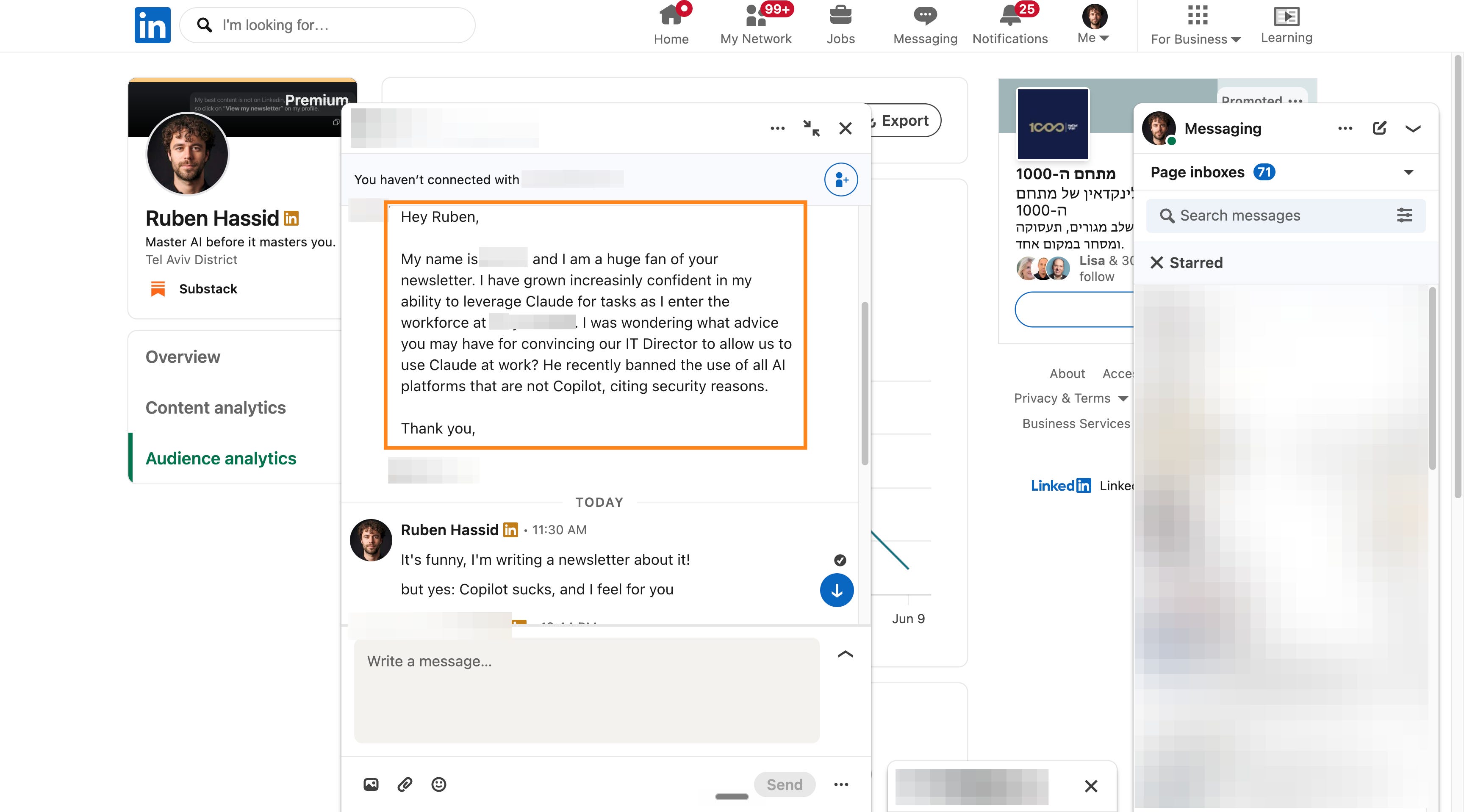
So you’re normal.
But you can’t keep doing it without some fixes first.
On the personal plans (the free or paid AI you signed up for yourself), the AI company is allowed to train on your chats by default. Check this:
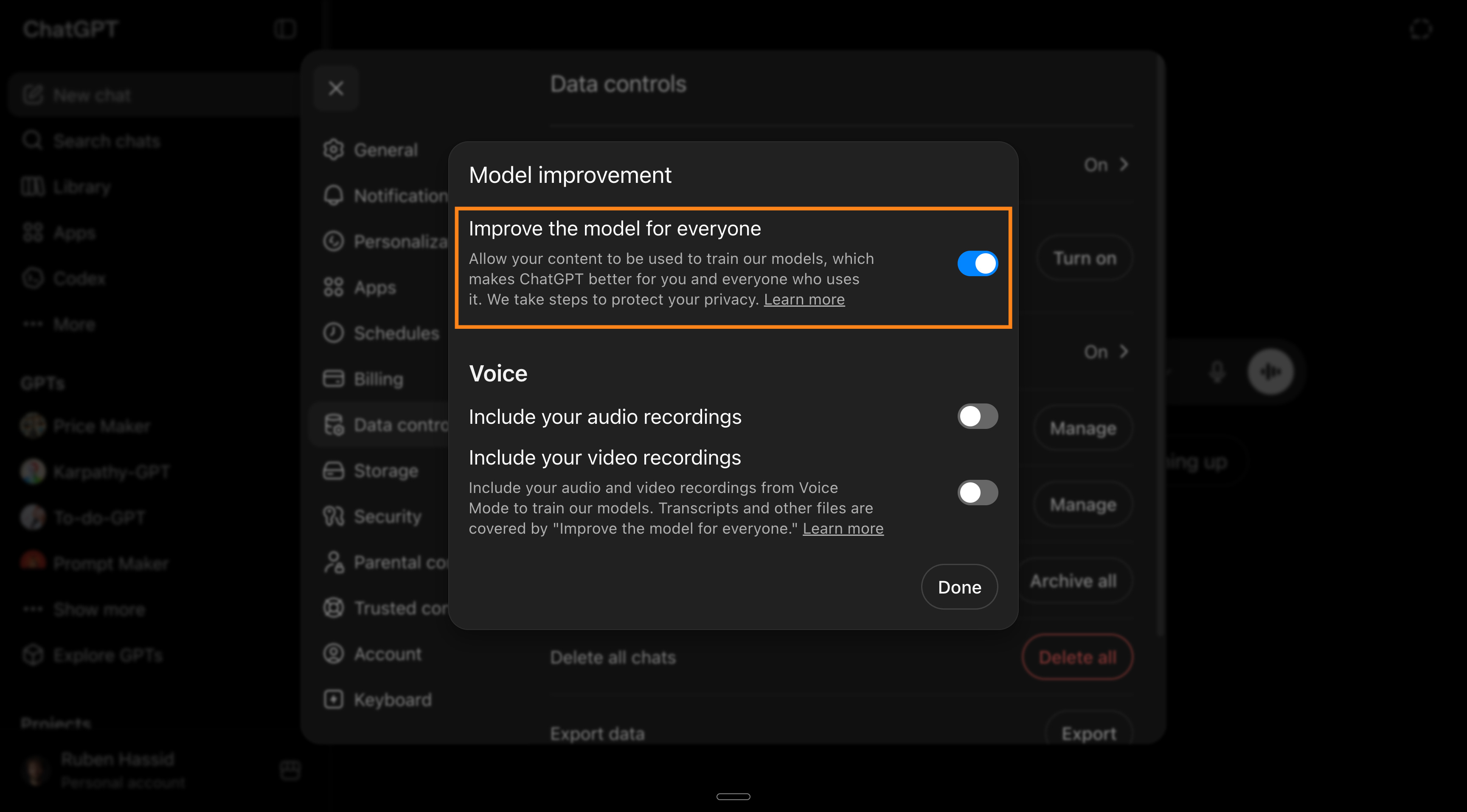
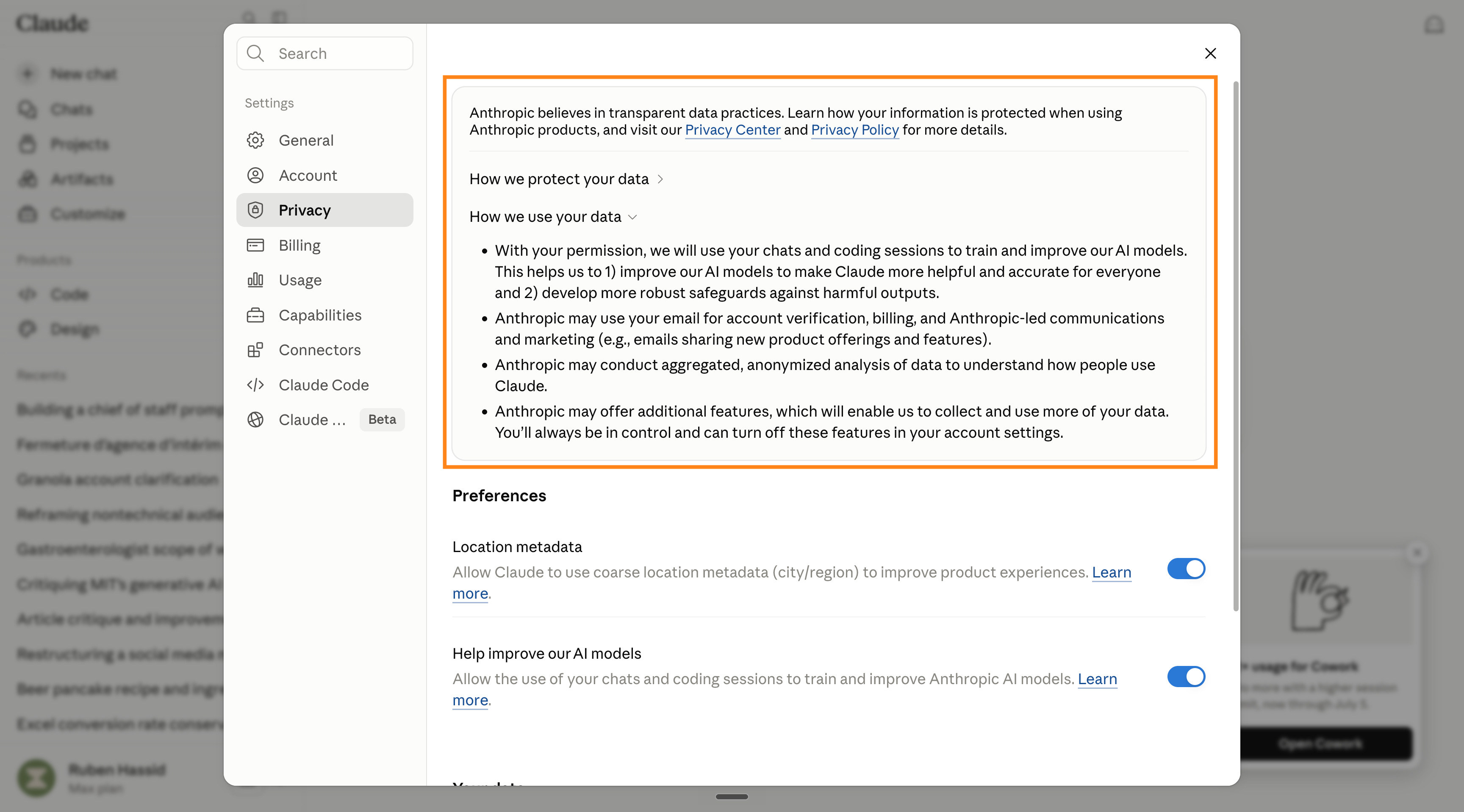
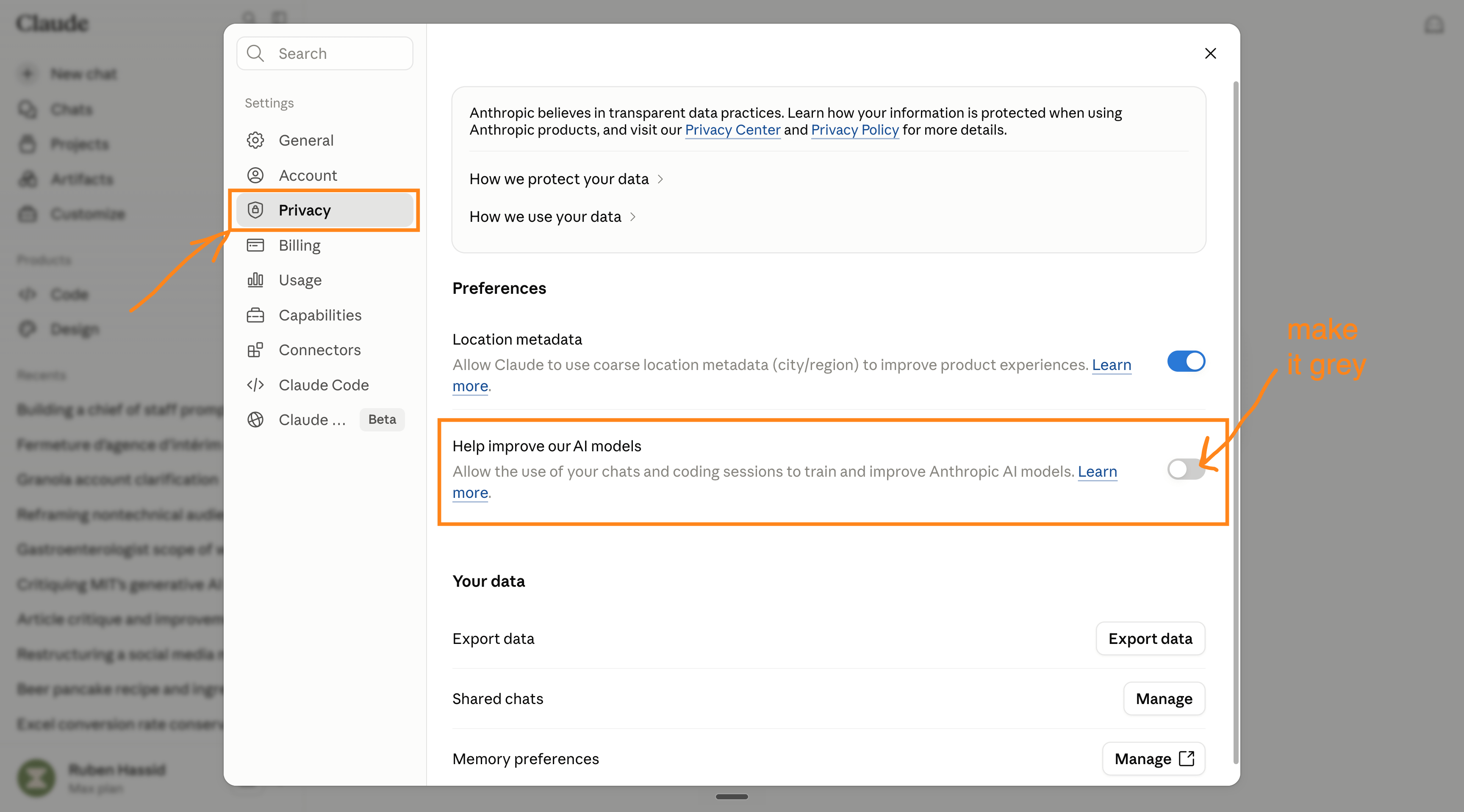
For Claude, Anthropic changed its consumer terms in August 2025: on Free, Pro, and Max, your chats and coding sessions are used to improve Claude unless you turn them off.
Don’t worry, I will teach you how.
But leave it on, and they can keep your conversations for up to 5 years.
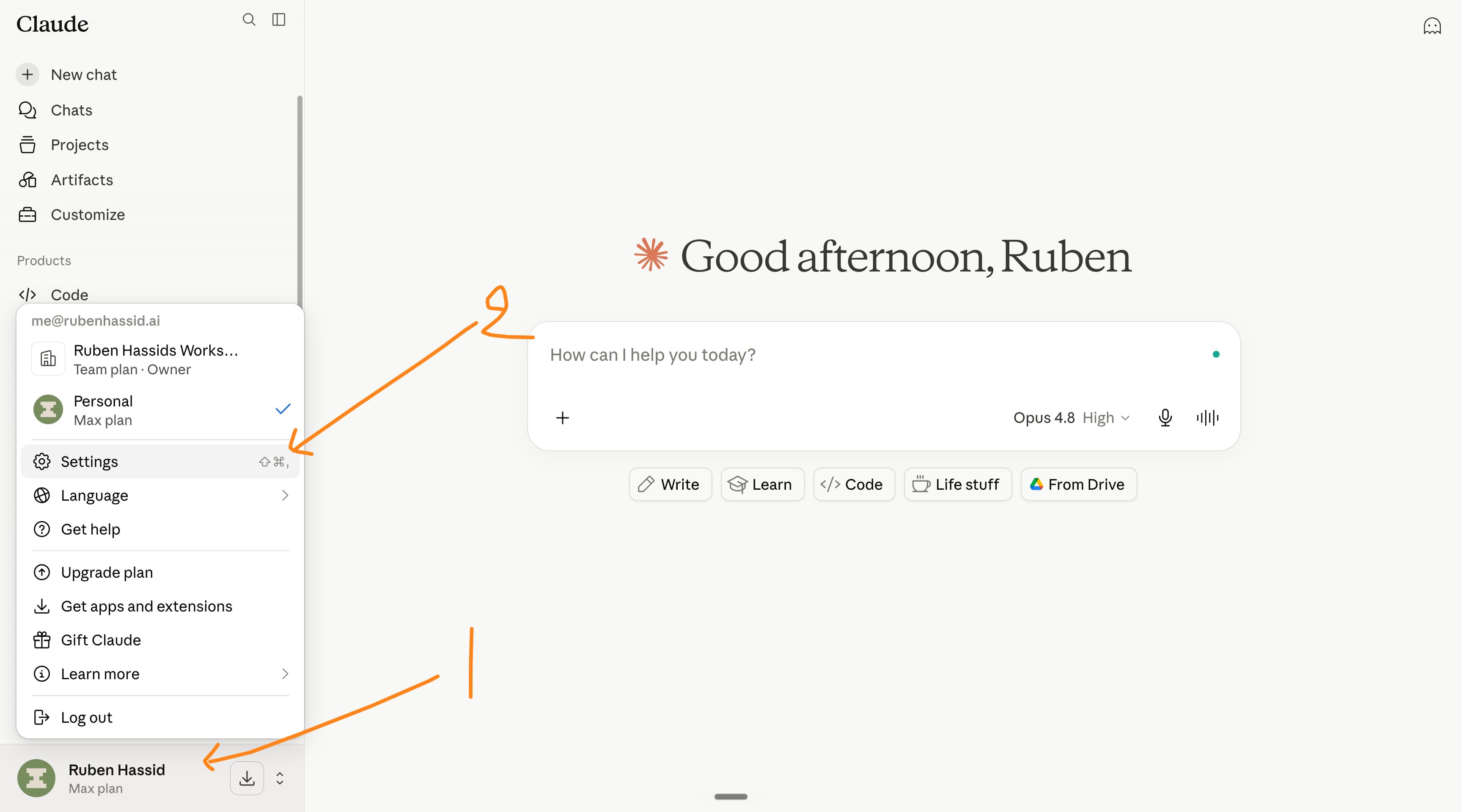
How to turn it off in Claude:
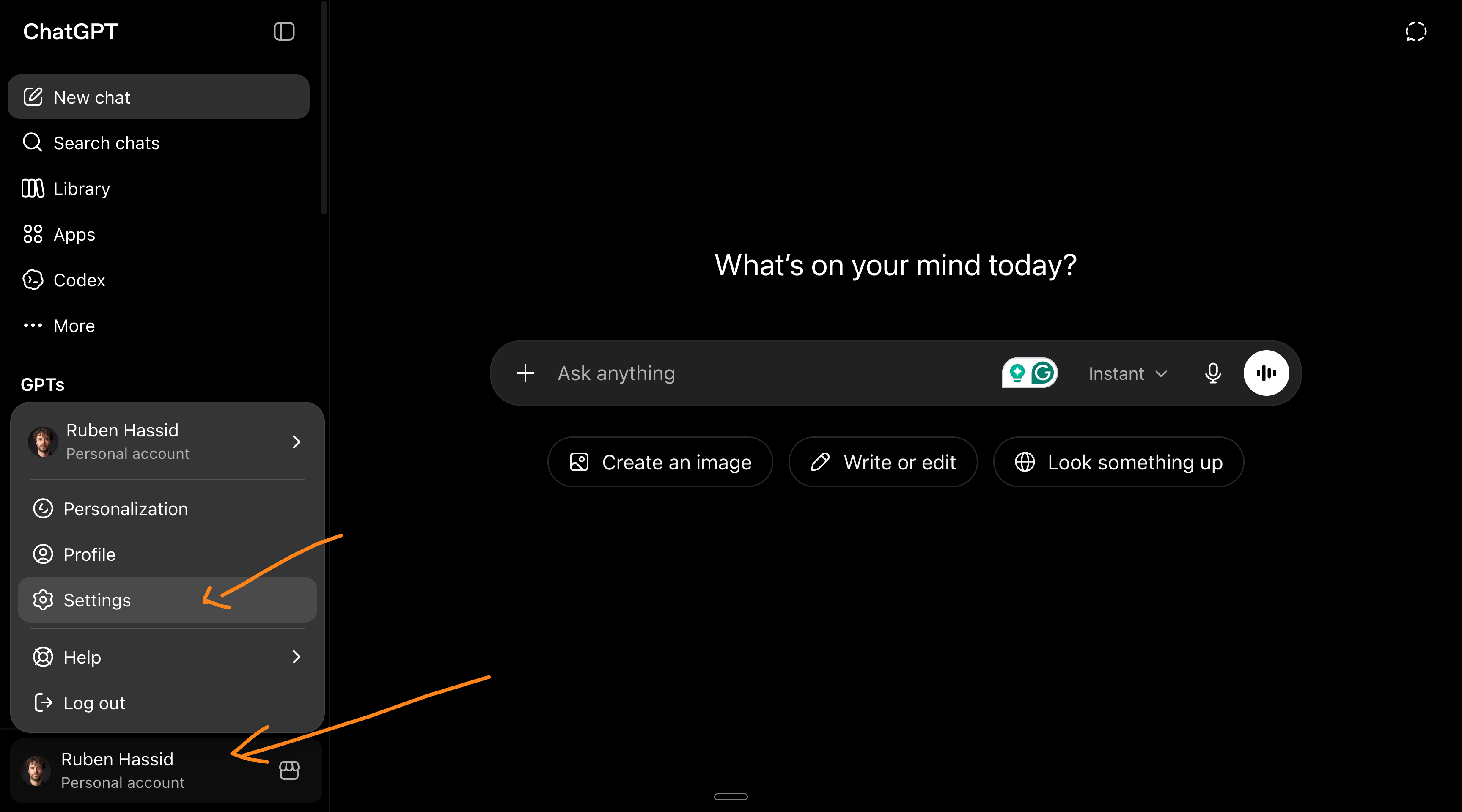
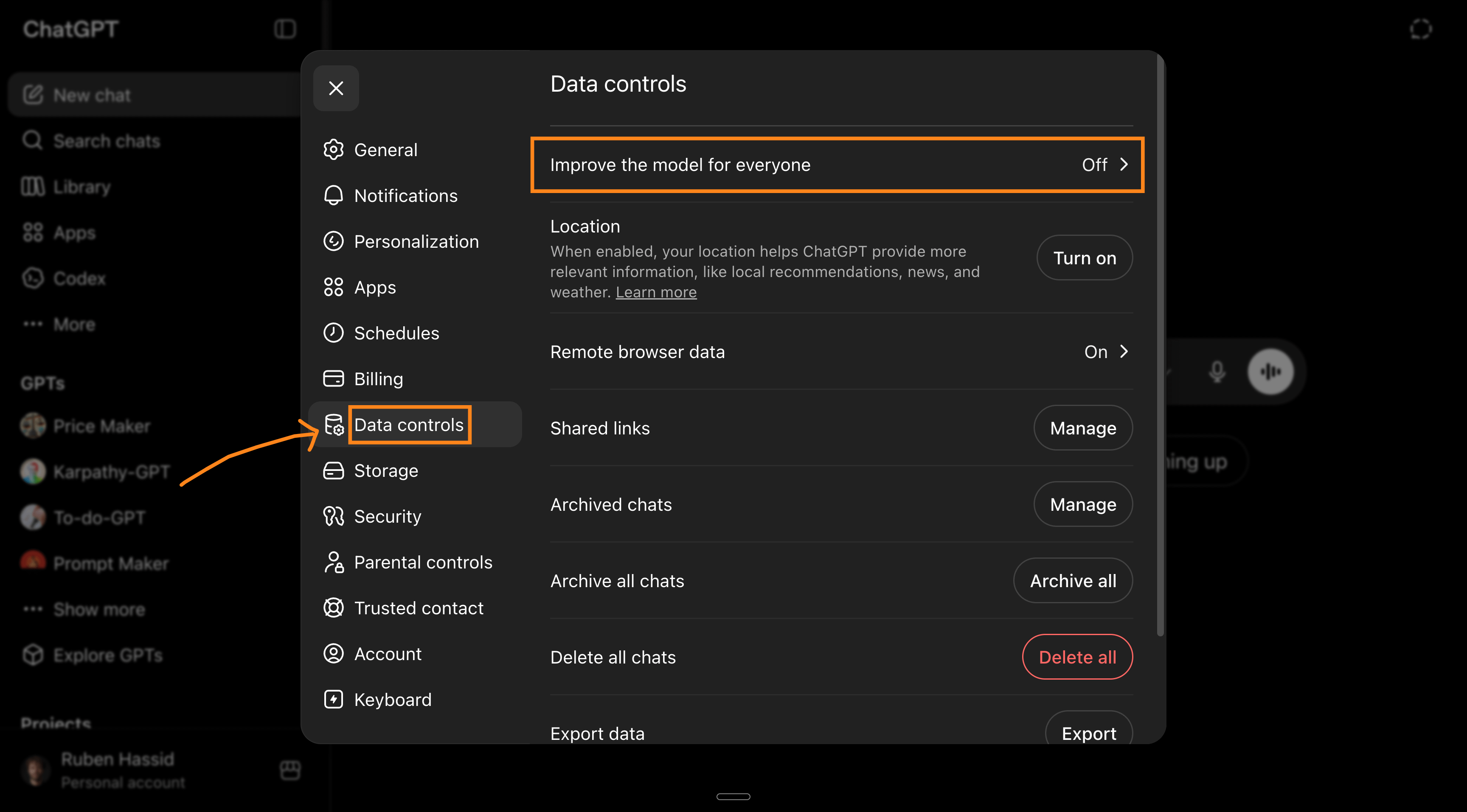
How to turn it off in ChatGPT:
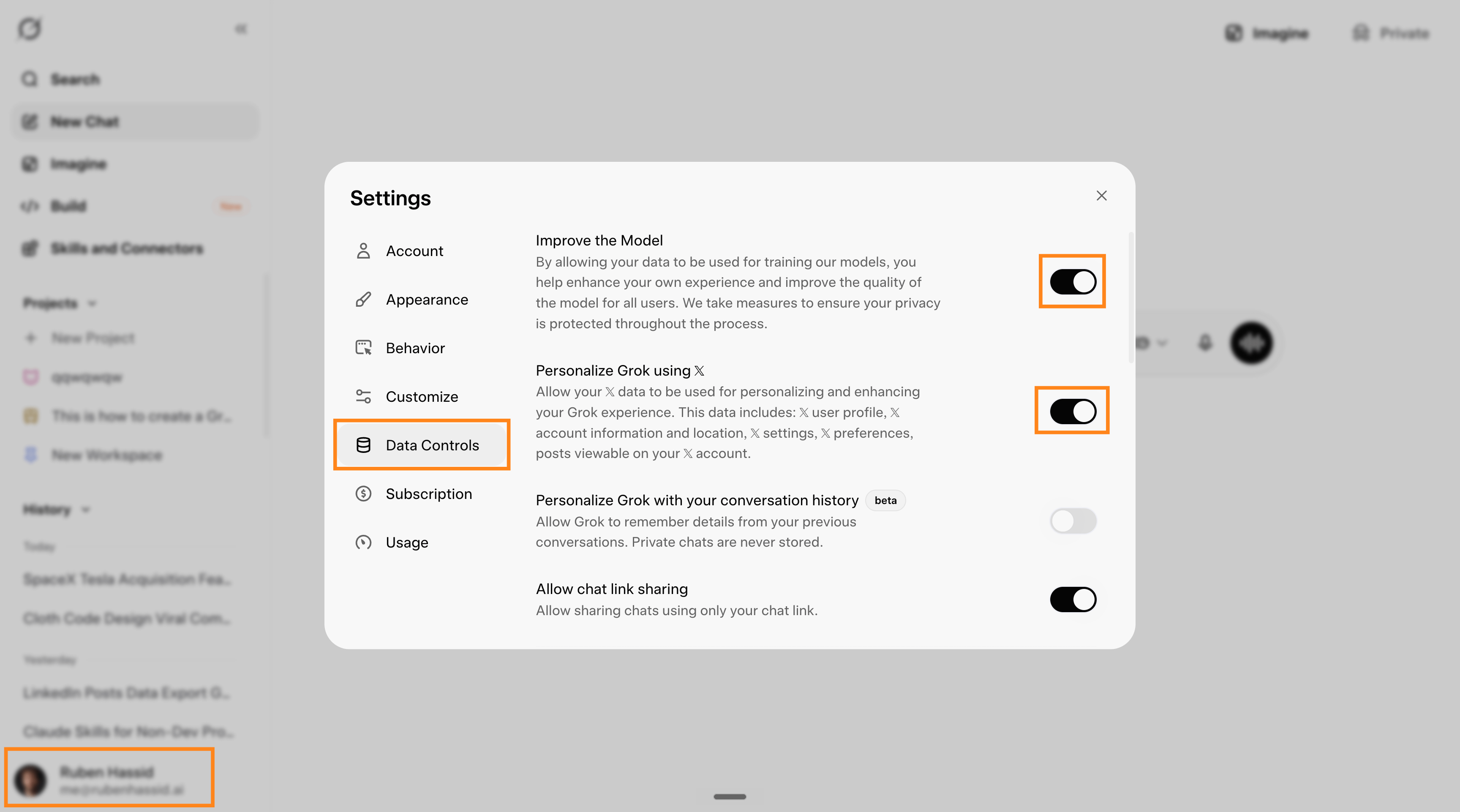
How to turn it off in Grok: profile > settings > data controls > turn off everything.
How to turn it off in Gemini: it’s actually a little bit harder.
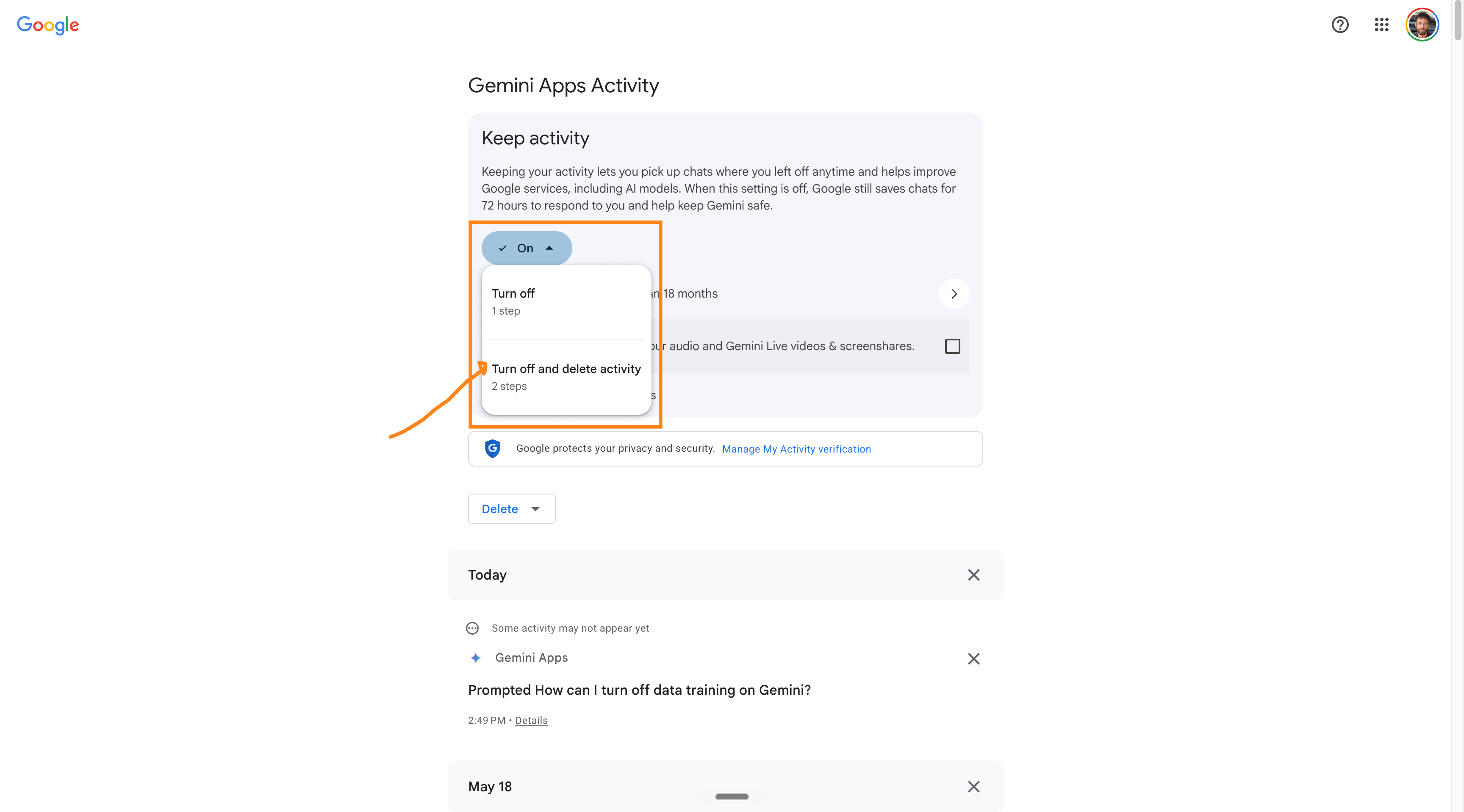
Worth knowing: The opt-out only applies going forward. It applies to new and resumed conversations after you save the setting; conversations already in a training run that has started are not pulled back. Models can't "unlearn" data once it's been incorporated, so turning it off sooner keeps more of your data out.
Sharing is free & helps others use AI more safely.
Update from the new Claude Fable 5.
As I was writing this newsletter, Claude just released their new model, Claude Fable 5, with this little footnote:
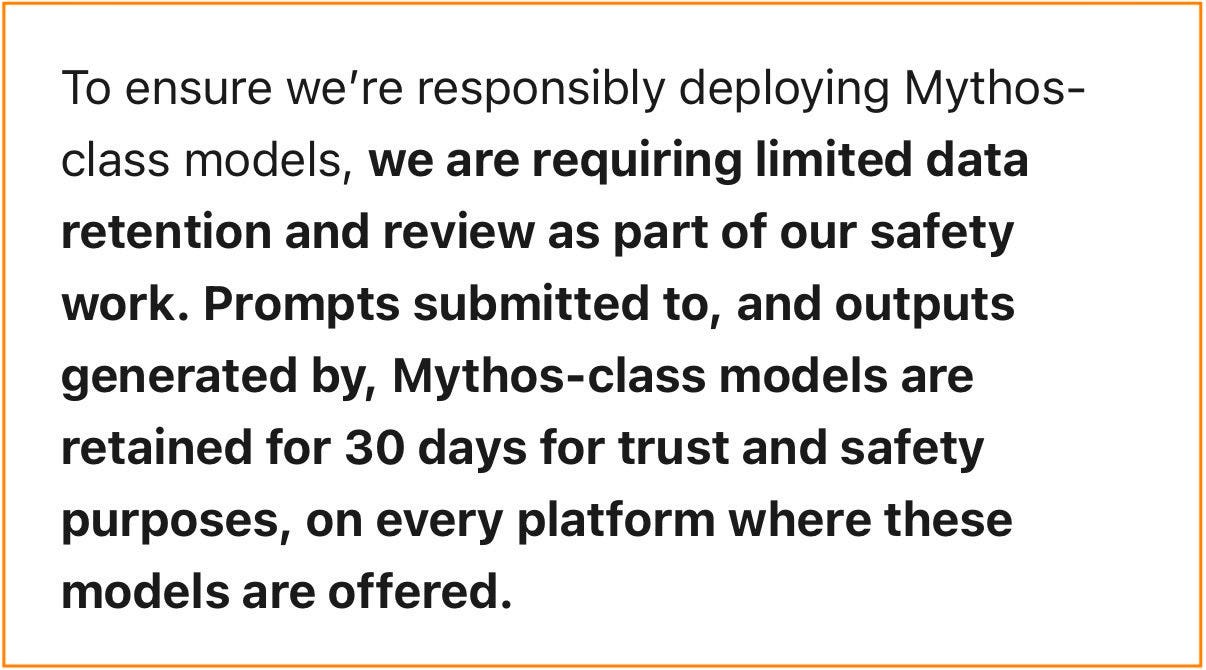
Use it at your own risk. Back to the original guide:
2. Can you actually get fired for this? Or sued?
Yes. Both have happened.
I’m not a lawyer. I run an AI newsletter, not a law firm. But these cases are public.
April 2023, Samsung. Engineers were allowed to use ChatGPT at work. Within 20 days, they leaked internal source code into it 3 separate times: semiconductor source code pasted to check for bugs, more code uploaded to fix defects, and a recording of an internal meeting. Samsung banned ChatGPT company-wide and opened disciplinary investigations.
When you paste confidential company information into your personal AI account, a lawyer can call it a few different things.
A breach of the NDA you signed. A chatbot run by another company counts as an outside party, and your contract almost certainly prevents you from sharing company secrets with outside parties.
Trade secret trouble. The US Defend Trade Secrets Act lets companies sue over leaked secrets. And a secret only stays legally secret while you keep it secret, so handing it to a third party under loose terms can wreck the company’s own protection of its own information.
In Europe, a GDPR problem. Paste a customer’s name, email, or phone number into your personal account, and your company can be liable for an unlawful data transfer. And it happened: West Technology Group v. Sundstrom, where a salesperson recorded confidential meetings with an AI tool and kept access after he left. The company sued.
The question to ask yourself. Before you paste, ask: “Would I be fine if this exact text showed up in the company-wide channel, with my name on it?”
→ Yes, paste away.
→ No, anonymize it first, or use your company’s tool if you have one.
Using the right AI becomes way too important for companies. No, Microsoft Copilot isn’t the best AI out there. That’s the bread&butter of my consulting arm: we help enterprise adopt the right AI, faster. DM me for a company training.
3. Never paste these into a personal account.
Some data should never touch your personal AI account. If you’ve pasted a few of these, you’re not alone (so has half the workforce). Just stop now.
Never paste:
Source code, or anything from your company’s codebase
Customer or patient data: names, emails, phone numbers, addresses, order history, health info
Unreleased plans, roadmaps, designs, prototypes
Non-public financials: revenue, margins, budgets, forecasts, deal terms
Anything marked confidential, internal-only, or under NDA
Logins, passwords, access keys, security settings
Full contracts or legal docs with real names and terms
Recordings or transcripts of internal meetings
If you need AI help with any of these, anonymize them first.
My favorite mistake: what if you use your company’s AI to vibecode a side project? I have bad news for you: your company now owns your project.
What if you vibecode your side project with your personal AI, but on the company’s computer? You’re still at risk. Just don’t do it.
The next section will focus on anonymizing data for use with your personal AI.
Sharing is free & helps others use AI more safely.
4. Anonymize your data before you paste.
Anonymizing means stripping the identifying details out before you paste, so the AI helps you without ever seeing the ‘secret’. It works because the shape of the problem is all the AI needs to do the job.
If you prompt “Marie Josephine needs content planning,” the real name adds nothing.
How to anonymize in 4 steps:
Swap names for roles. Real person becomes “the client.” Company becomes “Company A.” Product codename becomes “Project X.”
Give fake values. Real numbers become fake numbers of similar size. Real emails become name@example.com.
Only paste what’s needed. Don’t upload the original PDF or spreadsheet. It carries author names, comments, tracked changes, and hidden columns you forgot were there. Copy out the part you need and paste only that.
DON’T prompt this:
"Draft a renewal email to Sarah Chen at Medtronic. Their $2.3M
contract expires Aug 31 and they're unhappy about support delays."
DO this instead:
"Draft a renewal email to a client contact. Their $5M contract
expires end of next month, and they're unhappy about support delays."
What it means: anonymizing drops your risk a lot. It doesn’t make it zero. For truly regulated data (health records, legal files, anything that can re-identify a real person), the only clean answer is in section 7 of this newsletter.
Help a colleague. Share this with the team.
5. Use a temporary chat for work tasks.
Even with training switched off, your normal chats still save to your account’s history. For anything work-related, run it in a temporary chat instead.
How to start a new chat and turn on Temporary chat before you type.
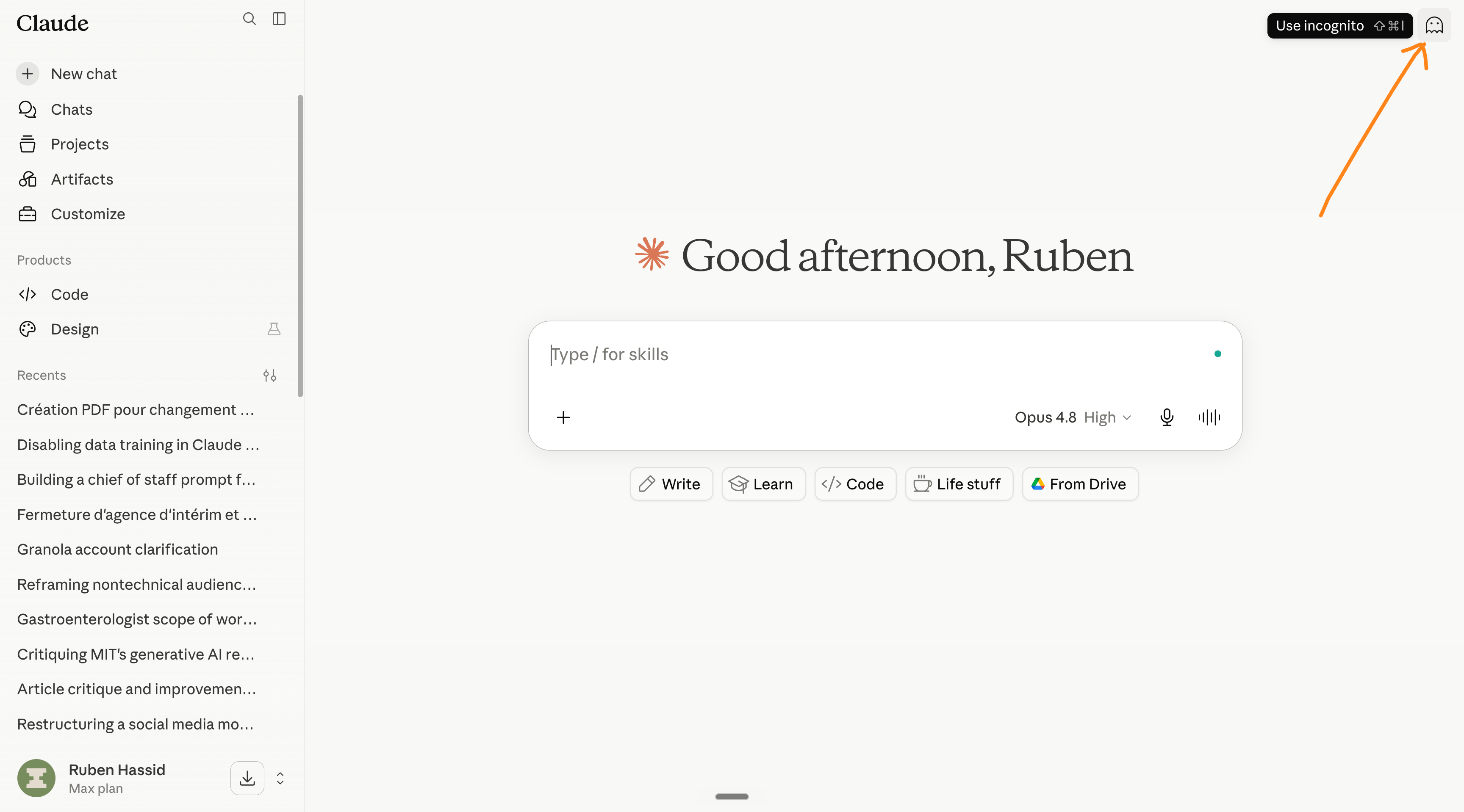
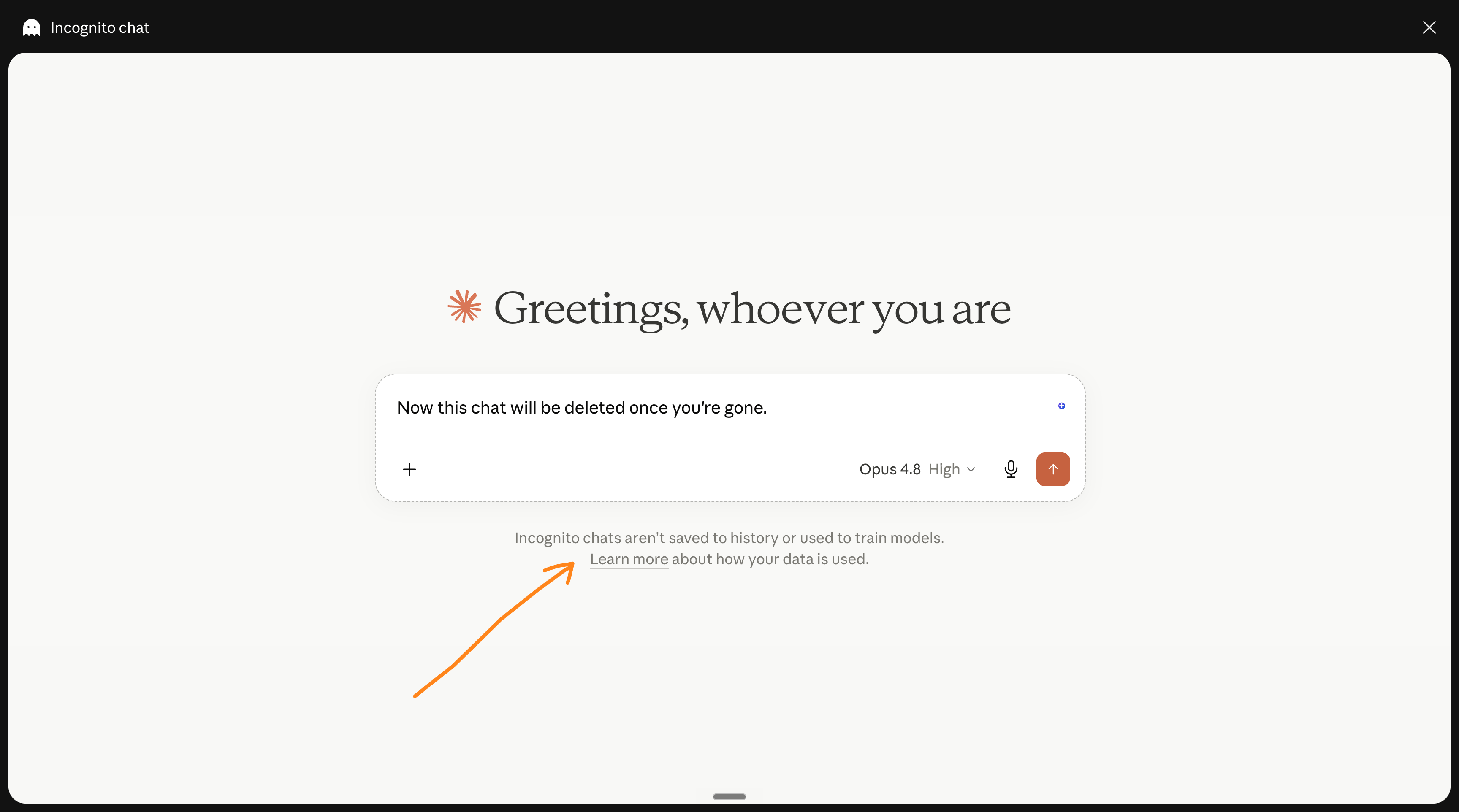
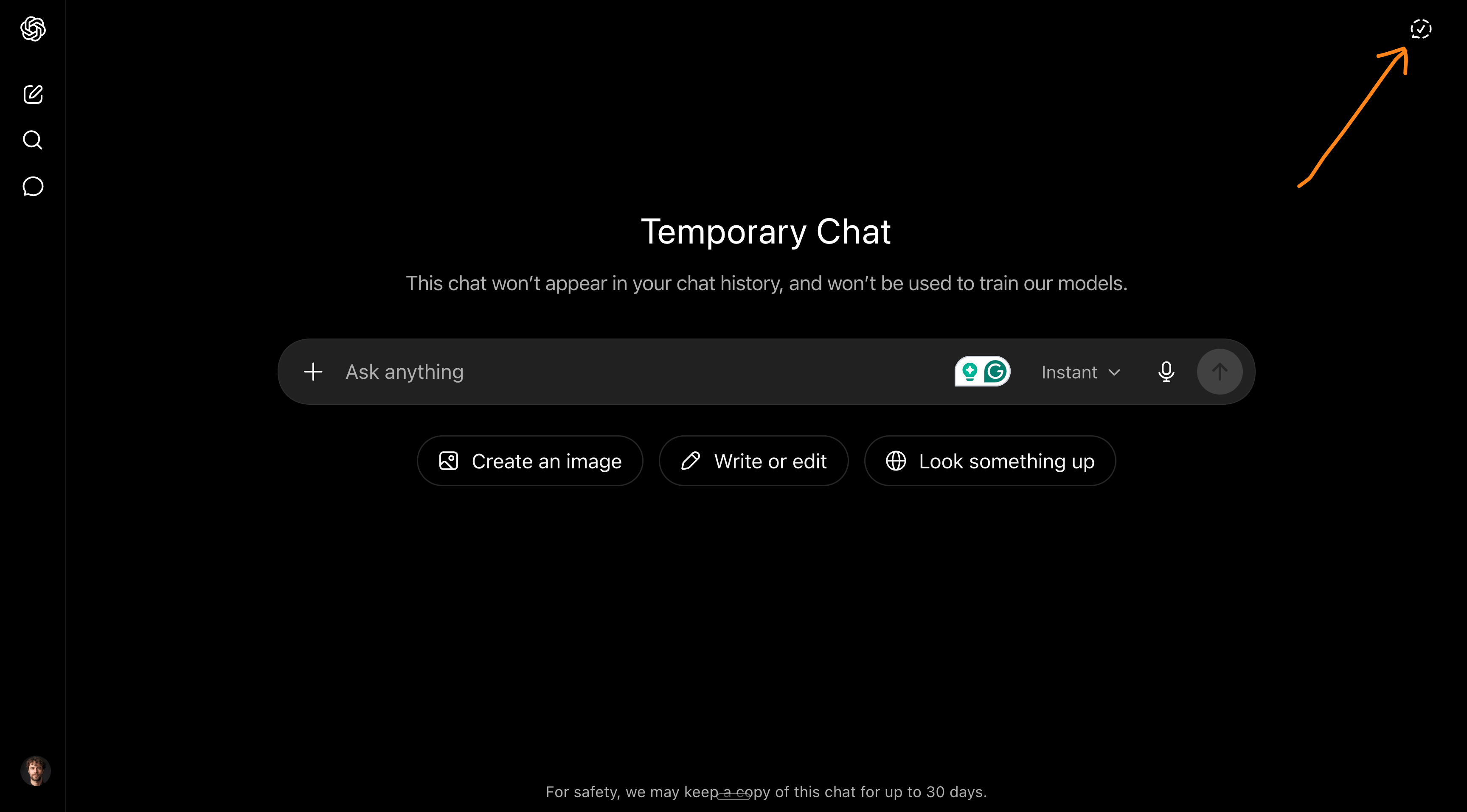
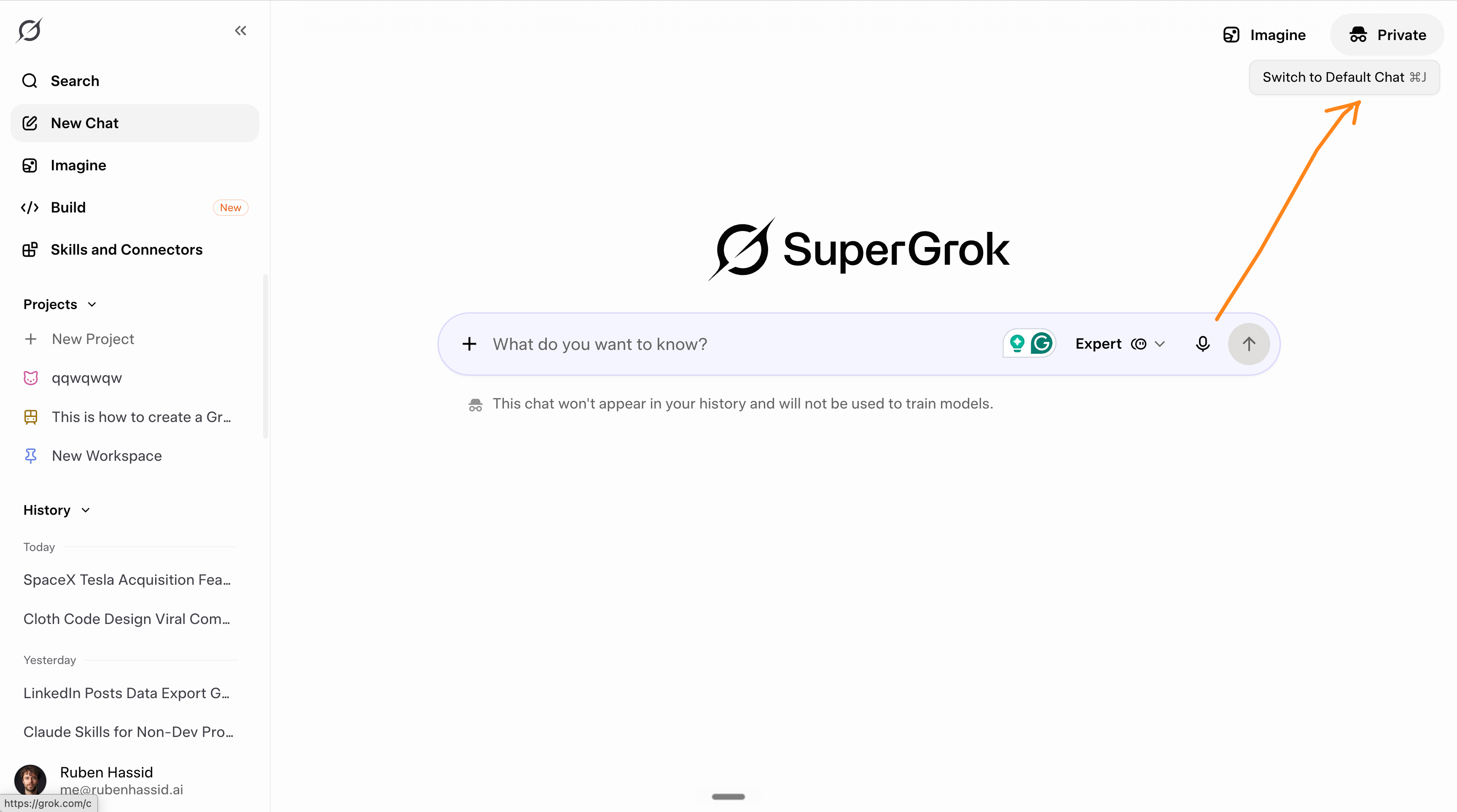
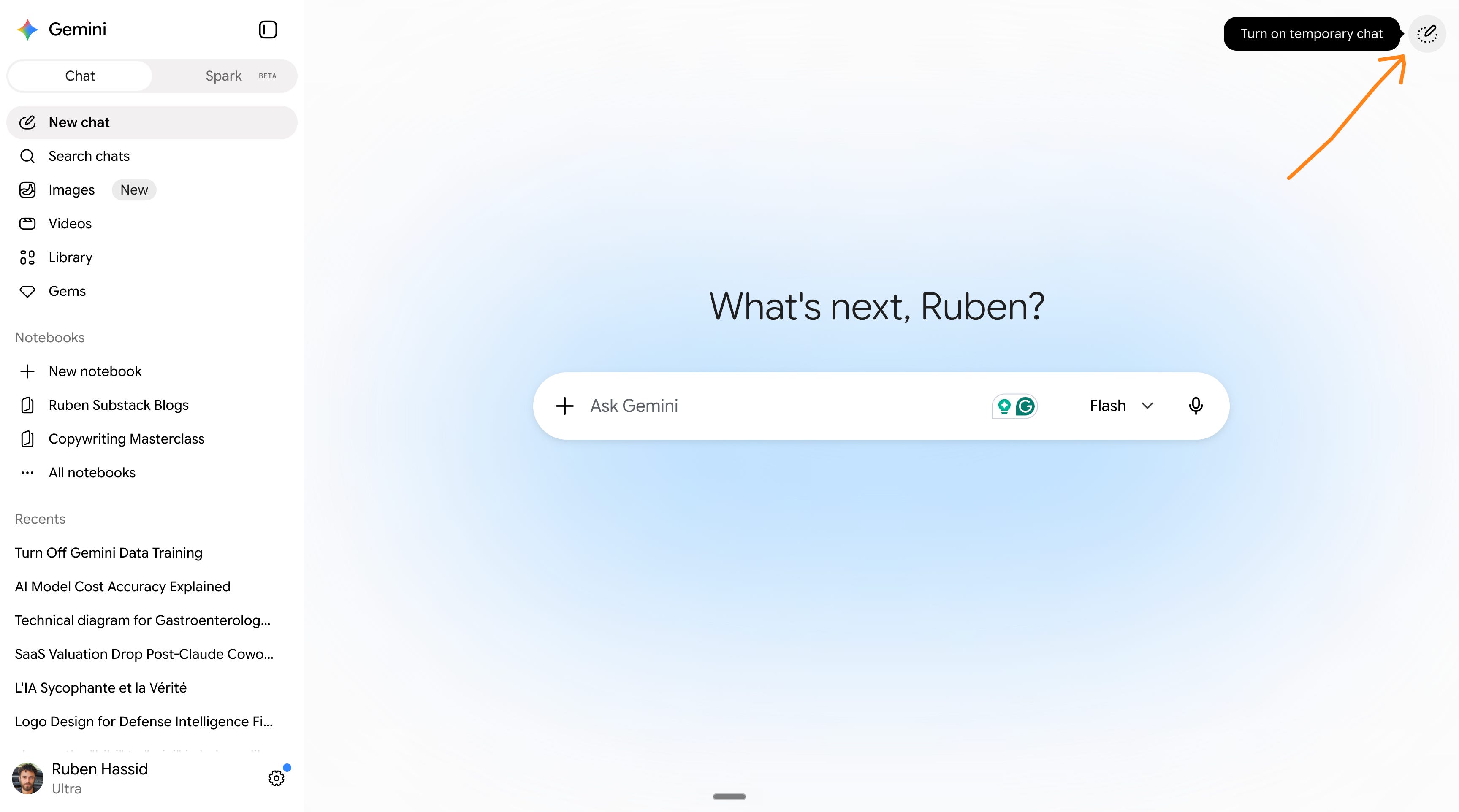
What it means: a temporary chat doesn’t save to your history and isn’t used for training. Close it, and it’s gone. Make it your default for private chats.
Send me a DM if you have a team of 50 people that needs to adopt AI faster.
6. The most dangerous thing.
A connector (some tools call it an integration or an “app”) links your AI to another service: Gmail, Google Drive, Calendar, Slack, Teams, Outlook. Once it’s connected, the AI can read that data and act on it.
Useful. Also, the most dangerous thing you can do with a personal AI account.
Two reasons.
The access is enormous. Connect Gmail and the AI can read your whole mailbox. Connect Drive and it can search every file you can open, including documents other people shared with you years ago and you forgot existed. Connect your work Gmail to your personal AI, and you’ve piped your company’s entire inbox into a tool your company has no contract with.
The second reason is the one that’s actually new: a connected AI can be hijacked by the content it reads. Researchers proved it twice in 2025. They have a name for why this works: the “lethal trifecta.” The moment an AI can reach your private data, read content from outside that you don’t control, and send information back out, it can be tricked into stealing your own data for an attacker.
How to use connectors safely:
Never connect your work accounts to your personal AI. Work Gmail, work Drive, work Slack stay off your personal account. That’s the whole company’s data in a tool with no contract behind it. If you need that, it runs on the company’s paid account or not at all.
Connect the least, with the narrowest access. Pick read-only, or a single folder, over “all of my Drive.” If you can just paste the one thing you need, skip the connector.
Only connect official connectors. Use the ones listed in your AI’s own connector directory. Treat a random third-party connector as untrusted, because a remote one can quietly change what it does after you approve it.
Review and disconnect monthly. Open your AI’s settings, and your Google or Microsoft account’s “third-party access” page, and cut anything you’re not actively using.
What it means: a connector hands your AI the keys to a whole app, and anyone who can get a file or an email in front of it can try to grab those keys. Connect almost nothing on a personal account. Save the connected setup for the company tool, where someone is actually paid to secure it.
It’s time to support this free newsletter & spread the word. Share it.
7. The best solution.
Get your company to pay for the best AI. And train your team on it.
Plain and simple.
And I help businesses do that. This newsletter is free because I know that not every single company on earth can afford my services. So my thesis is simple:
So far, 700,000 people are reading this newsletter for free. Go & do it yourself! I’m rooting for you. I’m sure you’ll figure things out alone, the way I did.
Then, 3,659 people are paying for this newsletter. They access my Circle community, so we figure things out together. Still you, but with others.
And I have a consulting firm in NYC to help dozens of enterprises figure out AI (ahem… a lot of Claude). I limit it to 3 new clients per month, with a minimum team size of 50 people. DM me here or on Linkedin.
And for some of you, you still need more.
So I’m starting live workshops. The first one will be to master Claude Cowork.
I made a separate email list (it’s also free) here: how-to-ai.co/interested.
You can sign up only to receive an email when we open a new live workshop.
How to choose the best for you:
You don’t want to pay. Keep reading this newsletter for free.
You want to pay a little. Join my Circle & get help from others.
You want to pay for yourself. Sign up to know about the next workshop.
You want your entire team to go faster. DM me!
You want to help this newsletter for free? Share it.
You are new here? Sign up for free.
UPDATE: I had to update this guide with the new Claude-5-Fable.
Please read this new part, because it impacts your data heavily.
Great newsletter, very useful. It aswered a question I had for a long a time about AI privacy. I took several classes on general AI and never found a content like this one. Thank you Ruben!