
No one cares about ChatGPT newest model, 5.2.
No one cares about the test, and why it’s (much, much) better.
So I will.
This is not about hyping a new release.
This is all about showing you why it will change how we work.
Here’s what to expect at the end of this guide:
My first 24-hour vibe check (is it really better?).
How to feel the difference (my favorite use cases).
The best prompt framework to push 5.2 to its limits (copy & paste).
1. My first 24-hour vibe check.
People think this is like “yet another” model release.
It’s not.
1: GPT-5.2 will be GPT-6.
Bear with me, I will go a bit technical on this.
✦ GPT-3 was a revolution at its time.
↳ New training. New paradigm of intelligence.
↳ Super expensive to use. Very slow to answer.
✦ Then GPT-3.5 came out.
↳ Same training. Same level of intelligence.
↳ But extremely fast and cheap.
✦ Then GPT-4 came out.
↳ New training. New paradigm of intelligence.
↳ Super expensive to use. Very slow to answer.
✦ Then GPT-4o came out.
↳ Same training. Same level of intelligence.
↳ But extremely fast and cheap.
✦ Then GPT-4.5 came out.
↳ New training. New paradigm of intelligence.
↳ Super expensive to use. Very slow to answer.
✦ Then GPT-5 came out.
↳ Same training. Same level of intelligence.
↳ But extremely fast and cheap.
✦ Now GPT-5.2 comes out.
↳ New training. New paradigm of intelligence.
↳ Super expensive to use. Very slow to answer.
You already know where it’s going: GPT-6 will be a faster/cheaper version of 5.2.
This is where the future of LLM is heading.
2: Tested on *real* life examples.
When a model gets released, I always check the first benchmark they share.
It tells you 80% of what you must know.
Here, OpenAI calls it ‘Economically valuable tasks’.
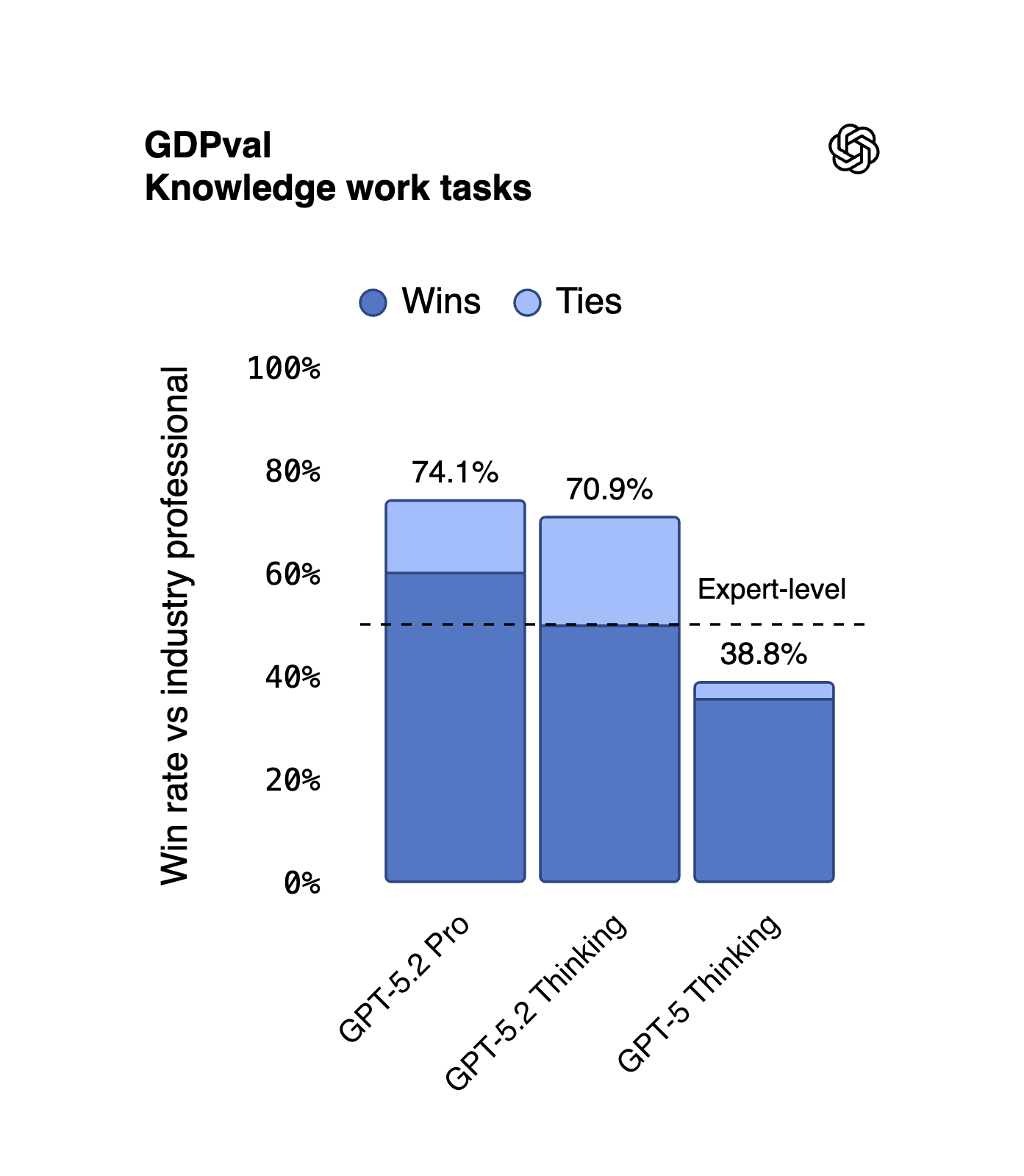
For the first time in history, GPT “performs at or above a human expert level” on “knowledge work tasks, according to expert human judges”.
That’s ‘you and I’ tasks: Project Management, Excel, Writing Docs, Strategies, Research. This is no longer junior work. It’s our day-to-day work. I’ll share more in the second part of this newsletter.
3: Longer context, better vision.
LLMs are about context.
Basically, their memory, how much they can memorize and understand the task they’re completing. But also how little they hallucinate performing the task.
GPT-5.2 is a massive jump.
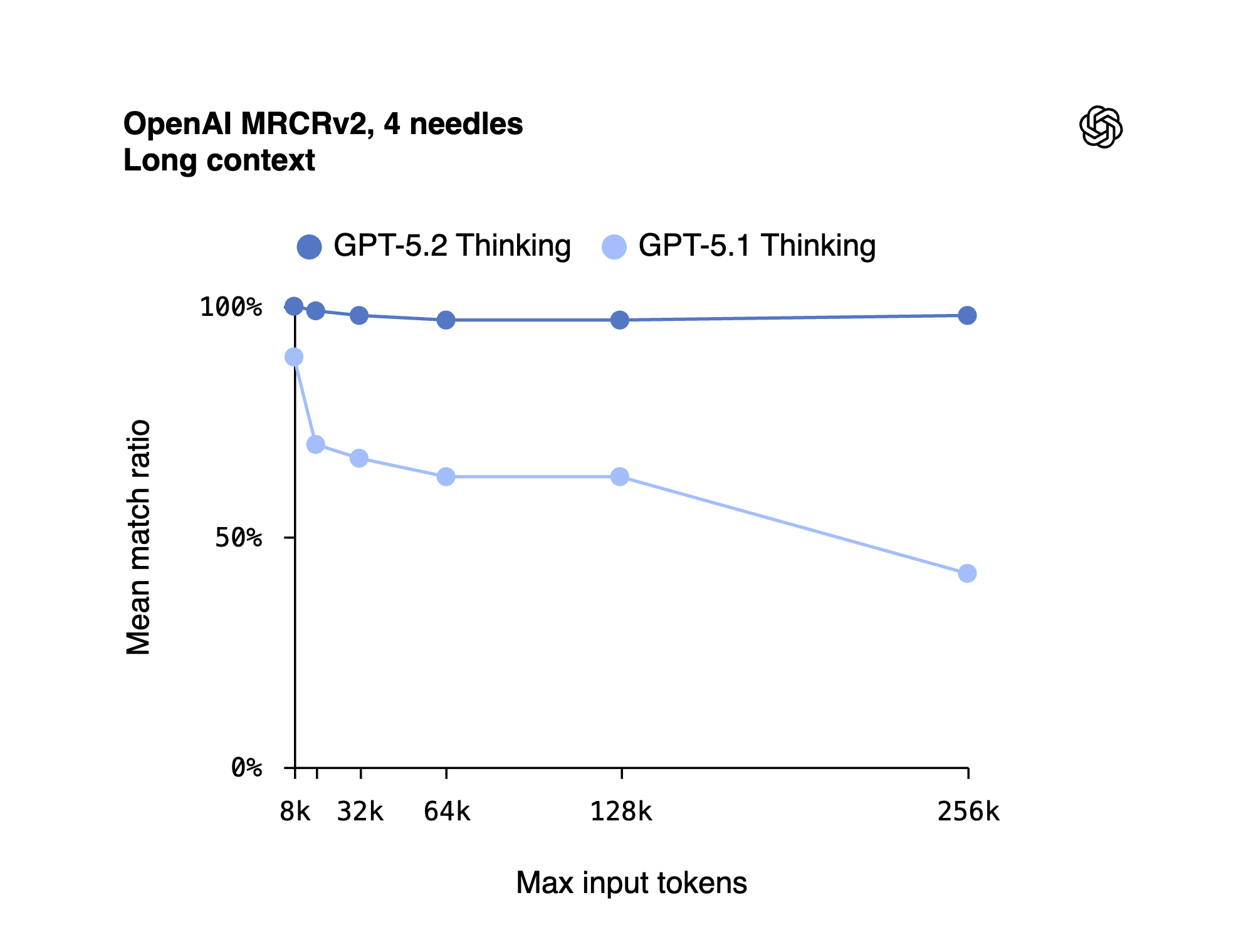
It can absorb and retrieve 98% of the information from a 256,000-token context window. But what does that mean? Well, if you upload 700 pages of pure text PDFs, it can remember 98% of them.
Imagine the impact for lawyers, insurance, legal teams, doctors, CEOs, CFOs - anyone who needs to absorb large quantities of text and make sure that the AI understands and memorizes everything.
So, how good is it compared to before? The previous version of ChatGPT could only remember 50% of a 300-page PDF, and less than 50% for a 700-page PDF. So, it’s basically gone from a random machine to a near-perfect assistant.
This isn’t it.
The new GPT also sees much better.
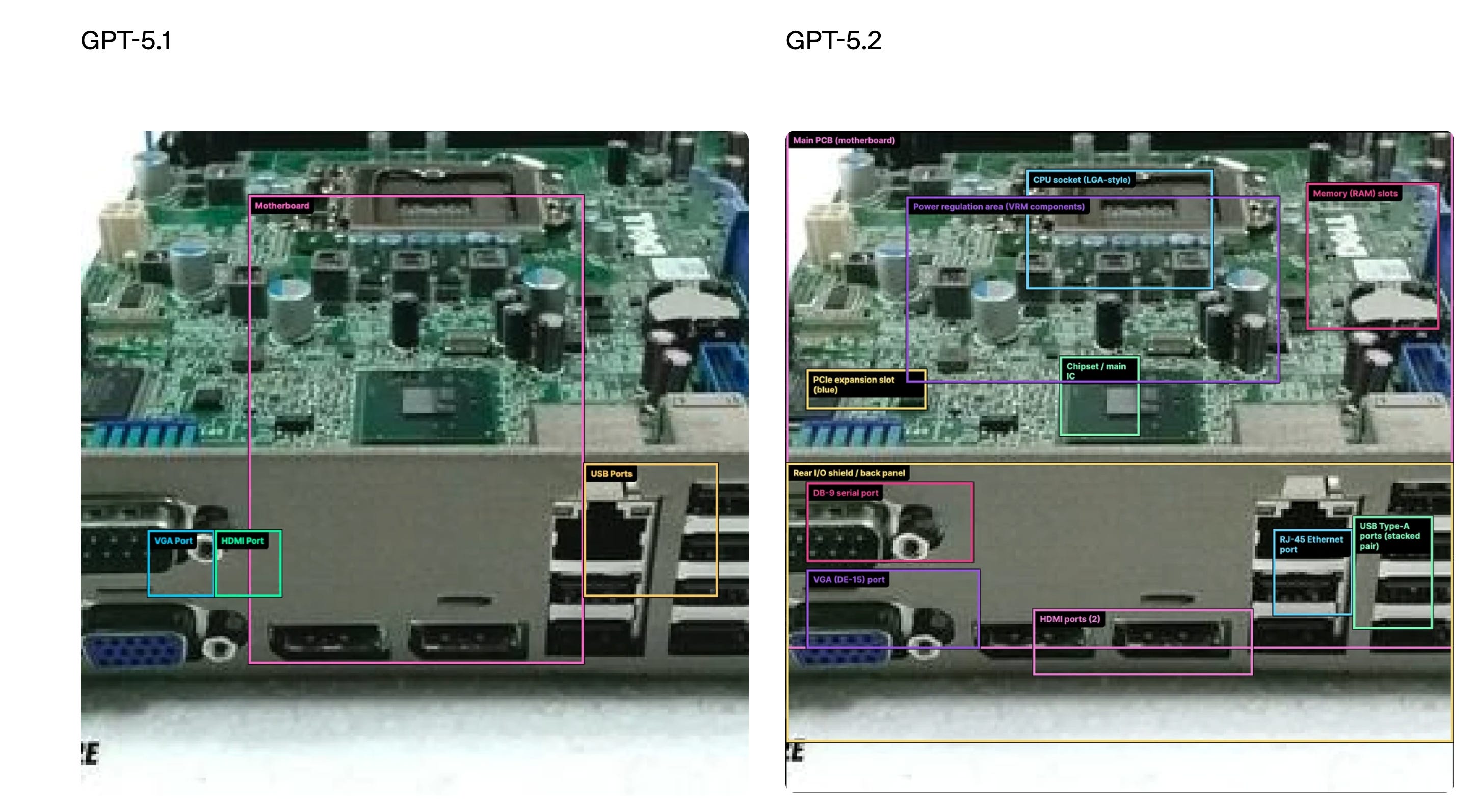
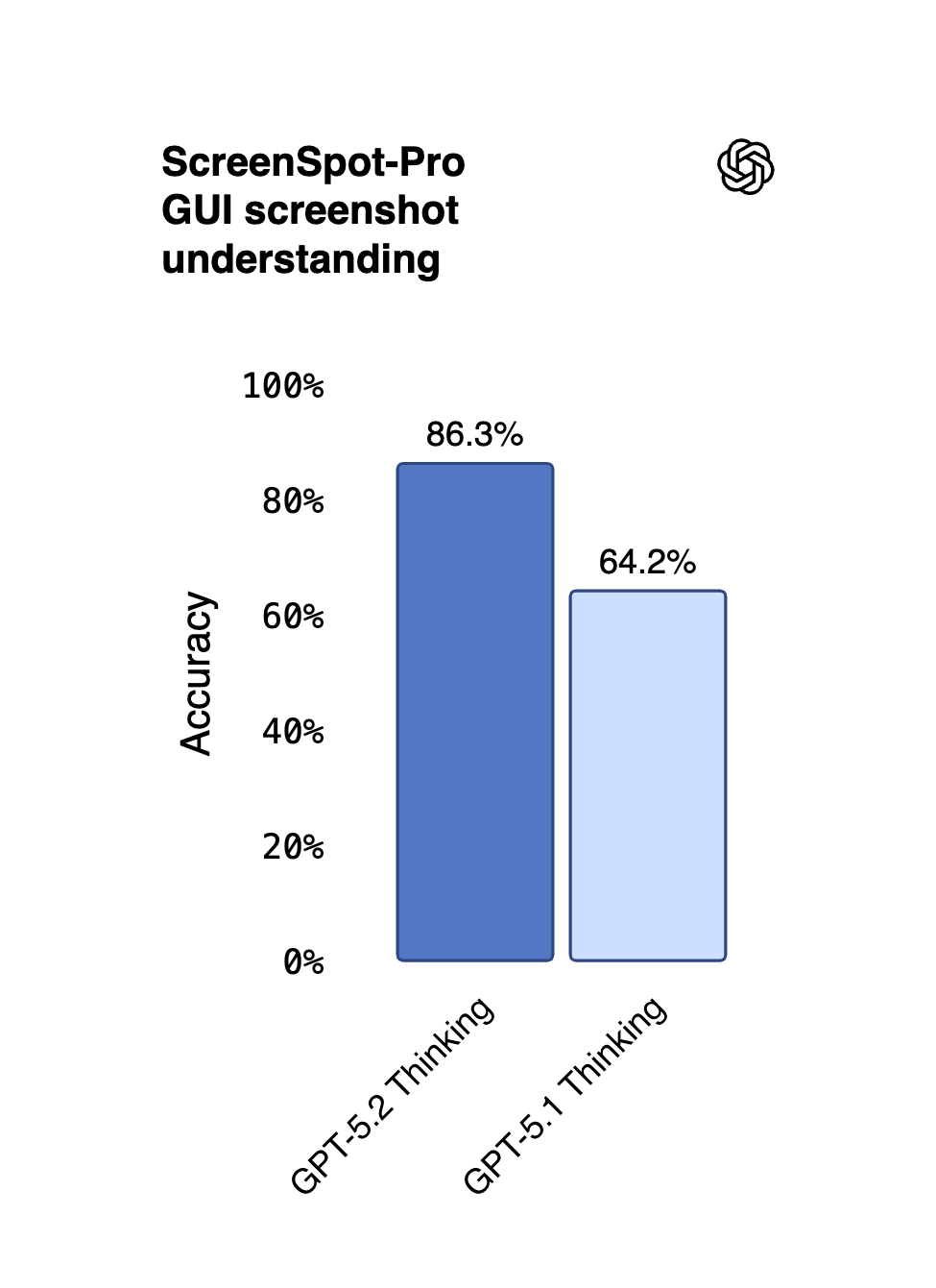
Why does it matter? It understands images, screenshots, Excel, dashboards, PDFs, or anything you upload MUCH better. A 22% increase.
Basically, it sees at a human level, at this point. What’s next? Better than us?
So the new GPT-5.2 is:
much smarter at work tasks,
can absorb more texts and understand images better.
It will change the work landscape in a few months. Mark my words.
The goal of this newsletter is to stay ahead, always.
Time to dive into real-life examples on section 2.
Are you new? Access my archive: https://docs.google.com/document/d/1pWuMCBVQo1zKcgKltX_BZxAr31KgxmOlp3Vzvmc5Hxc/edit?usp=sharing.
2. How to feel the difference.
I will test the new GPT-5.2 inside ChatGPT.
First, how to use it - a quick guide:
Case study #1: Make a *real* Excel file.
It’s the first time I get to see an LLM actually making an Excel file.
And I mean an Excel with formulas and everything.
Prompt:
Build an Excel workbook (.xlsx) from the assumptions below.
Tabs:
1) Inputs (assumptions + 3 scenarios: Base/Downside/Upside)
2) Model (monthly for 12 months)
3) Dashboard (3 charts + 6 KPIs)
Assumptions:
- Starting revenue: $120,000 MRR
- Growth: Base 8% MoM, Downside 4%, Upside 12%
- Churn: Base 3% MoM, Downside 5%, Upside 2%
- CAC: $35 per new subscriber
- ARPU: $6/mo
- Fixed costs: $45,000/mo
- Variable costs: 6% of revenue
Rules:
- No hard-coded numbers outside Inputs.
- Show formulas clearly.
- Output the .xlsx file.
Needless to say, I’m shocked by the results. And anyone who’s actually working with Excel would know this is a major leap. Check my chat example here.
Case study #2: Paste a long doc. Catch contradictions.
The goal here is just to take advantage of the super-long context window and how accurate it is at catching up mistakes.
Variations of this can be found to make better prompts for reviewing contracts, jurisdiction, or anything that involves very long PDFs, and not making mistakes.
Prompt:
I’m going to paste a long document.
Your job:
1) Extract a 12-bullet factual summary. Each bullet must include an exact quote + where it came from (section heading or nearby text).
2) List contradictions or unclear claims (at least 8). For each: quote both sides.
3) Make a decision memo:
- What we know (facts only)
- What we don’t know (explicitly)
- Risks (top 5)
- Next actions (top 7, owner + deadline placeholders)
Rules:
- If a detail is missing, write “Not stated”.
- Do not guess.
Ready? Say: “Paste it.”
If you want a new version of this prompt, you can also go to the prompt maker, paste this prompt, and explain what you want to change.
Here is how:
Case study #3: Upload a screenshot. Tell me what’s wrong.
Here we use its new vision pro as much as possible. It became so good at detecting anything - dashboard, Excel, PDF, you name it.
Prompt:
I will upload ONE screenshot of a dashboard, analytics page, or UI.
Do this:
1) Tell me what I’m looking at in 2 sentences.
2) Extract the 10 most important numbers/labels you can read (verbatim).
3) Diagnose 3 likely issues or opportunities (ranked).
4) Give a 7-step click-by-click plan for what to check next.
5) Write a 5-line Slack update I can send to my team.
Rules:
- Only use what you can see. If unreadable, say “Can’t read”.
- Ask up to 3 clarifying questions only if truly needed.
These are three very good prompts, but I made one massive prompt framework that always works with 5.2 that you just need to copy and paste with your own case study. I’m sharing more on Section 3.
3. The best prompt framework.
You want to push 5.2 to its limits. So I made this new prompt framework after reading their technical cookbook.
Copy and paste this prompt: